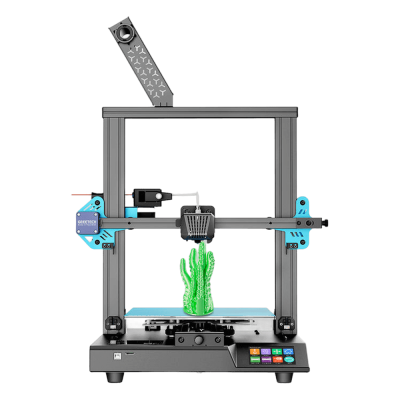
Has a USB-B (CH340) device port, used by Geeetech's Smartto Kits at 115200 baud, but no source shows it accepting a G-code stream from OctoPrint.
Джерело
Ships Geeetech's own closed-loop firmware (configured with Smartto Kits); no Klipper port for its board is known.
Джерело
Який слайсер використовувати для Geeetech Thunder
Жоден зі слайсерів у хмарі SimplyPrint, наскільки нам відомо, не може нарізати для Geeetech Thunder: він не підтримує стандартний G-code. Скористайтеся слайсером, рекомендованим виробником.
Відмова від відповідальності:
Ми прагнемо підтримувати цю інформацію максимально актуальною і точною, але не можемо гарантувати її повноту чи надійність. Наші дані базуються на матеріалах, наданих користувачами, і відомостях виробників.
Який філамент може друкувати Geeetech Thunder?
Сумісність із філаментом для Geeetech Thunder: матеріали, які Geeetech зазначає для нього.
Філамент
Придатність
Примітки
PLA
Чудово
У списку матеріалів виробника для цього принтера.
PETG
Чудово
У списку матеріалів виробника для цього принтера.
TPU і гнучкі матеріали
Чудово
У списку матеріалів виробника для цього принтера.
ABS & ASA
Чудово
У списку матеріалів виробника для цього принтера.
Nylon (PA)
З турботою
Можливо з обережністю: закрита камера й дуже сухий філамент необхідні.
Polycarbonate (PC)
Не найкращий варіант
Не рекомендовано, PC потребує дуже високої температури hotend і закритої камери.
Вугленаповнені та склонаповнені
З турботою
Можливо, якщо встановити загартоване або зносостійке сопло: абразивні волокна швидко зношують стандартне латунне сопло.
Порада: це загальна рекомендація зі специфікацій принтера, завжди перевіряйте рекомендовані параметри філаменту. У SimplyPrint можна зберегти профіль для кожної котушки й точно відстежувати філамент у запасі.
Схожі на Geeetech Thunder принтери, сумісні з SimplyPrint
Принтери того самого виробника, схожого розміру, що друкують тими самими інженерними або кількома матеріалами, як цей, доступні для придбання сьогодні та сумісні з SimplyPrint.
Хто виробляє Geeetech Thunder і яку свободу залишає вам Geeetech: чи принтери працюють без хмари виробника, підтримують будь-який філамент і слайсер та чи їх можна ремонтувати. Кожен аспект оцінено за відкритими джерелами.
Відкритість: Переважно відкритий (3.6 з 5)
Переважно відкритий
Закрита екосистемаВідкрити
Geeetech (HK GETECH Co., Limited, with its office at Shenzhen Getech Technology) is a Chinese 3D printer and filament maker that says it has worked on 3D printers since 2011. It made a long line of budget printers, from Prusa i3 kits through the A10/A20/A30, Mizar and Thunder series, and now sells the compact M1 and M1S for children and beginners alongside a large filament range.
Засновано:
2011 ·
Штаб-квартира:
Shenzhen, China (company registered in Hong Kong) ·
Власність:
HK GETECH Co., Limited; China office Shenzhen Getech Technology Co., Ltd ·
Вебсайт:www.geeetech.com
Mostly open, with a caveat: the older printers came with published Marlin source and schematics, while the current M1 line has closed firmware but still runs locally with any filament and open slicers.
Прошивка й користувацька прошивка ●●●●●
Geeetech published Marlin-based firmware source and board schematics for its earlier printers on GitHub (Geeetech3D) and its download centre, including open-source files for the Mizar S updated until 2024. For the current M1 and M1S it offers firmware binaries only; we found no source.
[11][12][9][7]
Локальне керування та інтеграції ●●●●●
The M1 Mini prints from a TF card or over USB with no account. The M1S adds Wi-Fi and the Geeetech app for printing from its model library 'anywhere', a remote feature that runs through Geeetech's app. Geeetech documents no network interface for other software, and for these models it offers only firmware binaries.
[4][5][8]
Сторонні філаменти, слайсери та компоненти ●●●●●
Any 1.75 mm filament (PLA and TPU on the M1), and Geeetech publishes Cura and OrcaSlicer profiles for it. Nozzles and hot-end parts for the M1 are Geeetech's own, sold in its store.
[4][7][10]
Ремонт і запчастини ●●●●●
Geeetech sells M1 parts (hotbed, nozzles, hot-end components, PEI plate) and posts videos on replacing the nozzle and the motherboard; schematics for older boards are published.
[10][7][9]
Спільнота та документація ●●●●●
A long-running wiki, a download centre with manuals, firmware, profiles and videos per model, and GitHub repositories. Independent coverage of the current M1 line is scarce.
[13][6][11]
Переваги
Inexpensive compact printers aimed at children and beginners.
Any 1.75 mm filament, with Cura and OrcaSlicer profiles published.
Spare nozzles, hotbeds and hot-end parts for the M1, plus repair videos.
Downloads (manuals, firmware) kept online for printers going back many years.
Недоліки
No published firmware source for the current M1 and M1S.
The M1S's remote printing runs through Geeetech's phone app; we found no privacy terms covering the app.
Small 100 x 110 x 100 mm build volume on the M1.
Little independent testing of the current models that we could find.
Перевірений досвід
листопад 2025: Geeetech added the M1S, an M1 with Wi-Fi and a phone app; its app was posted in September 2025 and its quick guide in November 2025.
[8]
лютий 2025: Geeetech released the M1 mini printer for children and beginners; its first setup and maintenance videos were posted in February 2025 and its manual in March 2025.
[7]
жовтень 2022: Geeetech published open-source files for the Mizar S on GitHub, updated until March 2024; files for the Mizar and Mizar Pro followed in November 2022.
[12][11]
На основі 13 джерел, остання перевірка 18 жовтня 2026. Показати джерела
Ми ще не знаємо. SimplyPrint працює з 130+ брендами й 600+ моделями через OctoPrint, Klipper і вбудовані інтеграції; якщо у вас є Geeetech Thunder, наша перевірка сумісності за кілька запитань покаже, як його можна підключити.
Який слайсер використовувати для Geeetech Thunder?
Жоден зі слайсерів у хмарі SimplyPrint, наскільки нам відомо, не може нарізати для Geeetech Thunder: він не підтримує стандартний G-code. Скористайтеся слайсером, рекомендованим виробником.
Який філамент може друкувати Geeetech Thunder?
Geeetech вказує PLA, PETG, TPU і гнучкі матеріали і ABS & ASA для Thunder.
Який розмір столу та робочий об'єм у Geeetech Thunder?
Принтер Geeetech Thunder має друкарський стіл розміром 250 x 250 mm і друкує моделі заввишки до 260 mm, з об'ємом друку приблизно 250 x 250 x 260 mm. Повну таблицю характеристик, зокрема тип столу й температури, дивіться вище.
 Китай
Китай


 PrusaSlicer
 OrcaSlicer
 BambuStudio
 ElegooSlicer
 CrealityPrint
 Cura
Cura Kiri:Moto