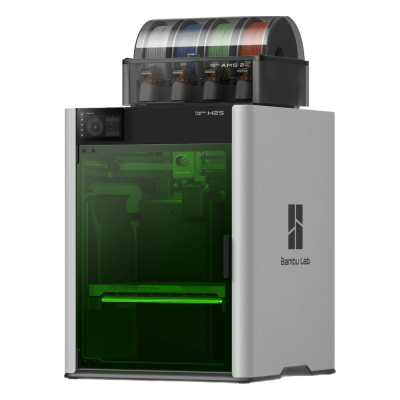
The H2S Laser Full Combo is the Bambu Lab H2S with the optional 10 W laser and cutting module added: a 340 x 320 x 340 mm enclosed printer with a 350 degrees C hotend, a 65 degrees C heated chamber and the AMS 2 Pro. It is for makers and small businesses that want big, fast prints plus laser cutting and engraving in one machine.
У разі підключення через Клієнт SimplyPrint у режимі лише LAN SimplyPrint підтримує все, що Bambu Lab H2S Laser Full Combo дає змогу робити іншому ПЗ: камеру та виявлення збоїв ШІ, Віддалений друк, Пропуск об'єктів, Керування температурою та рухом, зіставлення філаментів для багатоматеріального модуля і AutoPrint. Єдині винятки: те, що Bambu Lab H2S Laser Full Combo не дозволяє іншому ПЗ робити: Мікрокоригування, Вирівнювання стола і Калібрування Z-зміщення. У таблиці нижче порівняно два способи підключення до SimplyPrint.
Усі функції SimplyPrint для кожного способу підключення до SimplyPrint
Зіставити філамент зі слотами мультиматеріальної системи
Так
Так
Синхронізувати завантажений філамент із багатоматеріального модуля
Так
Так
Автоматизація
AutoPrint
Pro
Так
Залежить1
Завантажувати файл перед початком друку
Так
Принтер не підтримує2
Підключено до SimplyPrint через Клієнт SimplyPrint (Лише локальна мережа, рекомендовано)
Перевірено SimplyPrint
Моніторинг
Статус і прогрес у реальному часіТак
ВебкамераТак
Виявлення збоїв за допомогою ШІТак
Залишилося часуТак
Прогрес шаруТак
ТемпературиТак
Друк
Початок друкуТак
Пауза, відновлення та скасуванняТак
Пропуск об’єктівТак
Файли
Друкувати нарізані 3MF-файлиТак
Керування принтером
Змінити температуриТак
Переміщення за допомогою елементів керуванняТак
Повернення в початкове положенняТак
Екструдувати та втягуватиТак
Змінити швидкість друкуТак
Швидкість вентилятораТак
МікрокоригуванняПринтер не підтримує2
Надсилання G-codeТак
Калібрування
Змінити філаментТак
Вирівнювання столаПринтер не підтримує2
Калібрування Z-зміщенняПринтер не підтримує2
Багатоматеріальний
Зіставити філамент зі слотами мультиматеріальної системиТак
Синхронізувати завантажений філамент із багатоматеріального модуляТак
Автоматизація
AutoPrint ProТак
Завантажувати файл перед початком друкуТак
Підключено до SimplyPrint через Клієнт SimplyPrint (Хмарний режим)
Перевірено SimplyPrint
Моніторинг
Статус і прогрес у реальному часіТак
ВебкамераТак
Виявлення збоїв за допомогою ШІТак
Залишилося часуТак
Прогрес шаруТак
ТемпературиТак
Друк
Початок друкуЗалежить1
Пауза, відновлення та скасуванняЗалежить1
Пропуск об’єктівЗалежить1
Файли
Друкувати нарізані 3MF-файлиТак
Керування принтером
Змінити температуриТак
Переміщення за допомогою елементів керуванняЗалежить1
Повернення в початкове положенняЗалежить1
Екструдувати та втягуватиЗалежить1
Змінити швидкість друкуЗалежить1
Швидкість вентилятораЗалежить1
МікрокоригуванняПринтер не підтримує2
Надсилання G-codeЗалежить1
Калібрування
Змінити філаментЗалежить1
Вирівнювання столаПринтер не підтримує2
Калібрування Z-зміщенняПринтер не підтримує2
Багатоматеріальний
Зіставити філамент зі слотами мультиматеріальної системиТак
Синхронізувати завантажений філамент із багатоматеріального модуляТак
Автоматизація
AutoPrint ProЗалежить1
Завантажувати файл перед початком друкуПринтер не підтримує2
Працює
Залежить
Не підтримується
Принтер не підтримує
Прошивка Bambu Lab з 2025 року дозволяє лише моніторинг у хмарному режимі: щоб запускати друк і керувати принтером, використовуйте режим лише локальної мережі. Старіші прошивки досі дозволяють обидва варіанти.
Принтер не надає цього іншому ПЗ.
Який слайсер використовувати для Bambu Lab H2S Laser Full Combo
Принтери Bambu Lab використовують BambuStudio, власний слайсер Bambu Lab. У нашій хмарі ще немає готового профілю для Bambu Lab H2S Laser Full Combo.
Ми перелічуємо лише слайсери, якими можна користуватися в хмарі SimplyPrint, тож для Bambu Lab H2S Laser Full Combo можуть існувати інші.
Хмарний слайсер для Bambu Lab H2S Laser Full Combo: користуйтеся BambuStudio онлайн
Користуйтеся BambuStudio та іншими слайсерами прямо у браузері за допомогою онлайн-хмарного слайсера від SimplyPrint. Встановлення не потрібне. Нарізайте моделі для Bambu Lab H2S Laser Full Combo з будь-якого пристрою в будь-якій точці світу!
Автоматичні оновлення профілів: профілі щодня автоматично перевіряються та завантажуються з репозиторіїв слайсерів на GitHub, а також із нашої відкритої керованої спільнотою бази профілів слайсерів. Це гарантує, що ви завжди маєте доступ до найновіших профілів.
Примітка: Інших слайсерів, як-от Simplify3D, ideaMaker, SuperSlicer і KISSlicer, немає в нашій хмарі, тому ми не відстежуємо їхні профілі. Вони все одно можуть добре працювати з вашим Bambu Lab H2S Laser Full Combo: перевірте документацію або форуми самого слайсера, щоб знайти профіль. Ви також можете додати профілі до нашої відкритої бази профілів слайсерів на GitHub.
Застосунок для Bambu Lab H2S Laser Full Combo
SimplyPrint працює як застосунок для Bambu Lab H2S Laser Full Combo: на вашому телефоні й у будь-якому браузері, зі слайсером у хмарі.
Що ви отримуєте з SimplyPrint
Застосунок для iPhone і Android, однаковий у будь-якому браузері, і слайсер у хмарі.
Більше ніж моніторинг: черга друку, виявлення збоїв ШІ, AutoPrint і облікові записи для команди.
Для принтера Bambu Lab H2S Laser Full Combo у SimplyPrint ще немає змінника пластин або комплекту для автоматичного виштовхування, але AutoPrint все одно може підтримувати безперервний друк: щойно пластина буде вільна, він запустить наступне завдання з вашої черги.
Закриті принтери виштовхують надруковані моделі
Стіл принтера Bambu Lab H2S Laser Full Combo рухається лише вгору-вниз усередині корпусу, тому замість заміни пластин такі комплекти дають друкувальній головці змогу зіштовхнути охолоджену модель із пластини та вивести її через передні дверцята, які вони відчиняють після завершення друку.
G-code (.gcode, .gco, .g), Файли у форматі Zip (наприклад, 3MF)
Принтер
Виробник / бренд принтера
Bambu Lab
Назва моделі принтера
H2S Laser Full Combo
Вироблено компанією з
Китай
Запущено
26 серпня 2025
Відмова від відповідальності:
Ми прагнемо підтримувати цю інформацію максимально актуальною і точною, але не можемо гарантувати її повноту чи надійність. Наші дані базуються на матеріалах, наданих користувачами, і відомостях виробників.
Який філамент може друкувати Bambu Lab H2S Laser Full Combo?
Сумісність із філаментом для Bambu Lab H2S Laser Full Combo: матеріали, з якими він може працювати, визначені за характеристиками хотенда, столу, камери та корпусу.
Філамент
Придатність
Примітки
PLA
Чудово
Найпростіший у друці філамент. Працює майже на будь-якому принтері, стіл з підігрівом покращує адгезію, але не є обов’язковим.
PETG
Чудово
У комфортному діапазоні (для PETG потрібні hotend ~230-250C і стіл ~70-85C).
TPU і гнучкі матеріали
Чудово
Екструдер із прямим приводом добре подає гнучкий філамент. Друкуйте повільно для чистого результату.
ABS & ASA
Чудово
У закритому корпусі з достатньо гарячими хотендом і столом ABS та ASA друкуються добре.
Nylon (PA)
Добре
Можливо, але обережно: ретельно висушіть філамент, а закритий корпус дуже допоможе.
Polycarbonate (PC)
Добре
У діапазоні PC. Для найкращих результатів висушіть філамент, друкуйте повільно й використовуйте корпус.
Вугленаповнені та склонаповнені
З турботою
Можливо, якщо встановити загартоване або зносостійке сопло: абразивні волокна швидко зношують стандартне латунне сопло.
Порада: це загальна рекомендація зі специфікацій принтера, завжди перевіряйте рекомендовані параметри філаменту. У SimplyPrint можна зберегти профіль для кожної котушки й точно відстежувати філамент у запасі.
Найкращий філамент для Bambu Lab H2S Laser Full Combo
Філаменти, які Bambu Lab H2S Laser Full Combo добре друкує: спочатку Bambu Lab, потім найвідоміші.
Editor's Choice. Praises the large 340 x 340 mm bed, enclosure, perfect auto bed levelling and the faster, easier-to-maintain AMS 2 Pro, with clean results in PLA, PETG, nylon-CF and TPU. Downsides: the price and proprietary replacement parts. Tested the AMS Combo without the laser.
“The H2S has excellent quality and print speed, making it the perfect successor to the X1C.”
Rates the single-nozzle H2S for its huge 340 x 320 x 340 mm volume, speed and enclosed heated chamber, scoring 29/30 on his print-quality test. Cons: no dual nozzle, higher running cost from the heated chamber and an optional Vision Encoder.
“A single nozzle might seem like a step back for industrial and business users, but this machine offers enterprise-level print features and volume at an extremely affordable price.”
Frankly Built · 13 жовтня 2025
Uses two H2S units (supplied by Bambu Lab) across a variety of materials for weeks and reports no bugs, errors or clogs, with good prints out of the box. Calls it the bigger Bambu he wanted. Filament sponsor: Polymaker.
CNC Kitchen · 26 серпня 2025
Compares the H2S with the H2D: same look and a little more volume, $800 cheaper, but single-nozzle purge waste and no real multi-material. Still a hybrid with the 10 W laser and drag knife only. Calls it a fantastic choice for single-material parts that need the volume.
Made with Layers · 26 серпня 2025
Thomas Sanladerer sees the H2S as more of a bigger X1C than a baby H2D. He misses the second hotend for multi-material work, but finds little to complain about, with very well-designed hardware and near-flawless prints at a fair price. Sponsor: VoxelPLA.
Коли обрати Bambu Lab H2S Laser Full Combo
Choose the Laser Full Combo if you want the H2S's large, enclosed single-nozzle printing and also plan to cut or engrave: Bambu lists the laser module as optional and self-installed, so the base H2S is cheaper if you will not use it. Reviewers agree on the printing: Tom's Hardware gave it 4.5/5 and called it the successor to the X1C, and TechRadar also gave 4.5/5. If you want real multi-material with soluble supports, the dual-nozzle H2D suits better, as CNC Kitchen and Made with Layers note the single nozzle wastes filament on colour changes.
Переваги
A 340 x 320 x 340 mm enclosed volume with a 350 degrees C hotend and a 65 degrees C heated chamber (Bambu Lab).
Excellent print quality and speed with perfect auto bed levelling (Tom's Hardware); Frankly Built ran two units for weeks with no clogs or errors.
The 10 W 455 nm laser cuts up to 5 mm plywood, acrylic or PU, and the module adds air assist and digital cutting (Bambu Lab).
The AMS 2 Pro is faster and easier to maintain (Tom's Hardware), with clean results in PLA, PETG, nylon-CF and TPU.
Five flame sensors, a laser safety window and an emergency stop (Bambu Lab).
Works with SimplyPrint through the SimplyPrint Client, verified.
Недоліки
Single nozzle, so colour changes purge filament and there is no real multi-material; a second hotend is the H2D (CNC Kitchen, Made with Layers).
Expensive, with proprietary replacement parts (Tom's Hardware), and a higher running cost from the heated chamber (TechRadar).
The laser module needs self-installation, and a laser in a shared room needs supervision and safety rules (Bambu Lab).
It runs through Bambu Lab's own software and cloud, which some organisations' compliance rules don't allow; connected through SimplyPrint it can be cut off from that and use SimplyPrint's European cloud.
Кому підійде
ШколиМоже працювати
Enclosed, filtered and well protected, and SimplyPrint can queue student prints for approval, but the price and the laser module need supervision.
АматориЧудово підходить
Large, fast, reliable prints plus laser cutting and engraving, at a price that is high but fair for what it does.
ПідприємстваЧудово підходить
A large heated chamber for engineering filaments, verified SimplyPrint support, and laser cutting for enclosures and jigs.
Ферми друкуМоже працювати
Reliable per Frankly Built's two-unit test, but a large, costly single-nozzle machine with no plate-clearing kit in our sources.
Порівняйте Bambu Lab H2S Laser Full Combo зі схожими принтерами
Принтери того самого виробника, схожого розміру, що друкують тими самими інженерними або кількома матеріалами, як цей, доступні для придбання сьогодні. Порівнюйте до чотирьох принтерів поруч за характеристиками та способом підключення.
Також продається без модуля для багатоматеріального друку як Bambu Lab H2S.
Про Bambu Lab
Хто виробляє Bambu Lab H2S Laser Full Combo і яку свободу залишає вам Bambu Lab: чи принтери працюють без хмари виробника, підтримують будь-який філамент і слайсер та чи їх можна ремонтувати. Кожен аспект оцінено за відкритими джерелами.
Відкритість: Переважно закритий (2.3 з 5)
Переважно закритий
Закрита екосистемаВідкрити
Bambu Lab is a Shenzhen company founded in 2020 by former DJI engineers. It makes FDM printers in four families (A, P, X and H), the AMS multi-material units, the Bambu Studio slicer, the Bambu Handy app and the MakerWorld model site, and designs them to be used together. Its printers are used by beginners, hobbyists, schools and print farms.
Засновано:
2020 ·
Штаб-квартира:
Shenzhen, China ·
Власність:
Privately held; founded by CEO Ye Tao and other former DJI staff, with venture investors (BGR, 2026) ·
Вебсайт:bambulab.com
Bambu Lab works like Apple: printer, slicer, app, cloud and multi-material system come from one company and are made to work together. Filament and slicer choice stay open, but the firmware is closed and signed, and since 2025 third-party control needs Bambu Connect or the unsupported Developer Mode.
Прошивка й користувацька прошивка ●●●●●
The printer firmware is Bambu's own and closed; in 2022 Bambu said it would keep it in-house. Its security white paper describes secure boot that only runs verified firmware on X1, H2, P1 and A1 printers. Bambu publishes the GPL parts it uses (Linux kernel, U-Boot, BusyBox) but not the printer software. Rooting the X1 only became possible through a security flaw the X1Plus project used in 2024; Bambu then published a one-off rootable X1 firmware for owners who give up their warranty, and blocks rooting in later firmware.
[1][2][3][4][22]
Локальне керування та інтеграції ●●●●●
LAN Only mode prints and monitors from Bambu Studio or Bambu Connect without internet or an account; the Handy app, printing from outside the network and print history need Bambu's cloud. Since the 2025 authorization firmware, other software can only read status in normal mode. Full control needs Developer Mode, which cuts the cloud link and which Bambu says it cannot support because the protocols are not official. Bambu documents no local protocol; it offers a file hand-off to Bambu Connect and a Local Server SDK on application.
[23][24][6][7][5]
Сторонні філаменти, слайсери та компоненти ●●●●●
Third-party filament works, and Bambu publicly denied in 2025 that it would restrict it. OrcaSlicer and other slicers can be used, but since the 2025 firmware they send and control prints through Bambu Connect or Developer Mode. Hotends are Bambu's own designs, and Bambu says it cannot promise long-term support for accessories that control the printer unless it approved them first.
[7][6][4]
Ремонт і запчастини ●●●●●
Bambu's store sells individual spare parts down to motors, belts, encoders and boards, and its wiki has step-by-step replacement guides for each model (for example the P2S hotend and the H2D/H2C AP board). Many parts, hotends included, are Bambu-specific, so spares come from Bambu.
[8][9][10]
Дані й конфіденційність ●●●●●
Cloud features need a Bambu account, while LAN Only mode keeps jobs on the local network. Bambu publishes a Trust Center and a 38-page security white paper, says it holds ISO/IEC 27001, ISO/IEC 27701 and TRUSTe certifications, and runs a paid bug bounty. In August 2023 a cloud outage made some printers start earlier jobs on their own; Bambu apologised.
[2][11][5][12]
Спільнота та документація ●●●●●
Very large user community, the MakerWorld model site, a detailed wiki and a blog where Bambu explains its policy changes. Bambu Studio is developed in public on GitHub with an open issue tracker. The printer protocol is not documented, and Developer Mode is unsupported.
[13][5][7]
Переваги
Printer, slicer, app and AMS come from one company and are designed to work together, which makes a first setup simple.
Step-by-step repair guides for each model and individual spare parts sold in Bambu's store.
LAN Only mode works without internet or an account.
Bambu Studio is open source, and third-party filament works.
Publishes security certifications and runs a public bug bounty.
Недоліки
Firmware is closed and signed; current models have no supported way to run custom firmware.
Since the 2025 firmware, third-party software and accessories need Bambu Connect or the unsupported Developer Mode to control the printer.
Remote printing, the Handy app and print history depend on Bambu's cloud.
Hotends and many parts are Bambu-specific, so spares come from Bambu.
In 2026 a US jury found the X1, P1 and A1 infringe Stratasys patents; Bambu is appealing.
Перевірений досвід
вересень 2026: A US federal jury in Texas found that Bambu Lab's X1, P1 and A1 printers infringe Stratasys patents on prime towers and bed levelling, and awarded Stratasys $27.6 million. No injunction was placed on the printers. Bambu told Tom's Hardware it disagrees with the verdict and intends to seek post-trial review and appeal. Stratasys had filed two suits in 2024; more patents are still to be decided.
[14]
травень 2026: Bambu Lab pressed the developer of 'OrcaSlicer-bambulab', a fork that restored direct cloud printing from OrcaSlicer, to remove it, according to Manufactur3D. On 7 May Bambu said the fork impersonated the official Bambu Studio client to its cloud, which its user agreement does not allow, and that modifying and sharing its AGPL code remains fine. The developer disputed the claims.
[15][16][17]
жовтень 2025: Bambu Lab opened a Trust Center with a security white paper and listed ISO/IEC 27001, ISO/IEC 27701 and TRUSTe privacy certifications. A year later it said its bug bounty had worked with over 100 researchers and that it had added a public security update log.
[2][11]
20 січня 2025: After criticism from users and print farms, Bambu Lab announced an optional Developer Mode for X1, P1, A1 and A1 mini that leaves MQTT, FTP and the live stream open for third-party software in LAN mode, without official support. It also said LAN mode via Bambu Connect needs neither internet nor an account, and that third-party filament would not be restricted.
[7]
16 січня 2025: Bambu Lab announced firmware with 'authorization control', first for the X1: starting prints, moving axes, changing temperatures and binding the printer now require Bambu-approved software, also in LAN mode. On updated printers, third-party slicers and accessories such as the Panda Touch could no longer control the printer except through Bambu Connect; reading status still worked. Bambu cited security and up to 30 million unauthorised cloud requests a day; older firmware stayed optional.
[6]
березень 2024: After the X1Plus jailbreak, Bambu Lab published a one-off rootable firmware for the X1 series for owners who give up their warranty support. It said it does not support X1Plus, and that firmware after it would block rooting again.
[4]
лютий 2024: Bambu Lab extended its A1 heatbed-cable callback to a recall of all A1 printers and asked owners to stop using them. It reported electrical faults in under 0.1% of units and offered a full refund plus an $80 voucher, or a redesigned heatbed plus a $120 voucher and six extra months of warranty. The A1 mini was not affected.
[18][19]
січень 2024: Community developers rooted the X1 series through a security flaw in its firmware (up to version 1.07) and released the X1Plus custom firmware. Bambu Lab closed the flaw in later firmware.
[22]
серпень 2023: During a Bambu cloud outage on 15 August 2023, some printers started print jobs without user action, because jobs stuck in the cloud were resent when service returned. Bambu apologised, took responsibility and said it would add checks before a print starts.
[12]
травень 2022: Before its first printers shipped, Bambu Lab said its firmware would stay closed and in-house to remain competitive, and promised to open-source everything if the company ever could not survive.
[1]
На основі 24 джерел, остання перевірка 20 жовтня 2026. Показати джерела
Чи сумісний Bambu Lab H2S Laser Full Combo із SimplyPrint?
Так. Ви можете підключити Bambu Lab H2S Laser Full Combo до SimplyPrint через Клієнт SimplyPrint, а потім нарізати моделі, додавати їх до черги, запускати й відстежувати друки у браузері або мобільному застосунку.
Як підключити Bambu Lab H2S Laser Full Combo до SimplyPrint?
Скористайтеся нашим покроковим посібником з налаштування Bambu Lab H2S Laser Full Combo. У ньому показано, як підключити його через Клієнт SimplyPrint, що потрібно для кожного способу й який обрати.
Який слайсер використовувати для Bambu Lab H2S Laser Full Combo?
Використовуйте BambuStudio, власний слайсер Bambu Lab, створений для його принтерів. Його можна запустити в хмарному слайсері SimplyPrint; готового профілю для Bambu Lab H2S Laser Full Combo у ньому ще немає.
Чи можна використовувати OrcaSlicer з Bambu Lab H2S Laser Full Combo?
Так, але, наскільки нам відомо, OrcaSlicer не має вбудованого профілю для Bambu Lab H2S Laser Full Combo: почніть із профілю схожого принтера та вкажіть відповідні розмір столу, висоту й сопло.
Який філамент може друкувати Bambu Lab H2S Laser Full Combo?
З огляду на характеристики (хотенд до 350C, нагрівний стіл до 120C), Bambu Lab H2S Laser Full Combo добре працює з PLA, PETG, TPU і гнучкі матеріали або ABS & ASA. Повний посібник із філаментів для ABS, нейлону, PC і композитів наведено вище.
Чи працює Bambu Lab H2S Laser Full Combo з OctoPrint або Klipper?
Не безпосередньо: натомість плагін спільноти OctoPrint може підключити його через мережу. Але вам не потрібно ні те, ні інше: SimplyPrint підключається до Bambu Lab H2S Laser Full Combo через Клієнт SimplyPrint.
Який розмір столу та робочий об'єм у Bambu Lab H2S Laser Full Combo?
Принтер Bambu Lab H2S Laser Full Combo має друкарський стіл розміром 340 x 320 mm і друкує моделі заввишки до 340 mm, з об'ємом друку приблизно 340 x 320 x 340 mm. Повну таблицю характеристик, зокрема тип столу й температури, дивіться вище.
Коли вийшов Bambu Lab H2S Laser Full Combo?
H2S Laser Full Combo від Bambu Lab випущено 26 серпня 2025.
Чи може Bambu Lab H2S Laser Full Combo автоматично скидати надруковані моделі?
Підтримуваного нами комплекту для нього ще немає, але AutoPrint у SimplyPrint може виштовхувати моделі друкувальною головкою або запускати ваш G-code для виштовхування, а потім починати наступне завдання з вашої черги.
Де можна придбати Bambu Lab H2S Laser Full Combo?
Із власного магазину Bambu Lab, який має магазини для ЄС. Посилання на цій сторінці ведуть до цих магазинів, деякі з них партнерські, тож ми можемо отримати комісію без додаткових витрат для вас.
Розкриття інформації про партнерські посилання: деякі посилання на цій сторінці є партнерськими. Ми можемо отримати комісію, якщо ви зробите покупку, без додаткових витрат для вас. Як учасник програми Amazon Associates, ми отримуємо дохід від кваліфікованих покупок.
 Китай
Китай
 Клієнт SimplyPrint



 PrusaSlicer
 OrcaSlicer
 ElegooSlicer
 CrealityPrint
 Cura
Cura Kiri:Moto



 Bambu Lab не має магазину для США: спробуйте його магазин для ЄС