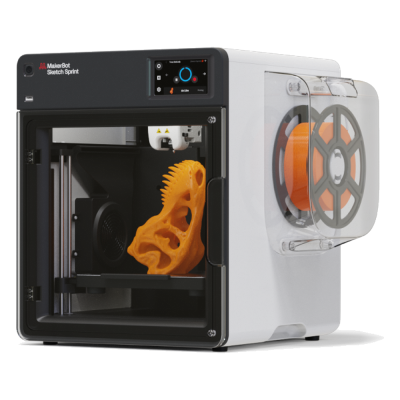
The Sketch Sprint is MakerBot's fully enclosed classroom printer, with a 220 x 220 x 220 mm plate, a camera and a PIN lock, printing MakerBot PLA and Tough PLA. It is for schools and educators who want a simple, safe, supported package.
A impressora 3D MakerBot Sketch Sprint funciona com SimplyPrint, OctoPrint, Mainsail e Fluidd?
Cada forma de conectá-la, o que é necessário e como configurá-la.
Não há forma conhecida de conectá-la ao SimplyPrint
Infelizmente, até onde sabemos, a MakerBot Sketch Sprint não é compatível atualmente com o OctoPrint, Mainsail, Fluidd ou SimplyPrint. Para a melhor experiência de impressão 3D, considere outras impressoras 3D compatíveis com esses softwares.
Como determinamos a compatibilidade
Consideramos uma impressora compatível se ela funcionar com um ou mais dos seguintes:
Integração personalizada do SimplyPrint para este modelo específico
Suporte ao OctoPrint (requer que a impressora ofereça impressão serial)
Suporte a Klipper, a impressora pode executar Klipper gravando firmware compatível ou usando um controlador/pad externo
A compatibilidade com OctoPrint depende principalmente de a impressora suportar comunicação serial. Se a impressão serial não for suportada, marcamos o OctoPrint como incompatível.
Observação: Algumas impressoras têm plugins OctoPrint de terceiros que permitem conexões não oficiais ou personalizadas. Não mantemos uma lista desses plugins, portanto eles não aparecem em nossos dados de compatibilidade.
Use o slicer da MakerBot, MakerBot Print: nenhum dos slicers na nuvem do SimplyPrint tem um perfil para a MakerBot Sketch Sprint, e ela não aceita G-code padrão até onde sabemos.
Especificações de MakerBot Sketch Sprint: tamanho da mesa, altura de impressão e mais
Suas dimensões, temperaturas, multimaterial e como se conecta, com base no fabricante e em nossa própria pesquisa.
Leia mais do fabricante
Tamanho
Volume de impressão
220 x 220 x 220 mm
Tipo de mesa
Square
Tamanho da mesa
220 x 220 mm
Altura máxima de impressão
220 mm
Imprimindo
Gabinete
Totalmente fechada
Velocidade máx. de impressão
300 mm/s
Temperatura máxima da extrusora
260 °C
Tem mesa aquecida
Sim
Temperatura máxima da mesa
110 °C
Número de bicos
1
Cabeçotes de ferramenta
1
Direct drive
Sim
Ferramenta de sondagem / Nivelamento automático de mesa
Sim
Largura do filamento
1.75 mm
Multimaterial
Trocador de ferramentas ou de hotend
Não
IDEX (extrusoras duplas independentes)
Não
Conectando
Conectividade
USB, Wi-Fi
Câmera integrada
Sim
Compatível com impressão via conexão serial
Desconhecido
Firmware incluído
Do próprio fabricante
Arquivos e fatiamento
Formatos de arquivo compatíveis
G-code (.gcode, .gco, .g)
A impressora
Fabricante / marca da impressora
MakerBot
Nome do modelo de impressora
Sketch Sprint
Fabricada por uma empresa de
EUA
Lançado
novembro 2024
Ainda fabricada
Sim
Aviso legal:
Nos esforçamos para manter esta informação o mais atualizada e precisa possível, mas não podemos garantir sua integridade nem confiabilidade. Nossos dados são baseados em envios de usuários e referências de fabricantes.
Que filamento a MakerBot Sketch Sprint pode imprimir?
Compatibilidade de filamento da MakerBot Sketch Sprint: os materiais listados pela MakerBot.
Filamento
Adequação
Notas
PLA
Ótimo
Na lista de materiais do fabricante para esta impressora.
PETG
Ótimo
Confortavelmente dentro da faixa (PETG funciona bem com hotend de ~230-250C e mesa de ~70-85C).
TPU e flexíveis
Ótimo
A extrusora direct-drive alimenta bem o filamento flexível. Imprima lentamente para resultados limpos.
ABS & ASA
Ótimo
Fechada, com hotend e mesa suficientemente quentes: ABS e ASA imprimem bem.
Nylon (PA)
Bom
É possível, com cuidado: seque bem o filamento, e uma câmara fechada ajuda muito.
Polycarbonate (PC)
Não é ideal
Não recomendado: o PC exige temperaturas muito altas no hotend e uma câmara fechada.
Reforçado com fibra de carbono e vidro
Com cuidado
Possível se você instalar um bico endurecido ou resistente ao desgaste, as fibras abrasivas desgastam rapidamente um bico de latão padrão.
Dica: este é um guia geral baseado nas especificações da impressora, sempre confira as configurações recomendadas para seu filamento. Com SimplyPrint, você pode salvar um perfil para cada bobina e acompanhar exatamente qual filamento tem em estoque.
Quando escolher MakerBot Sketch Sprint
Choose the Sketch Sprint when you run a classroom and want a closed, supported printer with lesson plans, teacher training and a way for students to submit prints without installing software. It is limited to MakerBot PLA and Tough PLA and costs 2,399 USD with five student seats, so it is poor value for anyone who wants material freedom. We found no independent review, and sources differ on its speed. For classroom use alongside SimplyPrint's print approval, an enclosed Bambu Lab P1S is cheaper and prints more materials, but note its own cloud trade-offs.
Vantagens
Fully enclosed with HEPA and carbon filters, and UL, CE and FCC certified (MakerBot).
Education package: PIN-code lock, 600+ lesson plans, ISTE-certified training and student print submission without software installs (MakerBot).
Built-in 2 MP camera for remote monitoring and automatic timelapses (MakerBot).
Heated plate to 110 °C with a removable flexible surface and mesh levelling (MakerBot).
Works with Digital Factory in the browser and Cura 5.9, and runs on Chromebooks (MakerBot).
Contras
Limited to MakerBot PLA and Tough PLA on a 0.4 mm nozzle (MakerBot), so no PETG, ABS or flexible filaments.
High price: 2,399 USD for the single-printer education bundle (MakerBot).
Not expected to connect to SimplyPrint: our catalog rates both Klipper and OctoPrint as unlikely, and it runs on MakerBot's own firmware and Digital Factory.
Small 220 x 220 x 220 mm plate.
No independent hands-on review found, and the print speed is quoted as either 250 or 300 mm/s depending on the listing.
Para quem é
EscolasBoa compatibilidade
Enclosed, filtered, PIN-locked and sold with lesson plans, though it uses MakerBot's own tools instead of SimplyPrint's approval queue and costs more than comparable printers.
HobbistasNão é uma boa opção
Locked to MakerBot's PLA range and priced for institutions, so a hobby printer gives you much more for the money.
EmpresasNão é uma boa opção
Only PLA and Tough PLA on a small plate, so it is not suited to functional parts.
Print farmsNão é uma boa opção
Not expected to connect to SimplyPrint and limited to a few materials, so it does not fit a fleet.
Com base nas informações do fabricante e em avaliações independentes.
Leia mais do fabricante
Impressoras semelhantes à MakerBot Sketch Sprint que funcionam com SimplyPrint
Impressoras do mesmo fabricante, de tamanho semelhante, que imprimem os mesmos materiais de engenharia ou em vários materiais, que você pode comprar hoje e que sabemos funcionar com SimplyPrint.
Quem fabrica a MakerBot Sketch Sprint e quão aberta a MakerBot permite que você seja: se as impressoras dela funcionam sem a nuvem da marca, aceitam qualquer filamento e slicer e podem ser reparadas. Cada área é avaliada com base em fontes públicas.
Abertura: Majoritariamente fechada (2.3 de 5)
Majoritariamente fechada
Ecossistema fechadoAbrir
MakerBot is an American 3D printer brand founded in New York in 2009 out of the open-source RepRap scene. Stratasys bought it in 2013 and merged it with Ultimaker in 2022; MakerBot is now UltiMaker's education brand, selling Sketch classroom printers with lesson plans, teacher tools and management in UltiMaker's Digital Factory cloud. The Replicator printers in our catalogue are discontinued.
Fundada:
2009-01 ·
Sede:
Brooklyn, New York, US ·
Propriedade:
Brand of UltiMaker, formed in August 2022 when Stratasys merged MakerBot with Ultimaker (NPM Capital 53.5%, Stratasys 46.5% at closing) ·
Site:www.makerbot.com
Proprietary firmware, MakerBot-only extruders and materials, and classroom management in UltiMaker's cloud. In return schools get one managed system with curriculum and support.
Firmware e firmware personalizado ●●●●●
MakerBot stopped sharing its hardware designs with the Replicator 2 in 2012, and its fifth-generation printers moved to proprietary controllers, extruders and firmware. We found no firmware source for the current Sketch line.
[15][14]
Controle local e integrações ●●●●●
The Sketch Sprint prints over Wi-Fi or Ethernet from UltiMaker Cura or Digital Factory, or from a USB stick. Classroom management, remote monitoring and browser slicing (Cura Cloud) run in UltiMaker's Digital Factory cloud, which replaced MakerBot CloudPrint in 2025. We found no documented local interface that other software could use.
[16][2][3]
Filamento, slicers e peças de terceiros ●●●●●
MakerBot lists only its own PLA and Tough PLA, and only its own Sketch extruder, for the Sketch Sprint. Slicing is in UltiMaker Cura (open source) or Cura Cloud.
[2]
Reparos e peças de reposição ●●●●●
UltiMaker's shop sells Sketch extruders, a Sketch Sprint nozzle assembly, build plates and cables, and still sells Smart Extruder+ units for the Replicator+; spare parts are mostly whole assemblies.
[6]
Dados e privacidade ●●●●●
Some MakerBot services need an account, and MakerBot's privacy policy lists what it collects (including device identifiers such as MAC addresses and usage data) and its use of Google Analytics and retargeting. Students can submit files through Link Share without an account.
[5][2]
Comunidade e documentação ●●●●●
MakerBot offers hundreds of free lesson plans, educator certification, Thingiverse Education and a support site; there is no public source code or bug tracker.
[1]
Vantagens
Built for schools: curriculum, lesson plans, teacher tools and certification are part of the package.
Enclosed Sketch printers with HEPA filtration, aimed at classrooms.
Students can submit files without creating accounts (Link Share).
Spare extruders and parts are still sold, even for the Replicator+.
Contras
Closed firmware and MakerBot-only extruders; only MakerBot PLA and Tough PLA are listed for the Sketch Sprint.
Fleet management depends on UltiMaker's Digital Factory cloud.
CloudPrint's 2025 shutdown left the Replicator 5th Gen, Mini, Mini+ and Z18 without cloud support.
Many ownership changes and layoffs over the years (Stratasys 2013, layoffs 2015 and 2017, Ultimaker merger 2022).
Histórico comprovado
dezembro 2025: UltiMaker shut down MakerBot CloudPrint in early December 2025, after announcing 1 October 2025. Printers had to be reconnected to Digital Factory by hand, and the Replicator Z18, 5th Gen, Mini and Mini+ are not supported there; MakerBot points their owners to MakerBot Print.
[3][4]
31 de agosto de 2022: Stratasys closed the merger of MakerBot with Ultimaker into a company named Ultimaker (now UltiMaker), owned 53.5% by NPM Capital and 46.5% by Stratasys.
[7]
fevereiro 2017: MakerBot announced a restructuring with another round of layoffs, Fortune reported.
[9]
julho 2016: A court dismissed the investor class action over the fifth-generation printers and Smart Extruder, finding the statements at issue were not actionable.
[10]
abril 2016: MakerBot moved printer manufacturing from Brooklyn to the contract manufacturer Jabil and parted ways with an undisclosed number of Brooklyn staff, The Verge reported.
[13]
julho 2015: A class action was filed against MakerBot and Stratasys alleging investors were misled about problems with the fifth-generation printers' Smart Extruder.
[11]
abril 2015: MakerBot laid off about 20% of its staff, roughly 100 people, under a new CEO, Motherboard reported.
[12]
junho 2013: Stratasys bought MakerBot in a stock deal worth $403 million at the time.
[8]
setembro 2012: With the Replicator 2, MakerBot stopped publishing its machine designs, a break with open-source hardware that co-founder Zach Smith criticised publicly.
[14][15]
Com base em 16 fontes, verificado pela última vez em 18 de outubro de 2026. Mostrar fontes
A impressora MakerBot Sketch Sprint é compatível com SimplyPrint?
Até onde sabemos, a MakerBot Sketch Sprint ainda não é compatível. O SimplyPrint funciona com mais de 130 marcas e mais de 600 modelos via OctoPrint, Klipper e integrações nativas. Consulte a lista de compatibilidade para encontrar uma impressora compatível.
Qual slicer devo usar para a MakerBot Sketch Sprint?
Use o slicer da MakerBot, MakerBot Print: nenhum dos slicers na nuvem do SimplyPrint tem um perfil para a MakerBot Sketch Sprint, e ela não aceita G-code padrão até onde sabemos.
Que filamento a MakerBot Sketch Sprint pode imprimir?
A MakerBot lista PLA para a Sketch Sprint.
Quais são as dimensões da mesa e o volume de impressão da MakerBot Sketch Sprint?
A MakerBot Sketch Sprint tem uma mesa de impressão de 220 x 220 mm e imprime até 220 mm de altura, com um volume de construção de cerca de 220 x 220 x 220 mm. Consulte a tabela de especificações completa acima para ver o tipo de mesa, temperaturas e mais.
Quando a MakerBot Sketch Sprint foi lançada?
A MakerBot lançou a Sketch Sprint em novembro 2024.
Onde comprar MakerBot Sketch Sprint?
Na loja da MakerBot, que atende em todos os outros lugares. Os links desta página levam a essas lojas. Alguns são links de afiliados, então podemos receber uma comissão sem custo extra para você.
 EUA
EUA


 PrusaSlicer
 OrcaSlicer
 BambuStudio
 ElegooSlicer
 CrealityPrint
 Cura
Cura Kiri:Moto