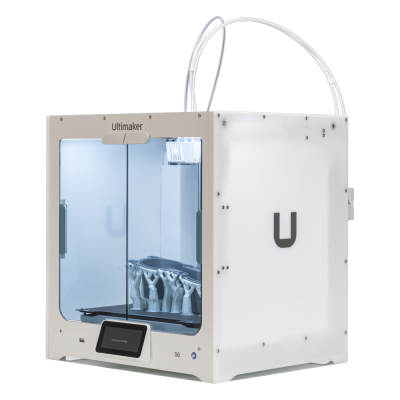
The S6 is UltiMaker's professional dual-extrusion desktop printer with swappable print cores, a flexible PEI plate and a partly enclosed chamber. It is for engineering teams, studios and schools that want a dependable, easy-to-run printer with a wide material range.
L’imprimante 3D Ultimaker S6 est-elle compatible avec SimplyPrint, OctoPrint, Mainsail et Fluidd ?
Chaque méthode de connexion, ses prérequis et sa configuration.
Client SimplyPrint
Pas encore confirmé, aidez-nous à le vérifier
The SimplyPrint Client's UltiMaker integration covers the S3, S5 and S7 (local HTTP API). The S6 and S8 run a different firmware that UltiMaker says is not compatible with the S3/S5/S7's; whether its local API is the same is unconfirmed.
Source
UltiMaker S-line printers take jobs over the network or from a USB drive; no USB serial printing is documented (the S7's manual shows a host port only).
Source
Ships UltiMaker's own closed firmware; no Klipper, and no known route to install it.
Source
Quel slicer utiliser avec Ultimaker S6
Les imprimantes Ultimaker utilisent Cura, le slicer de Ultimaker. Il n’existe pas encore de profil prêt à l’emploi pour l’imprimante Ultimaker S6 dans notre cloud.
Spécifications de Ultimaker S6 : dimensions du plateau, hauteur d’impression et plus
Ses dimensions, températures, gestion multi-matériaux et mode de connexion, d’après le fabricant et nos propres recherches.
Lire la suite du fabricant
Taille
Volume d’impression
330 x 240 x 300 mm
Type de plateau
Rectangle
Taille du plateau
330 x 240 mm
Hauteur d’impression max.
300 mm
Impression
Enceinte
Partiellement fermée
Vitesse d’impression maximale
500 mm/s
Température max. de l’extrudeur
340 °C
Avec plateau chauffant
Oui
Température max. du plateau
100 °C
Nombre de buses
2
Têtes d’impression
2
Direct drive
Non
Outil de palpage / nivellement automatique du plateau
Oui
Diamètre du filament
2.85 mm
Multi-matériaux
Changeur d’outils ou de hotends
Non
IDEX (deux extrudeurs indépendants)
Non
Connexion en cours
Connectivité
Wi-Fi, Ethernet, USB
Prend en charge l’impression via une connexion série
Non
Firmware fourni
Le firmware du fabricant
Fichiers et slicing
Formats de fichiers pris en charge
G-code (.gcode, .gco, .g)
L’imprimante
Fabricant / marque de l’imprimante
Ultimaker
Nom du modèle d’imprimante
S6
Entreprise fabricante originaire de
Pays-Bas
Lancement
juin 2025
Toujours fabriquée
Oui
Avertissement:
Nous nous efforçons de maintenir ces informations aussi à jour et exactes que possible, mais nous ne pouvons pas garantir leur exhaustivité ni leur fiabilité. Nos données reposent sur les contributions des utilisateurs et les références des fabricants.
Quel filament peut imprimer l’imprimante Ultimaker S6 ?
Compatibilité des filaments avec Ultimaker S6 : les matériaux indiqués par Ultimaker.
Filament
Adéquation
Notes
PLA
Très bien
Dans la liste des matériaux du fabricant pour cette imprimante.
PETG
Très bien
Dans la liste des matériaux du fabricant pour cette imprimante.
TPU et flexibles
Très bien
Dans la liste des matériaux du fabricant pour cette imprimante.
ABS & ASA
Très bien
Dans la liste des matériaux du fabricant pour cette imprimante.
Nylon (PA)
Très bien
Dans la liste des matériaux du fabricant pour cette imprimante.
Polycarbonate (PC)
Très bien
Dans la liste des matériaux du fabricant pour cette imprimante.
Chargé en fibres de carbone et de verre
Avec soin
Possible avec une buse renforcée ou résistante à l’usure, les fibres abrasives usent rapidement une buse standard en laiton.
Conseil : ce guide général repose sur les spécifications de l’imprimante, vérifiez toujours les paramètres recommandés pour votre filament. Avec SimplyPrint, vous pouvez enregistrer un profil pour chaque bobine et suivre précisément votre stock de filament.
Quand choisir l’imprimante Ultimaker S6
Choose the S6 when you want UltiMaker's ecosystem (Cura, Digital Factory, 301+ materials) at the lower end of the S series and can live with a partly enclosed chamber. The UltiMaker S8 is the step up if you want the fully enclosed build chamber and an integrated EPA filter; the S6 only has an optional Air Manager. We cannot yet connect it to SimplyPrint, so check that matters to you first.
Avantages
Dual extrusion with swappable print cores, and 301+ compatible materials including optional composite and metal cores (UltiMaker).
Up to 500 mm/s travel speed and 50,000 mm/s2 acceleration from the Cheetah motion planner (UltiMaker).
Flexible PEI-coated steel plate that releases parts easily, with an optional glass plate (UltiMaker).
Works with the Material Station for longer unattended runs and the optional Air Manager with an EPA filter (UltiMaker).
12-month warranty and Wi-Fi, Ethernet and USB connections (UltiMaker).
Inconvénients
No confirmed way to connect it to SimplyPrint: Klipper is not possible and OctoPrint is unlikely, and our SimplyPrint Client status is unknown.
Only partly enclosed and passively heated, so ABS and nylon are not as well served as on a fully enclosed printer; the filter is an optional extra.
Wi-Fi is 2.4 GHz only (UltiMaker).
No independent hands-on review found for the S6 itself; claims are UltiMaker's own.
Pour qui
ÉcolesBon choix
Easy to run and well supported with a warranty; the partly open chamber and the lack of a confirmed SimplyPrint connection are the drawbacks.
ParticuliersPeut fonctionner
Capable, but priced for professionals and tied to UltiMaker's ecosystem.
EntreprisesBon choix
Dual extrusion, many materials and a warranty suit prototyping and tooling work.
Fermes d’impressionPeut fonctionner
The Material Station allows longer unattended runs, but we cannot yet connect it to SimplyPrint.
Imprimantes similaires à la Ultimaker S6 fonctionnant avec SimplyPrint
Des imprimantes du même fabricant, de taille similaire, imprimant les mêmes matériaux techniques ou en multi-matériaux, disponibles aujourd’hui et dont nous savons qu’elles fonctionnent avec SimplyPrint.
Qui fabrique Ultimaker S6, et quelle liberté vous laisse Ultimaker : ses imprimantes peuvent-elles fonctionner sans son cloud, accepter tous les filaments et slicers, et être réparées ? Chaque critère est évalué à partir de sources publiques.
Ouverture : Mixte (2.9 sur 5)
Mixte
Jardin closOuvert
UltiMaker is the company formed in 2022 when the Dutch printer maker Ultimaker, founded in 2011, merged with MakerBot. It sells professional desktop and industrial printers (the S series, Factor 4, MakerBot Method and Sketch) to businesses, engineering teams and schools, and develops the open-source Cura slicer and the Digital Factory cloud platform.
Fondée:
2011 ·
Siège social:
Zaltbommel, Netherlands, and New York, USA ·
Propriété:
Privately held; at the 2022 merger NPM Capital held the majority and Stratasys a minority stake ·
Site web:ultimaker.com
UltiMaker is mixed: Cura and material choice are open, and printers can be used on the local network, but the printer firmware is closed and most management features sit in its Digital Factory cloud.
Micrologiciel et micrologiciel personnalisé ●●●●●
The printers' own software is not published: UltiMaker's GitHub has its Linux kernel configuration and Cura, but no printer firmware. We found no documented way to run custom firmware on current S-series or Method printers.
[1][2]
Contrôle local et intégrations ●●●●●
Cura can add an S-series printer on the local network, by discovery or IP, without signing in, and start prints. UltiMaker says most features are only available through its Digital Factory cloud, and the API it documents publicly is that cloud API; we found no public documentation for controlling the printers locally.
[3][12]
Filaments, slicers et pièces tiers ●●●●●
Cura is open source and widely used with other brands, and UltiMaker lists over 300 materials, including third-party ones, for the S series. Print cores and the Material Station are UltiMaker's own parts.
[2][4]
Réparations et pièces détachées ●●●●●
UltiMaker publishes maintenance schedules for the S series and sells part bundles and maintenance kits, and gives an expected printer lifetime of five years at 1,500 printing hours a year.
[5]
Données et confidentialité ●●●●●
Local printing needs no account; Digital Factory needs one. UltiMaker's privacy policy says data is stored and processed in the EEA or the United States depending on the user's region.
[6][3]
Communauté et documentation ●●●●●
Cura is developed in public on GitHub with a large open issue tracker, and UltiMaker runs a community forum and support knowledge base. Printer internals are not documented publicly.
[2][3]
Avantages
Cura is open source and works with printers from many brands.
Wide material choice on the S series, including third-party materials.
Printers can be used on the local network without an account.
Published maintenance schedules and maintenance kits for long service life.
Inconvénients
Printer firmware is closed.
Most fleet and management features need the Digital Factory cloud, with paid tiers.
MakerBot CloudPrint was shut down in 2025, forcing users to move platforms.
Print cores and the Material Station are UltiMaker-only parts.
Expérience
21 mai 2026: UltiMaker launched the Factor 4 Plus, an industrial printer up to twice as fast as the Factor 4, with TRACE print validation for production and defence customers.
[7]
février 2026: UltiMaker sold the Thingiverse model platform to MyMiniFactory and archived its Thingiverse forum.
[8]
décembre 2025: UltiMaker shut down MakerBot CloudPrint in early December 2025. Users had to reconnect printers to Digital Factory, with a free year of its premium tier offered to former CloudPrint users; the Replicator+ cannot be networked in Digital Factory.
[9]
mai 2022: Ultimaker and Stratasys' MakerBot announced a merger backed by $62.4 million from NPM Capital and Stratasys, with co-CEOs from both companies and headquarters in the Netherlands and New York. The combined company took the UltiMaker name.
[10][11]
D’après 12 sources, dernière vérification le 18 octobre 2026. Afficher les sources
L’imprimante Ultimaker S6 est-elle compatible avec SimplyPrint ?
Nous ne le savons pas encore. SimplyPrint fonctionne avec plus de 130 marques et plus de 600 modèles via OctoPrint, Klipper et des intégrations natives ; si vous avez une Ultimaker S6, notre vérification de compatibilité vous indique en quelques questions comment elle pourrait se connecter.
Quel slicer utiliser pour la Ultimaker S6 ?
Utilisez Cura, le slicer de Ultimaker, conçu pour ses imprimantes. Vous pouvez l’utiliser dans le slicer en ligne de SimplyPrint ; il n’y a pas encore de profil prêt à l’emploi pour la Ultimaker S6.
Quel filament peut imprimer l’imprimante Ultimaker S6 ?
Ultimaker indique PLA, PETG, ABS & ASA, Nylon (PA), Polycarbonate (PC) et TPU et flexibles pour S6.
Quelle est la taille du plateau et le volume d’impression de Ultimaker S6 ?
L’imprimante Ultimaker S6 possède un plateau d’impression de 330 x 240 mm et imprime jusqu’à 300 mm de haut, soit un volume d’impression d’environ 330 x 240 x 300 mm. Consultez le tableau complet des caractéristiques ci-dessus pour le type de plateau, les températures et plus encore.
Quand Ultimaker S6 est-elle sortie ?
Ultimaker a lancé S6 en juin 2025.
Où acheter Ultimaker S6 ?
Depuis la boutique de Ultimaker, qui possède des boutiques pour les États-Unis. Les liens de cette page mènent vers ces boutiques. Certains sont des liens affiliés, nous pouvons donc toucher une commission sans coût supplémentaire pour vous.
 Pays-Bas


 PrusaSlicer
 OrcaSlicer
 BambuStudio
 ElegooSlicer
 CrealityPrint
 Kiri:Moto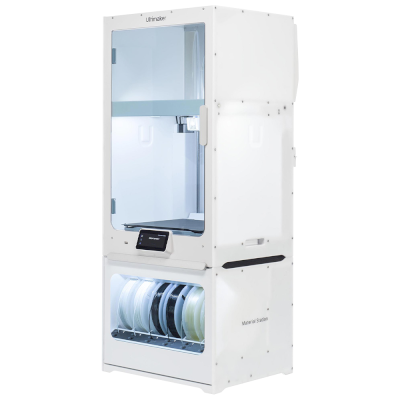


 Les meilleures pour États-Unis : boutique de Ultimaker pour les États-Unis