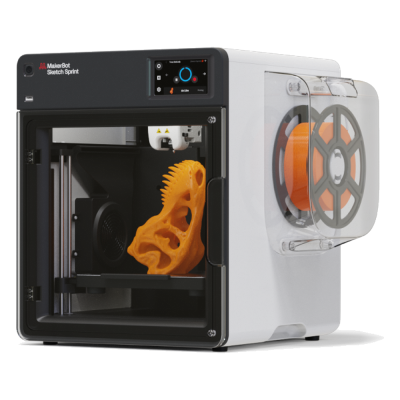
The Sketch Sprint is MakerBot's fully enclosed classroom printer, with a 220 x 220 x 220 mm plate, a camera and a PIN lock, printing MakerBot PLA and Tough PLA. It is for schools and educators who want a simple, safe, supported package.
¿Funciona la impresora 3D MakerBot Sketch Sprint con SimplyPrint, OctoPrint, Mainsail y Fluidd?
Cada forma de conectarla, lo que necesita y cómo configurarla.
No se conoce ninguna forma de conectarla a SimplyPrint
Lamentablemente, la MakerBot Sketch Sprint no es compatible actualmente, hasta donde sabemos, con OctoPrint, Mainsail, Fluidd o SimplyPrint. Para la mejor experiencia de impresión 3D, considera otras impresoras 3D compatibles con estos programas.
Cómo determinamos la compatibilidad
Consideramos una impresora compatible si funciona con uno o varios de los siguientes:
Integración personalizada de SimplyPrint para este modelo específico
Compatibilidad con OctoPrint (requiere que la impresora admita la impresión a través del puerto serie)
Compatibilidad con Klipper (la impresora puede ejecutar Klipper, ya sea instalando firmware compatible o usando un controlador/pantalla externo)
La compatibilidad con OctoPrint se basa principalmente en si la impresora admite comunicación serie. Si no admite la impresión mediante comunicación serie, marcamos OctoPrint como no compatible.
Nota: Algunas impresoras tienen plugins de terceros para OctoPrint que habilitan conexiones no oficiales o personalizadas. No mantenemos una lista de estos plugins, así que no aparecen en nuestros datos de compatibilidad.
Usa el slicer propio de MakerBot, MakerBot Print: ninguno de los slicers en la nube de SimplyPrint tiene un perfil para la MakerBot Sketch Sprint, y no admite G-code estándar que conozcamos.
Especificaciones de MakerBot Sketch Sprint: tamaño de cama, altura de impresión y más
Su tamaño, temperaturas, multimaterial y cómo se conecta, según el fabricante y nuestra propia investigación.
Más información del fabricante
Tamaño
Volumen de impresión
220 x 220 x 220 mm
Tipo de cama
Square
Tamaño de cama
220 x 220 mm
Altura máxima de impresión
220 mm
Impresión
Cerramiento
Totalmente cerrada
Velocidad máxima de impresión
300 mm/s
Temperatura máxima del extrusor
260 °C
Tiene cama caliente
Sí
Temperatura máxima de la cama
110 °C
Número de boquillas
1
Cabezales de impresión
1
Direct drive
Sí
Herramienta de sondeo / Nivelación automática de la cama
Sí
Ancho del filamento
1.75 mm
Multimaterial
Cambiador de herramientas o de hotends
No
IDEX (extrusores dobles independientes)
No
Conectando
Conectividad
USB, Wi-Fi
Cámara integrada
Sí
Admite impresión por puerto serie
Desconocido
Firmware incluido
El propio del fabricante
Archivos y laminado
Formatos de archivo compatibles
G-code (.gcode, .gco, .g)
La impresora
Fabricante / marca de la impresora
MakerBot
Nombre del modelo de impresora
Sketch Sprint
Fabricada por una empresa de
EE. UU.
Lanzado
noviembre 2024
Se sigue fabricando
Sí
Aviso legal:
Nos esforzamos por mantener esta información lo más actualizada y precisa posible, pero no podemos garantizar su integridad ni su fiabilidad. Nuestros datos se basan en aportaciones de usuarios y referencias de fabricantes.
¿Qué filamento admite MakerBot Sketch Sprint?
Compatibilidad de filamento de la MakerBot Sketch Sprint: los materiales que MakerBot indica para ella.
Filamento
Idoneidad
Notas
PLA
Genial
En la lista de materiales del fabricante para esta impresora.
PETG
Genial
Dentro del rango óptimo (PETG funciona bien con un hotend de unos 230 a 250C y una cama de unos 70 a 85C).
TPU y flexibles
Genial
El extrusor de accionamiento directo alimenta bien el filamento flexible. Imprime despacio para obtener resultados limpios.
ABS & ASA
Genial
Cerrada, con un hotend y una cama lo bastante calientes: ABS y ASA se imprimen bien.
Nylon (PA)
Bueno
Es posible con cuidado: seca bien el filamento y un cerramiento ayuda mucho.
Polycarbonate (PC)
No es ideal
No recomendado, el PC necesita temperaturas de hotend muy altas y una cámara cerrada.
Con fibra de carbono y relleno de vidrio
Con cuidado
Es posible si instalas una boquilla endurecida o resistente al desgaste. Las fibras abrasivas desgastan rápido una boquilla de latón estándar.
Consejo: esta es una guía general basada en las especificaciones de la impresora. Comprueba siempre los ajustes recomendados para tu filamento. Con SimplyPrint puedes guardar un perfil para cada bobina y saber exactamente qué filamento tienes en inventario.
Cuándo elegir la MakerBot Sketch Sprint
Choose the Sketch Sprint when you run a classroom and want a closed, supported printer with lesson plans, teacher training and a way for students to submit prints without installing software. It is limited to MakerBot PLA and Tough PLA and costs 2,399 USD with five student seats, so it is poor value for anyone who wants material freedom. We found no independent review, and sources differ on its speed. For classroom use alongside SimplyPrint's print approval, an enclosed Bambu Lab P1S is cheaper and prints more materials, but note its own cloud trade-offs.
Ventajas
Fully enclosed with HEPA and carbon filters, and UL, CE and FCC certified (MakerBot).
Education package: PIN-code lock, 600+ lesson plans, ISTE-certified training and student print submission without software installs (MakerBot).
Built-in 2 MP camera for remote monitoring and automatic timelapses (MakerBot).
Heated plate to 110 °C with a removable flexible surface and mesh levelling (MakerBot).
Works with Digital Factory in the browser and Cura 5.9, and runs on Chromebooks (MakerBot).
Desventajas
Limited to MakerBot PLA and Tough PLA on a 0.4 mm nozzle (MakerBot), so no PETG, ABS or flexible filaments.
High price: 2,399 USD for the single-printer education bundle (MakerBot).
Not expected to connect to SimplyPrint: our catalog rates both Klipper and OctoPrint as unlikely, and it runs on MakerBot's own firmware and Digital Factory.
Small 220 x 220 x 220 mm plate.
No independent hands-on review found, and the print speed is quoted as either 250 or 300 mm/s depending on the listing.
A quién va dirigido
Centros educativosBuena opción
Enclosed, filtered, PIN-locked and sold with lesson plans, though it uses MakerBot's own tools instead of SimplyPrint's approval queue and costs more than comparable printers.
AficionadosNo encaja bien
Locked to MakerBot's PLA range and priced for institutions, so a hobby printer gives you much more for the money.
EmpresasNo encaja bien
Only PLA and Tough PLA on a small plate, so it is not suited to functional parts.
Granjas de impresiónNo encaja bien
Not expected to connect to SimplyPrint and limited to a few materials, so it does not fit a fleet.
Impresoras como la MakerBot Sketch Sprint que funcionan con SimplyPrint
Impresoras del mismo fabricante, de tamaño similar, que imprimen los mismos materiales técnicos o en multimaterial, que puedes comprar hoy y que sabemos que funcionan con SimplyPrint.
Quién fabrica MakerBot Sketch Sprint y cuánta libertad te da MakerBot: si sus impresoras funcionan sin su nube, aceptan cualquier filamento y slicer, y se pueden reparar. Cada área se valora con fuentes públicas.
Apertura: Mayormente cerrada (2.3 de 5)
Mayormente cerrada
Ecosistema cerradoAbrir
MakerBot is an American 3D printer brand founded in New York in 2009 out of the open-source RepRap scene. Stratasys bought it in 2013 and merged it with Ultimaker in 2022; MakerBot is now UltiMaker's education brand, selling Sketch classroom printers with lesson plans, teacher tools and management in UltiMaker's Digital Factory cloud. The Replicator printers in our catalogue are discontinued.
Fundada:
2009-01 ·
Sede central:
Brooklyn, New York, US ·
Propiedad:
Brand of UltiMaker, formed in August 2022 when Stratasys merged MakerBot with Ultimaker (NPM Capital 53.5%, Stratasys 46.5% at closing) ·
Sitio web:www.makerbot.com
Proprietary firmware, MakerBot-only extruders and materials, and classroom management in UltiMaker's cloud. In return schools get one managed system with curriculum and support.
Firmware y firmware personalizado ●●●●●
MakerBot stopped sharing its hardware designs with the Replicator 2 in 2012, and its fifth-generation printers moved to proprietary controllers, extruders and firmware. We found no firmware source for the current Sketch line.
[15][14]
Control local e integraciones ●●●●●
The Sketch Sprint prints over Wi-Fi or Ethernet from UltiMaker Cura or Digital Factory, or from a USB stick. Classroom management, remote monitoring and browser slicing (Cura Cloud) run in UltiMaker's Digital Factory cloud, which replaced MakerBot CloudPrint in 2025. We found no documented local interface that other software could use.
[16][2][3]
Filamento, slicers y piezas de terceros ●●●●●
MakerBot lists only its own PLA and Tough PLA, and only its own Sketch extruder, for the Sketch Sprint. Slicing is in UltiMaker Cura (open source) or Cura Cloud.
[2]
Reparaciones y repuestos ●●●●●
UltiMaker's shop sells Sketch extruders, a Sketch Sprint nozzle assembly, build plates and cables, and still sells Smart Extruder+ units for the Replicator+; spare parts are mostly whole assemblies.
[6]
Datos y privacidad ●●●●●
Some MakerBot services need an account, and MakerBot's privacy policy lists what it collects (including device identifiers such as MAC addresses and usage data) and its use of Google Analytics and retargeting. Students can submit files through Link Share without an account.
[5][2]
Comunidad y documentación ●●●●●
MakerBot offers hundreds of free lesson plans, educator certification, Thingiverse Education and a support site; there is no public source code or bug tracker.
[1]
Ventajas
Built for schools: curriculum, lesson plans, teacher tools and certification are part of the package.
Enclosed Sketch printers with HEPA filtration, aimed at classrooms.
Students can submit files without creating accounts (Link Share).
Spare extruders and parts are still sold, even for the Replicator+.
Desventajas
Closed firmware and MakerBot-only extruders; only MakerBot PLA and Tough PLA are listed for the Sketch Sprint.
Fleet management depends on UltiMaker's Digital Factory cloud.
CloudPrint's 2025 shutdown left the Replicator 5th Gen, Mini, Mini+ and Z18 without cloud support.
Many ownership changes and layoffs over the years (Stratasys 2013, layoffs 2015 and 2017, Ultimaker merger 2022).
Trayectoria
diciembre 2025: UltiMaker shut down MakerBot CloudPrint in early December 2025, after announcing 1 October 2025. Printers had to be reconnected to Digital Factory by hand, and the Replicator Z18, 5th Gen, Mini and Mini+ are not supported there; MakerBot points their owners to MakerBot Print.
[3][4]
31 de agosto de 2022: Stratasys closed the merger of MakerBot with Ultimaker into a company named Ultimaker (now UltiMaker), owned 53.5% by NPM Capital and 46.5% by Stratasys.
[7]
febrero 2017: MakerBot announced a restructuring with another round of layoffs, Fortune reported.
[9]
julio 2016: A court dismissed the investor class action over the fifth-generation printers and Smart Extruder, finding the statements at issue were not actionable.
[10]
abril 2016: MakerBot moved printer manufacturing from Brooklyn to the contract manufacturer Jabil and parted ways with an undisclosed number of Brooklyn staff, The Verge reported.
[13]
julio 2015: A class action was filed against MakerBot and Stratasys alleging investors were misled about problems with the fifth-generation printers' Smart Extruder.
[11]
abril 2015: MakerBot laid off about 20% of its staff, roughly 100 people, under a new CEO, Motherboard reported.
[12]
junio 2013: Stratasys bought MakerBot in a stock deal worth $403 million at the time.
[8]
septiembre 2012: With the Replicator 2, MakerBot stopped publishing its machine designs, a break with open-source hardware that co-founder Zach Smith criticised publicly.
[14][15]
Investigado a partir de 16 fuentes, última comprobación: 18 de octubre de 2026. Mostrar fuentes
¿La MakerBot Sketch Sprint es compatible con SimplyPrint?
Que sepamos, MakerBot Sketch Sprint aún no es compatible. SimplyPrint funciona con más de 130 marcas y más de 600 modelos mediante OctoPrint, Klipper e integraciones nativas. Consulta la lista de compatibilidad para ver impresoras compatibles.
¿Qué slicer debo usar para la MakerBot Sketch Sprint?
Usa el slicer propio de MakerBot, MakerBot Print: ninguno de los slicers en la nube de SimplyPrint tiene un perfil para la MakerBot Sketch Sprint, y no admite G-code estándar que conozcamos.
¿Qué filamento admite MakerBot Sketch Sprint?
MakerBot indica PLA para el modelo Sketch Sprint.
¿Cuál es el tamaño de la cama y el volumen de impresión de MakerBot Sketch Sprint?
La MakerBot Sketch Sprint tiene una cama de impresión de 220 x 220 mm e imprime piezas de hasta 220 mm de alto, con un volumen de impresión de unos 220 x 220 x 220 mm. Consulta la tabla de especificaciones completa de arriba para ver el tipo de cama, temperaturas y más.
¿Cuándo salió MakerBot Sketch Sprint?
MakerBot lanzó el modelo Sketch Sprint en noviembre 2024.
¿Dónde puedo comprar la MakerBot Sketch Sprint?
Desde la tienda de MakerBot, que tiene tiendas para en cualquier otro lugar. Los enlaces de esta página llevan a esas tiendas; algunos son enlaces de afiliados, por lo que podemos recibir una comisión sin coste adicional para ti.
 EE. UU.


 PrusaSlicer
 OrcaSlicer
 BambuStudio
 ElegooSlicer
 CrealityPrint
 Cura
Cura Kiri:Moto