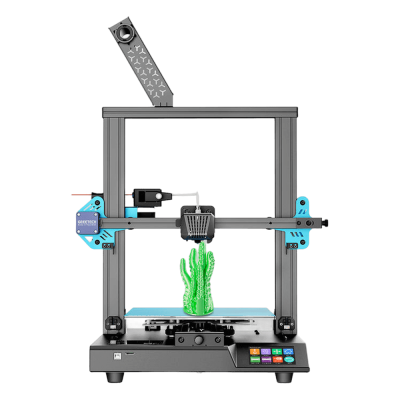
¿Funciona la impresora 3D Geeetech Thunder con SimplyPrint, OctoPrint, Mainsail y Fluidd?
Cada forma de conectarla, lo que necesita y cómo configurarla.
Has a USB-B (CH340) device port, used by Geeetech's Smartto Kits at 115200 baud, but no source shows it accepting a G-code stream from OctoPrint.
Origen
Ships Geeetech's own closed-loop firmware (configured with Smartto Kits); no Klipper port for its board is known.
Origen
Qué slicer usar con Geeetech Thunder
Ningún slicer de la nube de SimplyPrint puede laminar para la Geeetech Thunder, que sepamos: no admite G-code estándar. Usa el slicer recomendado por su fabricante.
Solo incluimos slicers que puedes usar en la nube de SimplyPrint, por lo que puede haber otros para la Geeetech Thunder.
No hay slicing en línea para Geeetech Thunder
Especificaciones de Geeetech Thunder: tamaño de cama, altura de impresión y más
Su tamaño, temperaturas, multimaterial y cómo se conecta, según el fabricante y nuestra propia investigación.
Más información del fabricante
Tamaño
Volumen de impresión
250 x 250 x 260 mm
Tipo de cama
Square
Tamaño de cama
250 x 250 mm
Altura máxima de impresión
260 mm
Impresión
Cerramiento
Estructura abierta
Sistema de movimiento
Impresora de cama móvil
Velocidad máxima de impresión
300 mm/s
Temperatura máxima del extrusor
250 °C
Tiene cama caliente
Sí
Temperatura máxima de la cama
110 °C
Número de boquillas
1
Cabezales de impresión
1
Direct drive
No
Herramienta de sondeo / Nivelación automática de la cama
Sí
Ancho del filamento
1.75 mm
Multimaterial
Cambiador de herramientas o de hotends
No
IDEX (extrusores dobles independientes)
No
Conectando
Conectividad
USB, Tarjeta SD
Copias de
Tarjeta microSD, Memoria USB
Puerto USB para imprimir por USB
USB-B
Admite impresión por puerto serie
Desconocido
Firmware incluido
El propio del fabricante
Archivos y laminado
Formatos de archivo compatibles
G-code (.gcode, .gco, .g)
La impresora
Fabricante / marca de la impresora
Geeetech
Nombre del modelo de impresora
Thunder
Fabricada por una empresa de
China
Lanzado
septiembre 2022
Aviso legal:
Nos esforzamos por mantener esta información lo más actualizada y precisa posible, pero no podemos garantizar su integridad ni su fiabilidad. Nuestros datos se basan en aportaciones de usuarios y referencias de fabricantes.
¿Qué filamento admite Geeetech Thunder?
Compatibilidad de filamento de la Geeetech Thunder: los materiales que Geeetech indica para ella.
Filamento
Idoneidad
Notas
PLA
Genial
En la lista de materiales del fabricante para esta impresora.
PETG
Genial
En la lista de materiales del fabricante para esta impresora.
TPU y flexibles
Genial
En la lista de materiales del fabricante para esta impresora.
ABS & ASA
Genial
En la lista de materiales del fabricante para esta impresora.
Nylon (PA)
Con cuidado
Es posible con cuidado, una carcasa cerrada y filamento muy seco son imprescindibles.
Polycarbonate (PC)
No es ideal
No recomendado, el PC necesita temperaturas de hotend muy altas y una cámara cerrada.
Con fibra de carbono y relleno de vidrio
Con cuidado
Es posible si instalas una boquilla endurecida o resistente al desgaste. Las fibras abrasivas desgastan rápido una boquilla de latón estándar.
Consejo: esta es una guía general basada en las especificaciones de la impresora. Comprueba siempre los ajustes recomendados para tu filamento. Con SimplyPrint puedes guardar un perfil para cada bobina y saber exactamente qué filamento tienes en inventario.
Impresoras como la Geeetech Thunder que funcionan con SimplyPrint
Impresoras del mismo fabricante, de tamaño similar, que imprimen los mismos materiales técnicos o en multimaterial, que puedes comprar hoy y que sabemos que funcionan con SimplyPrint.
Quién fabrica Geeetech Thunder y cuánta libertad te da Geeetech: si sus impresoras funcionan sin su nube, aceptan cualquier filamento y slicer, y se pueden reparar. Cada área se valora con fuentes públicas.
Apertura: Mayormente abierta (3.6 de 5)
Mayormente abierta
Ecosistema cerradoAbrir
Geeetech (HK GETECH Co., Limited, with its office at Shenzhen Getech Technology) is a Chinese 3D printer and filament maker that says it has worked on 3D printers since 2011. It made a long line of budget printers, from Prusa i3 kits through the A10/A20/A30, Mizar and Thunder series, and now sells the compact M1 and M1S for children and beginners alongside a large filament range.
Fundada:
2011 ·
Sede central:
Shenzhen, China (company registered in Hong Kong) ·
Propiedad:
HK GETECH Co., Limited; China office Shenzhen Getech Technology Co., Ltd ·
Sitio web:www.geeetech.com
Mostly open, with a caveat: the older printers came with published Marlin source and schematics, while the current M1 line has closed firmware but still runs locally with any filament and open slicers.
Firmware y firmware personalizado ●●●●●
Geeetech published Marlin-based firmware source and board schematics for its earlier printers on GitHub (Geeetech3D) and its download centre, including open-source files for the Mizar S updated until 2024. For the current M1 and M1S it offers firmware binaries only; we found no source.
[11][12][9][7]
Control local e integraciones ●●●●●
The M1 Mini prints from a TF card or over USB with no account. The M1S adds Wi-Fi and the Geeetech app for printing from its model library 'anywhere', a remote feature that runs through Geeetech's app. Geeetech documents no network interface for other software, and for these models it offers only firmware binaries.
[4][5][8]
Filamento, slicers y piezas de terceros ●●●●●
Any 1.75 mm filament (PLA and TPU on the M1), and Geeetech publishes Cura and OrcaSlicer profiles for it. Nozzles and hot-end parts for the M1 are Geeetech's own, sold in its store.
[4][7][10]
Reparaciones y repuestos ●●●●●
Geeetech sells M1 parts (hotbed, nozzles, hot-end components, PEI plate) and posts videos on replacing the nozzle and the motherboard; schematics for older boards are published.
[10][7][9]
Comunidad y documentación ●●●●●
A long-running wiki, a download centre with manuals, firmware, profiles and videos per model, and GitHub repositories. Independent coverage of the current M1 line is scarce.
[13][6][11]
Ventajas
Inexpensive compact printers aimed at children and beginners.
Any 1.75 mm filament, with Cura and OrcaSlicer profiles published.
Spare nozzles, hotbeds and hot-end parts for the M1, plus repair videos.
Downloads (manuals, firmware) kept online for printers going back many years.
Desventajas
No published firmware source for the current M1 and M1S.
The M1S's remote printing runs through Geeetech's phone app; we found no privacy terms covering the app.
Small 100 x 110 x 100 mm build volume on the M1.
Little independent testing of the current models that we could find.
Trayectoria
noviembre 2025: Geeetech added the M1S, an M1 with Wi-Fi and a phone app; its app was posted in September 2025 and its quick guide in November 2025.
[8]
febrero 2025: Geeetech released the M1 mini printer for children and beginners; its first setup and maintenance videos were posted in February 2025 and its manual in March 2025.
[7]
octubre 2022: Geeetech published open-source files for the Mizar S on GitHub, updated until March 2024; files for the Mizar and Mizar Pro followed in November 2022.
[12][11]
Investigado a partir de 13 fuentes, última comprobación: 18 de octubre de 2026. Mostrar fuentes
¿La Geeetech Thunder es compatible con SimplyPrint?
Aún no lo sabemos. SimplyPrint funciona con más de 130 marcas y más de 600 modelos mediante OctoPrint, Klipper e integraciones integradas. Si tienes una Geeetech Thunder, nuestra comprobación de compatibilidad te indica en unas pocas preguntas cómo podría conectarse.
¿Qué slicer debo usar para la Geeetech Thunder?
Ningún slicer de la nube de SimplyPrint puede laminar para la Geeetech Thunder, que sepamos: no admite G-code estándar. Usa el slicer recomendado por su fabricante.
¿Qué filamento admite Geeetech Thunder?
Geeetech indica PLA, PETG, TPU y flexibles y ABS & ASA para el modelo Thunder.
¿Cuál es el tamaño de la cama y el volumen de impresión de Geeetech Thunder?
La Geeetech Thunder tiene una cama de impresión de 250 x 250 mm e imprime piezas de hasta 260 mm de alto, con un volumen de impresión de unos 250 x 250 x 260 mm. Consulta la tabla de especificaciones completa de arriba para ver el tipo de cama, temperaturas y más.
¿Cuándo salió Geeetech Thunder?
Geeetech lanzó el modelo Thunder en septiembre 2022.
 China
China


 PrusaSlicer
 OrcaSlicer
 BambuStudio
 ElegooSlicer
 CrealityPrint
 Cura
Cura Kiri:Moto