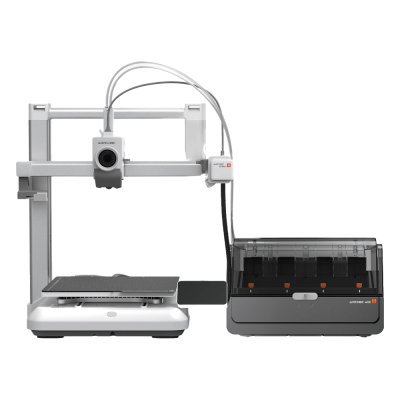
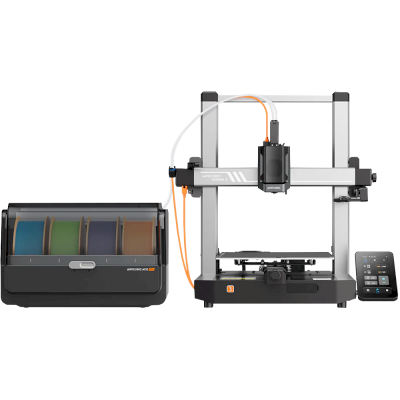
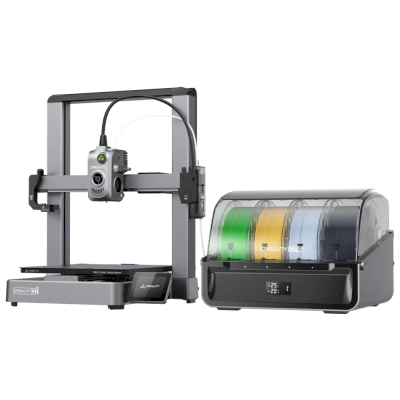
The Kobra 4 is Anycubic's quiet, fast open-frame bedslinger: a 260 mm build cube, a 300 degrees C hotend, a built-in 720p camera and a 600 mm/s top speed. It is for hobbyists who want a simple PLA and PETG printer, and the Combo adds the ACE 2 Pro for four colours.
Esto significa que comparte muchas características con el modelo base, pero puede tener modificaciones específicas, funciones adicionales o accesorios incluidos.
Conecta Anycubic Kobra 4 Combo a SimplyPrint
¿Funciona la impresora 3D Anycubic Kobra 4 Combo con SimplyPrint, OctoPrint, Mainsail y Fluidd?
Cada forma de conectarla, lo que necesita y cómo configurarla.
Cliente de SimplyPrint
Aún no confirmado, ayúdanos a averiguarlo
Anycubic's Kobra OS; the Client supports the Kobra 3 and S1 families, but nothing yet says the Kobra 4 firmware is the same.
Origen
Kobra OS is Klipper-based but has no Moonraker; Rinkhals does not list the Kobra 4.
Origen
Qué slicer usar con Anycubic Kobra 4 Combo
Usa el slicer propio de Anycubic, Anycubic Slicer Next: ninguno de los slicers en la nube de SimplyPrint tiene un perfil para la Anycubic Kobra 4 Combo, y no admite G-code estándar que conozcamos.
Especificaciones de Anycubic Kobra 4 Combo: tamaño de cama, altura de impresión y más
Su tamaño, temperaturas, multimaterial y cómo se conecta, según el fabricante y nuestra propia investigación.
Más información del fabricante
Tamaño
Volumen de impresión
260 x 260 x 260 mm
Tipo de cama
Square
Tamaño de cama
260 x 260 mm
Altura máxima de impresión
260 mm
Impresión
Cerramiento
Estructura abierta
Sistema de movimiento
Impresora de cama móvil
Velocidad máxima de impresión
600 mm/s
Temperatura máxima del extrusor
300 °C
Tiene cama caliente
Sí
Temperatura máxima de la cama
100 °C
Número de boquillas
1
Cabezales de impresión
1
Direct drive
Sí
Herramienta de sondeo / Nivelación automática de la cama
Sí
Ancho del filamento
1.75 mm
Multimaterial
Incluye multimaterial
Anycubic ACE 2 Pro
Unidades multimaterial compatibles
Anycubic ACE Pro, Anycubic ACE 2 Pro
Cambiador de herramientas o de hotends
No
IDEX (extrusores dobles independientes)
No
Conectando
Conectividad
Wi-Fi, USB
Cámara integrada
Sí
Copias de
Memoria USB
Admite impresión por puerto serie
No
Firmware incluido
El propio del fabricante
Archivos y laminado
Formatos de archivo compatibles
G-code (.gcode, .gco, .g)
La impresora
Fabricante / marca de la impresora
Anycubic
Nombre del modelo de impresora
Kobra 4 Combo
Fabricada por una empresa de
China
Lanzado
mayo 2026
Se sigue fabricando
Sí
Aviso legal:
Nos esforzamos por mantener esta información lo más actualizada y precisa posible, pero no podemos garantizar su integridad ni su fiabilidad. Nuestros datos se basan en aportaciones de usuarios y referencias de fabricantes.
¿Qué filamento admite Anycubic Kobra 4 Combo?
Compatibilidad de filamento de la Anycubic Kobra 4 Combo: los materiales que Anycubic indica para ella.
Filamento
Idoneidad
Notas
PLA
Genial
En la lista de materiales del fabricante para esta impresora.
PETG
Genial
En la lista de materiales del fabricante para esta impresora.
TPU y flexibles
Genial
En la lista de materiales del fabricante para esta impresora.
ABS & ASA
Con cuidado
La cama está lo bastante caliente, pero ABS y ASA se deforman sin un cerramiento, muy recomendado para impresiones limpias.
Nylon (PA)
Con cuidado
Es posible con cuidado, una carcasa cerrada y filamento muy seco son imprescindibles.
Polycarbonate (PC)
Con cuidado
Al límite: PC realmente necesita una cámara cerrada y caliente para evitar deformaciones.
Con fibra de carbono y relleno de vidrio
Con cuidado
Es posible si instalas una boquilla endurecida o resistente al desgaste. Las fibras abrasivas desgastan rápido una boquilla de latón estándar.
Consejo: esta es una guía general basada en las especificaciones de la impresora. Comprueba siempre los ajustes recomendados para tu filamento. Con SimplyPrint puedes guardar un perfil para cada bobina y saber exactamente qué filamento tienes en inventario.
Lo que dicen los expertos sobre Anycubic Kobra 4 Combo
Reseñas de personas que prueban impresoras profesionalmente. Enlazamos a ellas, las opiniones son suyas.
Tested an early-production Kobra 4 Combo with the ACE 2 Pro and calls it an updated Kobra 3 with A1-style looks. Likes the quick-swap high-flow hardened nozzle, quick assembly, quiet running and better colour handling. Dislikes slow filament swaps, wasteful purging, the large footprint and awkward TPU. Subtitle: did the Kobra X do it better? Probably.
“It doesn’t do much to move the needle when compared to its brethren, but it's a solid machine and a good value.”
Cuándo elegir la Anycubic Kobra 4 Combo
Choose the Kobra 4 when you want an easy, quiet printer at a low price and mostly print PLA and PETG: Tom's Hardware, testing the Combo, called it a solid machine and good value, though an evolution of the Kobra 3 more than a leap. Choose the Combo for colour, but note Tom's Hardware found filament swaps slow and purging wasteful. If you need ABS or ASA or a closed chamber, pick an enclosed printer such as the Bambu Lab P2S or Creality K2; if you want a larger plate, the Kobra 3 Max V2 Combo is bigger.
Ventajas
Quiet: Anycubic gives 48 dB in standard mode and 45 dB in silent mode, and Tom's Hardware also found it quiet.
Quick assembly, about 15 minutes by Anycubic's claim, and a quick-swap high-flow hardened nozzle (Tom's Hardware).
A built-in 720p camera with spaghetti and foreign-object detection, plus time-lapse and an app (Anycubic).
The Combo adds the ACE 2 Pro for four colours (up to eight with two units) and better colour handling (Tom's Hardware, Anycubic).
Tom's Hardware rated the Combo 4/5 and a good value.
Desventajas
Open frame with no enclosure, so it is best kept to PLA, PETG and TPU.
Filament swaps with the ACE 2 Pro are slow and purging is wasteful, and TPU is awkward (Tom's Hardware).
A large footprint for a 260 mm printer (Tom's Hardware).
We have not confirmed how it connects to SimplyPrint; Klipper is ruled out and OctoPrint unlikely, so check before buying for a fleet.
A quién va dirigido
Centros educativosPuede funcionar
Quiet and easy to set up, with a camera, but open and without confirmed SimplyPrint support, so queueing student prints for approval is not assured.
AficionadosBuena opción
Quiet, quick to set up and good value, with an optional four-colour Combo; it is more evolution than revolution (Tom's Hardware).
EmpresasPuede funcionar
Good for PLA and PETG prototypes, but open, with slow colour changes and no confirmed SimplyPrint route.
Granjas de impresiónNo encaja bien
SimplyPrint compatibility is unconfirmed and it has no enclosure or plate-clearing kit in our sources.
Impresoras como la Anycubic Kobra 4 Combo que funcionan con SimplyPrint
Impresoras del mismo fabricante, de tamaño similar, que imprimen los mismos materiales técnicos o en multimaterial, que puedes comprar hoy y que sabemos que funcionan con SimplyPrint.
También se vende sin la unidad multimaterial, como Anycubic Kobra 4.
Sobre Anycubic
Quién fabrica Anycubic Kobra 4 Combo y cuánta libertad te da Anycubic: si sus impresoras funcionan sin su nube, aceptan cualquier filamento y slicer, y se pueden reparar. Cada área se valora con fuentes públicas.
Apertura: Mixto (3.0 de 5)
Mixto
Ecosistema cerradoAbrir
Anycubic is a Chinese 3D printer maker founded in 2015. It sells the Kobra line of FDM printers, including the enclosed Kobra S1 and S1 Max, the large Kobra 3 Max and the low-cost Kobra X, the ACE Pro multi-material unit and Photon resin printers. Its printers are aimed at hobbyists and home users at budget to mid-range prices.
Fundada:
2015 ·
Sede central:
China (its global store is run by Hongkong Anycubic Technology Co., Limited) ·
Sitio web:www.anycubic.com
Anycubic is mixed: its printers work locally in LAN mode, take third-party filament and slicers, and have spare parts and guides, but its published firmware source leaves proprietary parts closed, custom firmware is unsupported, and its cloud had a security incident in 2024.
Firmware y firmware personalizado ●●●●●
The Kobra 3, 3 Max and S1 run Klipper-go, Anycubic's Go port of Klipper. Anycubic published its source with the kernel and U-Boot under GPL, for the Kobra 3 in October 2024 and for the wider family in October 2025, but says some proprietary features are kept closed, and that modifying the firmware voids the warranty. The community project Rinkhals adds Fluidd, Mainsail and SSH, and reports that the newer Kobra X only accepts signed updates.
[1][2][3]
Control local e integraciones ●●●●●
LAN mode lets Anycubic Slicer Next send prints, show progress and stream video on the local network without an account, and the S1's firmware 2.5.9.9 added sending from OrcaSlicer. With LAN mode on, the cloud, the app and AI failure detection are off, and the S1 must leave LAN mode and be bound to an account to update its firmware. Anycubic documents no local API for other software; Moonraker, Fluidd and Mainsail come only with the community firmware Rinkhals.
[4][5][3]
Filamento, slicers y piezas de terceros ●●●●●
Third-party filament works. Anycubic Slicer Next is an open-source OrcaSlicer fork, and recent firmware accepts files sent from OrcaSlicer. Hotends, extruders and many other parts are model-specific Anycubic parts.
[6][5][7]
Reparaciones y repuestos ●●●●●
Anycubic's store sells hotends, extruders, motherboards, heated beds, motors and screens, and its wiki has replacement guides for current models, for example the Kobra S1 Max XY motors and the Kobra X Y-axis motor.
[7][8][9]
Datos y privacidad ●●●●●
LAN mode keeps data on the local network, but the app and cloud need an account. Anycubic's privacy policy allows broad collection, including product usage, device signals and nearby Wi-Fi access points, and storage in the United States. In February 2024 a flaw in its cloud MQTT server let a third party push a file to Kobra 2 printers; Anycubic apologised and patched it.
[10][11][4]
Comunidad y documentación ●●●●●
Active user community and a wiki with guides and error codes for each model. Source releases leave proprietary parts closed, and custom firmware is a community effort.
[4][2][3]
Ventajas
Budget to mid-range prices, with multi-colour Combo bundles.
LAN mode works without an account.
Spare parts and replacement guides for current models.
Open-source slicer, and third-party filament works.
Desventajas
Published firmware source leaves some features closed; modifying firmware voids the warranty.
LAN mode turns off the app, cloud and AI failure detection, and firmware updates need the cloud.
The privacy policy allows broad data collection.
Its cloud was used to push files to printers in 2024 (fixed).
Trayectoria
octubre 2025: Anycubic published Klipper-go, its Go port of Klipper, as a standalone project for the Kobra 3, Kobra 3 V2, Kobra 3 Max and Kobra S1, with the MCU firmware, Linux kernel and U-Boot sources, on GitHub under GPL-3.0. It says some proprietary features remain closed.
[2][12]
octubre 2024: Anycubic published the Kobra 3 firmware sources (Klipper-go, MCU firmware, Linux kernel and U-Boot) on GitHub under GPL-3.0.
[1]
febrero 2024: A third party used a vulnerability in Anycubic's cloud MQTT server to make Kobra 2 Pro/Plus/Max printers download a file named 'hacked_machine_readme.gcode'. Anycubic counted 237 affected printers and over 2,000 that received the file, apologised for its late response, tightened cloud authorisation and released a firmware fix.
[11]
Investigado a partir de 14 fuentes, última comprobación: 18 de octubre de 2026. Mostrar fuentes
¿La Anycubic Kobra 4 Combo es compatible con SimplyPrint?
Aún no lo sabemos. SimplyPrint funciona con más de 130 marcas y más de 600 modelos mediante OctoPrint, Klipper e integraciones integradas. Si tienes una Anycubic Kobra 4 Combo, nuestra comprobación de compatibilidad te indica en unas pocas preguntas cómo podría conectarse.
¿Qué slicer debo usar para la Anycubic Kobra 4 Combo?
Usa el slicer propio de Anycubic, Anycubic Slicer Next: ninguno de los slicers en la nube de SimplyPrint tiene un perfil para la Anycubic Kobra 4 Combo, y no admite G-code estándar que conozcamos.
¿Qué filamento admite Anycubic Kobra 4 Combo?
Anycubic indica PLA, PETG y TPU y flexibles para el modelo Kobra 4 Combo.
¿Cuál es el tamaño de la cama y el volumen de impresión de Anycubic Kobra 4 Combo?
La Anycubic Kobra 4 Combo tiene una cama de impresión de 260 x 260 mm e imprime piezas de hasta 260 mm de alto, con un volumen de impresión de unos 260 x 260 x 260 mm. Consulta la tabla de especificaciones completa de arriba para ver el tipo de cama, temperaturas y más.
¿Cuándo salió Anycubic Kobra 4 Combo?
Anycubic lanzó el modelo Kobra 4 Combo en mayo 2026.
¿Dónde puedo comprar la Anycubic Kobra 4 Combo?
Desde la tienda de Anycubic, que tiene tiendas para EE. UU. y en cualquier otro lugar. Los enlaces de esta página llevan a esas tiendas; algunos son enlaces de afiliados, por lo que podemos recibir una comisión sin coste adicional para ti.
Aviso de afiliación: algunos enlaces de esta página son enlaces de afiliados. Podemos recibir una comisión si realizas una compra, sin coste adicional para ti. Como asociados de Amazon, obtenemos ingresos por las compras que cumplen los requisitos.
 China
China


 PrusaSlicer
 OrcaSlicer
 BambuStudio
 ElegooSlicer
 CrealityPrint
 Cura
Cura Kiri:Moto

 Mejor opción para EE. UU.: tienda de Anycubic para EE. UU.