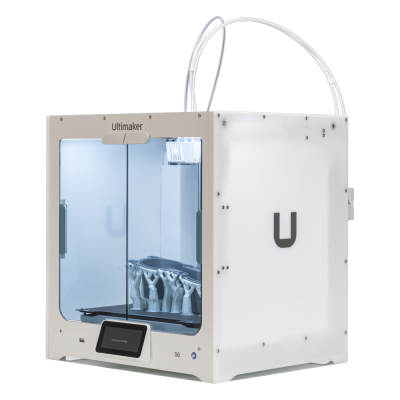
The S6 is UltiMaker's professional dual-extrusion desktop printer with swappable print cores, a flexible PEI plate and a partly enclosed chamber. It is for engineering teams, studios and schools that want a dependable, easy-to-run printer with a wide material range.
Funktioniert der 3D-Drucker Ultimaker S6 mit SimplyPrint, OctoPrint, Mainsail und Fluidd?
Jede Verbindungsmöglichkeit, Voraussetzungen und Einrichtung.
SimplyPrint Client
Noch nicht bestätigt, hilf uns, das herauszufinden
The SimplyPrint Client's UltiMaker integration covers the S3, S5 and S7 (local HTTP API). The S6 and S8 run a different firmware that UltiMaker says is not compatible with the S3/S5/S7's; whether its local API is the same is unconfirmed.
Quelle
UltiMaker S-line printers take jobs over the network or from a USB drive; no USB serial printing is documented (the S7's manual shows a host port only).
Quelle
Haftungsausschluss:
Wir bemühen uns, diese Informationen so aktuell und genau wie möglich zu halten, können aber keine Vollständigkeit oder Zuverlässigkeit garantieren. Unsere Daten basieren auf Nutzereinreichungen und Herstellerangaben.
Welches Filament kann Ultimaker S6 drucken?
Filamentkompatibilität für den Ultimaker S6: die von Ultimaker dafür angegebenen Materialien.
Filament
Eignung
Notizen
PLA
Großartig
Auf der Materialliste des Herstellers für diesen Drucker.
PETG
Großartig
Auf der Materialliste des Herstellers für diesen Drucker.
TPU und flexible Materialien
Großartig
Auf der Materialliste des Herstellers für diesen Drucker.
ABS & ASA
Großartig
Auf der Materialliste des Herstellers für diesen Drucker.
Nylon (PA)
Großartig
Auf der Materialliste des Herstellers für diesen Drucker.
Polycarbonate (PC)
Großartig
Auf der Materialliste des Herstellers für diesen Drucker.
Kohlefaser- und glasfasergefüllt
Mit Sorgfalt
Möglich mit einer gehärteten oder verschleißfesten Düse. Die abrasiven Fasern verschleißen eine Standard-Messingdüse schnell.
Tipp: Dies ist eine allgemeine Anleitung anhand der Druckerspezifikationen. Prüfe immer die empfohlenen Einstellungen deines Filaments. Mit SimplyPrint kannst du für jede Spule ein Profil speichern und genau verfolgen, welches Filament du auf Lager hast.
Wann du dich für den Ultimaker S6 entscheiden solltest
Choose the S6 when you want UltiMaker's ecosystem (Cura, Digital Factory, 301+ materials) at the lower end of the S series and can live with a partly enclosed chamber. The UltiMaker S8 is the step up if you want the fully enclosed build chamber and an integrated EPA filter; the S6 only has an optional Air Manager. We cannot yet connect it to SimplyPrint, so check that matters to you first.
Vorteile
Dual extrusion with swappable print cores, and 301+ compatible materials including optional composite and metal cores (UltiMaker).
Up to 500 mm/s travel speed and 50,000 mm/s2 acceleration from the Cheetah motion planner (UltiMaker).
Flexible PEI-coated steel plate that releases parts easily, with an optional glass plate (UltiMaker).
Works with the Material Station for longer unattended runs and the optional Air Manager with an EPA filter (UltiMaker).
12-month warranty and Wi-Fi, Ethernet and USB connections (UltiMaker).
Nachteile
No confirmed way to connect it to SimplyPrint: Klipper is not possible and OctoPrint is unlikely, and our SimplyPrint Client status is unknown.
Only partly enclosed and passively heated, so ABS and nylon are not as well served as on a fully enclosed printer; the filter is an optional extra.
Wi-Fi is 2.4 GHz only (UltiMaker).
No independent hands-on review found for the S6 itself; claims are UltiMaker's own.
Für wen geeignet
SchulenPasst gut
Easy to run and well supported with a warranty; the partly open chamber and the lack of a confirmed SimplyPrint connection are the drawbacks.
HobbyanwenderKann funktionieren
Capable, but priced for professionals and tied to UltiMaker's ecosystem.
UnternehmenPasst gut
Dual extrusion, many materials and a warranty suit prototyping and tooling work.
DruckfarmenKann funktionieren
The Material Station allows longer unattended runs, but we cannot yet connect it to SimplyPrint.
Basierend auf Herstellerangaben und unabhängigen Bewertungen.
Mehr vom Hersteller
Ähnliche Drucker wie Ultimaker S6, die mit SimplyPrint funktionieren
Drucker desselben Herstellers in ähnlicher Größe, die dieselben technischen Materialien drucken oder wie dieser Drucker mehrere Materialien verarbeiten, heute erhältlich sind und nachweislich mit SimplyPrint funktionieren.
Wer den Ultimaker S6 herstellt und wie offen Ultimaker ist: ob die Drucker ohne eigene Cloud funktionieren, beliebiges Filament und jeden Slicer akzeptieren und repariert werden können. Jeder Bereich wird anhand öffentlicher Quellen bewertet.
Offenheit: Gemischt (2.9 von 5)
Gemischt
Abgeschlossenes ÖkosystemÖffnen
UltiMaker is the company formed in 2022 when the Dutch printer maker Ultimaker, founded in 2011, merged with MakerBot. It sells professional desktop and industrial printers (the S series, Factor 4, MakerBot Method and Sketch) to businesses, engineering teams and schools, and develops the open-source Cura slicer and the Digital Factory cloud platform.
Gegründet:
2011 ·
Hauptsitz:
Zaltbommel, Netherlands, and New York, USA ·
Eigentümerschaft:
Privately held; at the 2022 merger NPM Capital held the majority and Stratasys a minority stake ·
Website:ultimaker.com
UltiMaker is mixed: Cura and material choice are open, and printers can be used on the local network, but the printer firmware is closed and most management features sit in its Digital Factory cloud.
Firmware und angepasste Firmware ●●●●●
The printers' own software is not published: UltiMaker's GitHub has its Linux kernel configuration and Cura, but no printer firmware. We found no documented way to run custom firmware on current S-series or Method printers.
[1][2]
Lokale Steuerung und Integrationen ●●●●●
Cura can add an S-series printer on the local network, by discovery or IP, without signing in, and start prints. UltiMaker says most features are only available through its Digital Factory cloud, and the API it documents publicly is that cloud API; we found no public documentation for controlling the printers locally.
[3][12]
Filament, Slicer und Teile von Drittanbietern ●●●●●
Cura is open source and widely used with other brands, and UltiMaker lists over 300 materials, including third-party ones, for the S series. Print cores and the Material Station are UltiMaker's own parts.
[2][4]
Reparaturen und Ersatzteile ●●●●●
UltiMaker publishes maintenance schedules for the S series and sells part bundles and maintenance kits, and gives an expected printer lifetime of five years at 1,500 printing hours a year.
[5]
Daten und Datenschutz ●●●●●
Local printing needs no account; Digital Factory needs one. UltiMaker's privacy policy says data is stored and processed in the EEA or the United States depending on the user's region.
[6][3]
Community und Dokumentation ●●●●●
Cura is developed in public on GitHub with a large open issue tracker, and UltiMaker runs a community forum and support knowledge base. Printer internals are not documented publicly.
[2][3]
Vorteile
Cura is open source and works with printers from many brands.
Wide material choice on the S series, including third-party materials.
Printers can be used on the local network without an account.
Published maintenance schedules and maintenance kits for long service life.
Nachteile
Printer firmware is closed.
Most fleet and management features need the Digital Factory cloud, with paid tiers.
MakerBot CloudPrint was shut down in 2025, forcing users to move platforms.
Print cores and the Material Station are UltiMaker-only parts.
Erfolgsbilanz
21. Mai 2026: UltiMaker launched the Factor 4 Plus, an industrial printer up to twice as fast as the Factor 4, with TRACE print validation for production and defence customers.
[7]
Februar 2026: UltiMaker sold the Thingiverse model platform to MyMiniFactory and archived its Thingiverse forum.
[8]
Dezember 2025: UltiMaker shut down MakerBot CloudPrint in early December 2025. Users had to reconnect printers to Digital Factory, with a free year of its premium tier offered to former CloudPrint users; the Replicator+ cannot be networked in Digital Factory.
[9]
Mai 2022: Ultimaker and Stratasys' MakerBot announced a merger backed by $62.4 million from NPM Capital and Stratasys, with co-CEOs from both companies and headquarters in the Netherlands and New York. The combined company took the UltiMaker name.
[10][11]
Recherchiert anhand von 12 Quellen, zuletzt geprüft am 18. Oktober 2026. Quellen anzeigen
Wie Ultimaker im Vergleich zu allen anderen Marken abschneidet und welche Drucker wir kaufen würden: die besten 3D-Drucker 2026.
Häufig gestellte Fragen
Ist Ultimaker S6 mit SimplyPrint kompatibel?
Wir wissen es noch nicht. SimplyPrint funktioniert mit über 130 Marken und über 600 Modellen über OctoPrint, Klipper und integrierte Schnittstellen. Wenn du einen Ultimaker S6 hast, zeigt dir unsere Kompatibilitätsprüfung mit wenigen Fragen, wie er verbunden werden könnte.
Welchen Slicer sollte ich für den Ultimaker S6 verwenden?
Nutze Cura, den eigenen Slicer von Ultimaker für dessen Drucker. Du kannst ihn im Online-Slicer von SimplyPrint nutzen, dort gibt es aber noch kein fertiges Profil für den Ultimaker S6.
Welches Filament kann Ultimaker S6 drucken?
Ultimaker führt PLA, PETG, ABS & ASA, Nylon (PA), Polycarbonate (PC) und TPU und flexible Materialien für S6 auf.
Wie groß sind Druckbett und Bauraum von Ultimaker S6?
Der Ultimaker S6 hat ein Druckbett von 330 x 240 mm und druckt bis zu 300 mm hoch, mit einem Bauvolumen von etwa 330 x 240 x 300 mm. Die vollständige Tabelle oben enthält Bettart, Temperaturen und mehr.
Wann erschien Ultimaker S6?
Ultimaker brachte S6 im Juni 2025 auf den Markt.
Wo kann ich den Ultimaker S6 kaufen?
Über den eigenen Shop von Ultimaker, der Shops für die USA hat. Die Links auf dieser Seite führen zu diesen Shops. Einige sind Affiliate-Links, daher erhalten wir möglicherweise eine Provision, ohne Mehrkosten für dich.
 Niederlande


 PrusaSlicer
 OrcaSlicer
 BambuStudio
 ElegooSlicer
 CrealityPrint
 Kiri:Moto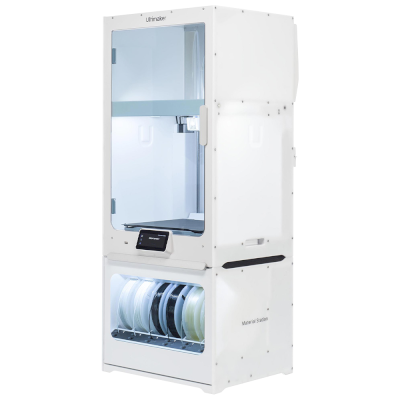


 Am besten für USA: Shop von Ultimaker für die USA