Sahip olduğunuz tüm yazıcılar için tek makara yöneticisi
Evinizde tek yazıcı kullanıyor veya 200 yazıcılı bir baskı çiftliği işletiyor olsanız da filament yöneticisi, elinizde hangi filamentlerin bulunduğunu, nerede olduklarını, maliyetlerini ve ne kadar kaldığını canlı ve doğru biçimde gösterir. Bambu Lab, Creality, Prusa ve SimplyPrint'in desteklediği diğer tüm markalarla çalışır; baskı kuyruğunuz, istatistikleriniz ve slicer ayarlarınızla entegre olur.
Kendiliğinden çalışan filament takibi
SimplyPrint'i elektronik tablodan veya basit bir makara takipçisinden ayıran şey şudur: kullanım otomatik düşülür. SimplyPrint üzerinden baskı başlattığınızda, işin ne kadar filament kullandığını belirlemek için G-code'u analiz eder, makaranın çapı ve malzeme yoğunluğuna göre bunu grama çevirir ve baskı bittiğinde atanan makaradan düşeriz. Baskıyı yarıda iptal ederseniz veya baskı yarıda başarısız olursa yaklaşık yarısını düşeriz. Hiçbir sayıyla uğraşmazsınız.
Bağlı her yazıcı için arka planda gerçekleşir; gerçek iş yükü çalıştıranların geçtikleri gün Excel'i bırakmasının nedeni budur.
Otomatik takibi iş başında incele
Bir baskı çalışırken makaranın kalan ağırlığının kendiliğinden azalmasını izleyin. Teraziye veya veri girişine gerek yoktur.
SimplyPrint ile bir baskı başlatın ve atanan makaranın ağırlığının kendiliğinden azaldığını izleyin. G-code'u okur, gram miktarını hesaplar ve makaradan düşeriz. Terazi yok, elektronik tablo yok, elle giriş yok.
 Şimdi yazdırılıyor
- benchy.gcode -12 g 2 saat önce
- cable-clips-x8.3mf -31 g dün
İnteraktif demoda filament yöneticisini keşfedin.
Gerçek makara envanterini kendiniz inceleyin, hesap gerekmez.
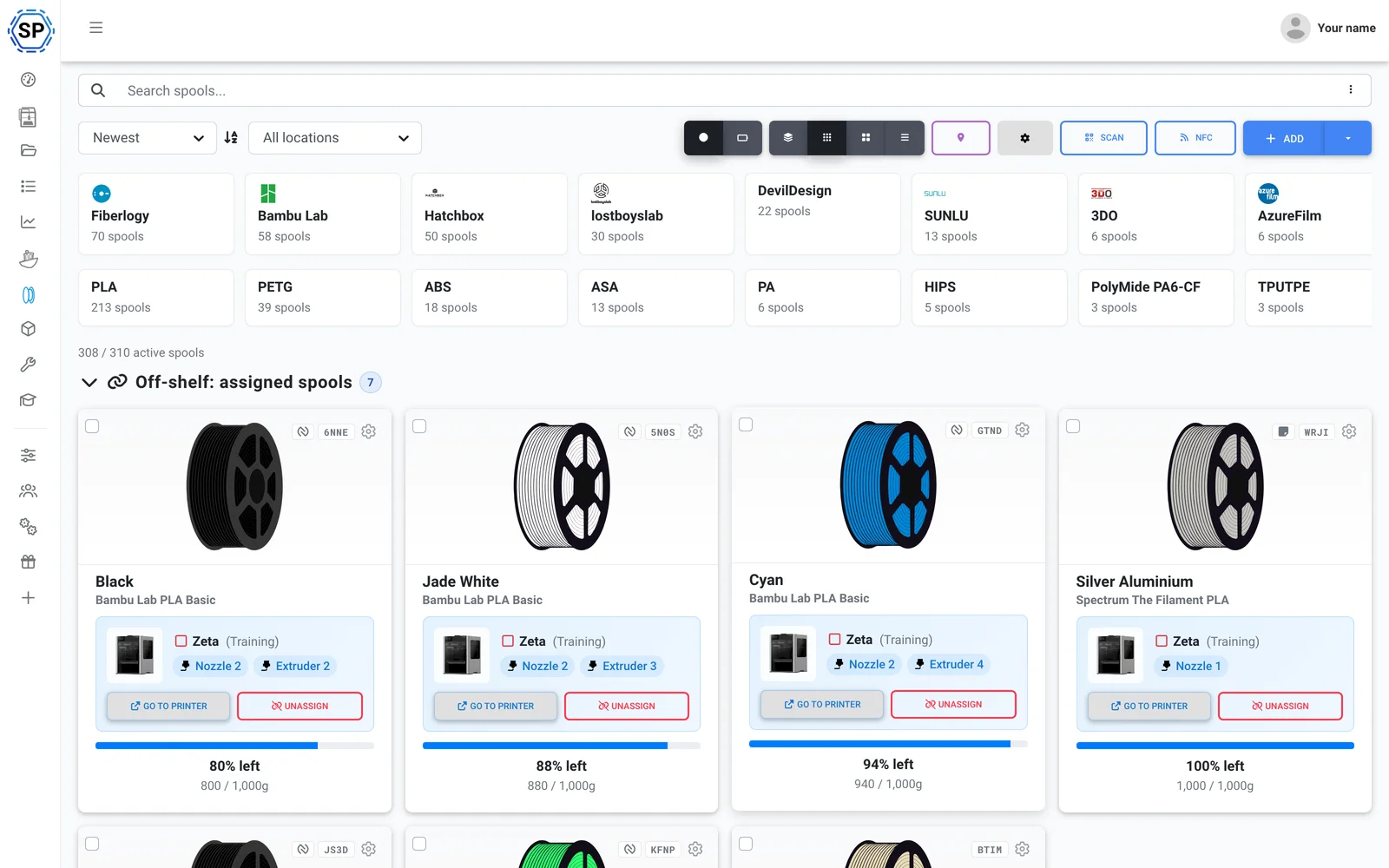
Her makara istediğiniz gibi düzenlenir
Her makara; renk, marka, malzeme, çap, maliyet, satın alma tarihi ve kalan ağırlık içeren ayrı bir kayıttır. Envanterinizi düşünme biçiminize göre görüntüleyin ve makaraları kapasite sınırları olan iç içe konumlarda saklayın.
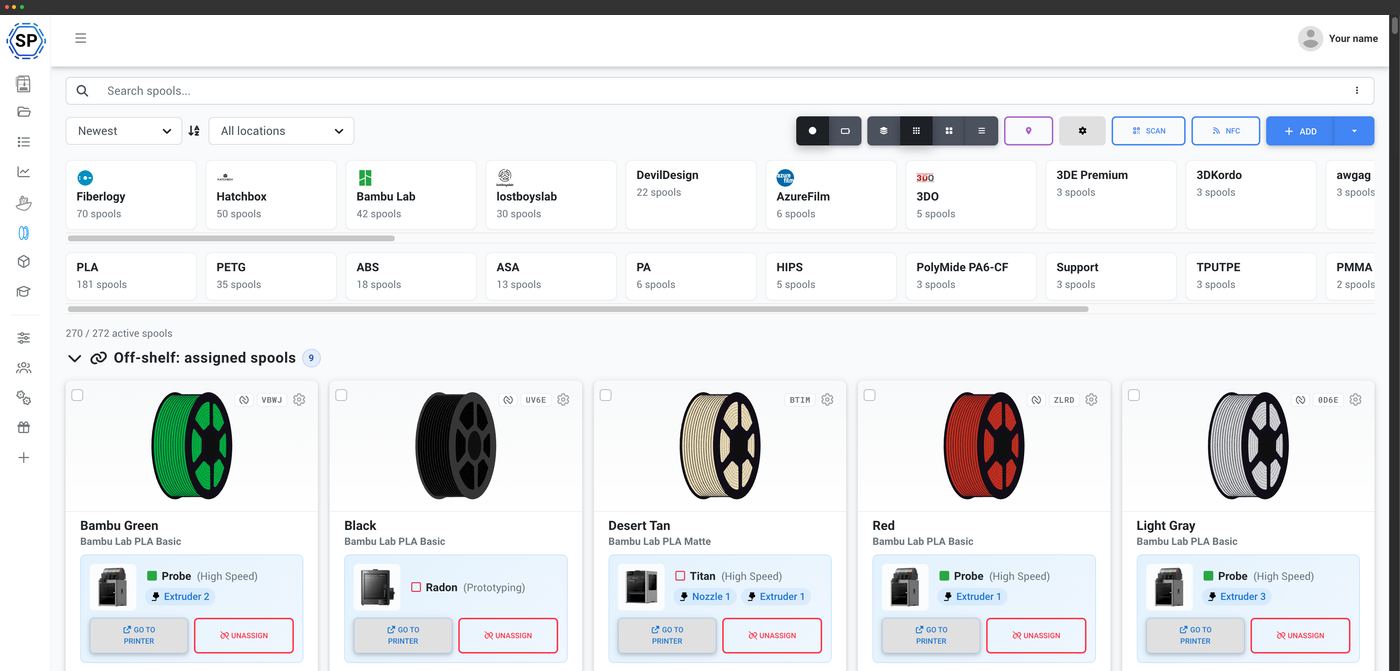
Renk örnekleri ve kalan ağırlığı tek bakışta gösteren görsel kartlar.
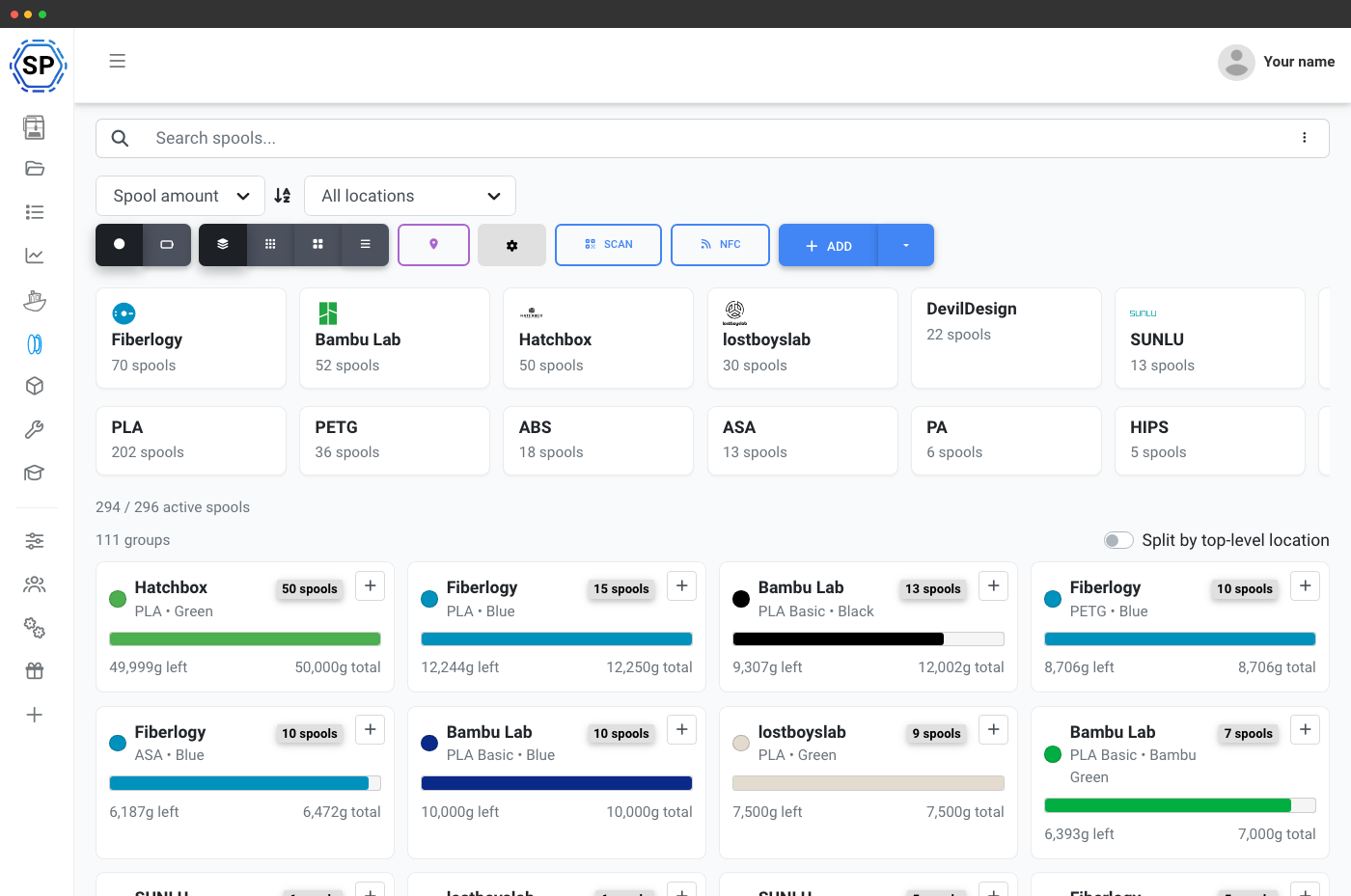
Makaraları marka ve malzemeye göre gruplayın, böylece yinelenenler bir arada olur.
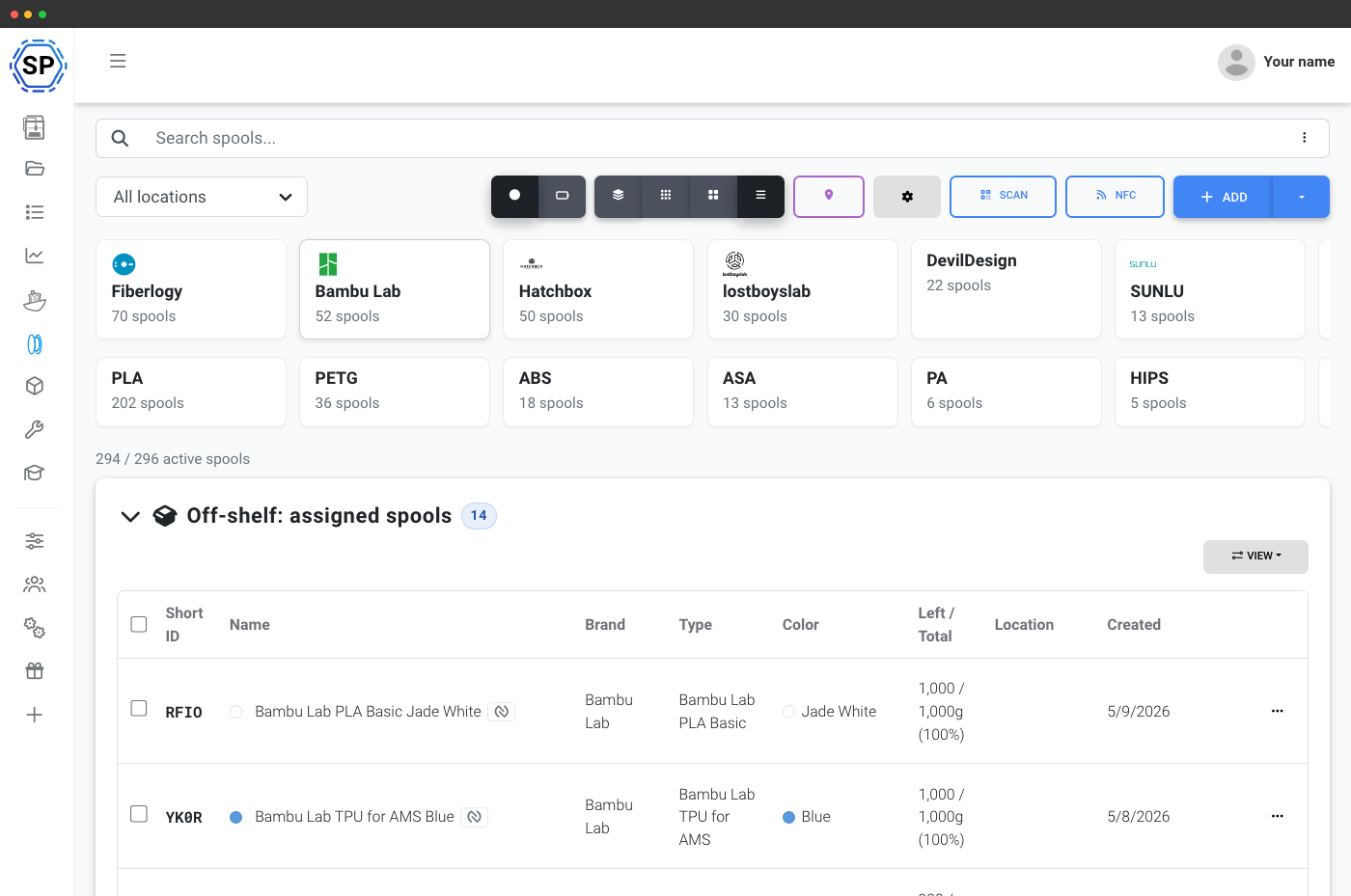
Büyük envanteri taramak için sıralanabilir sütunlarda tüm alanlar.
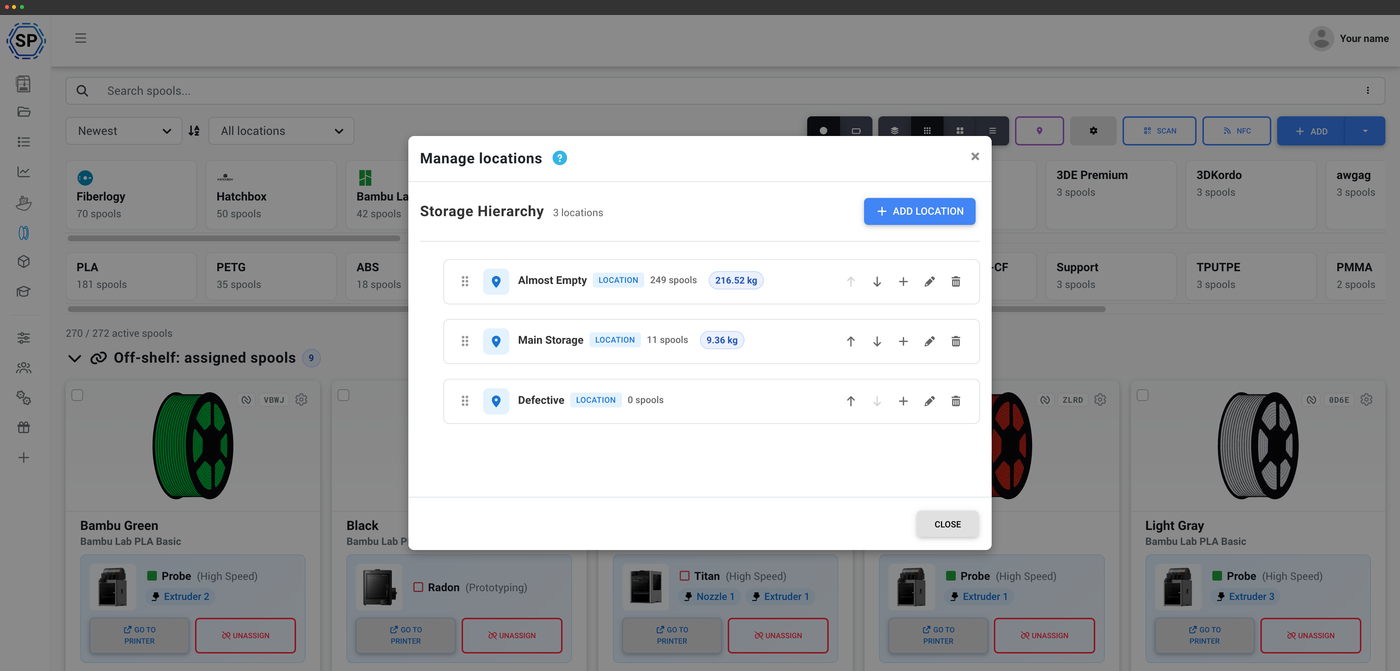
Konum başına makara sayılarıyla iç içe odalar, raflar ve çekmeceler.
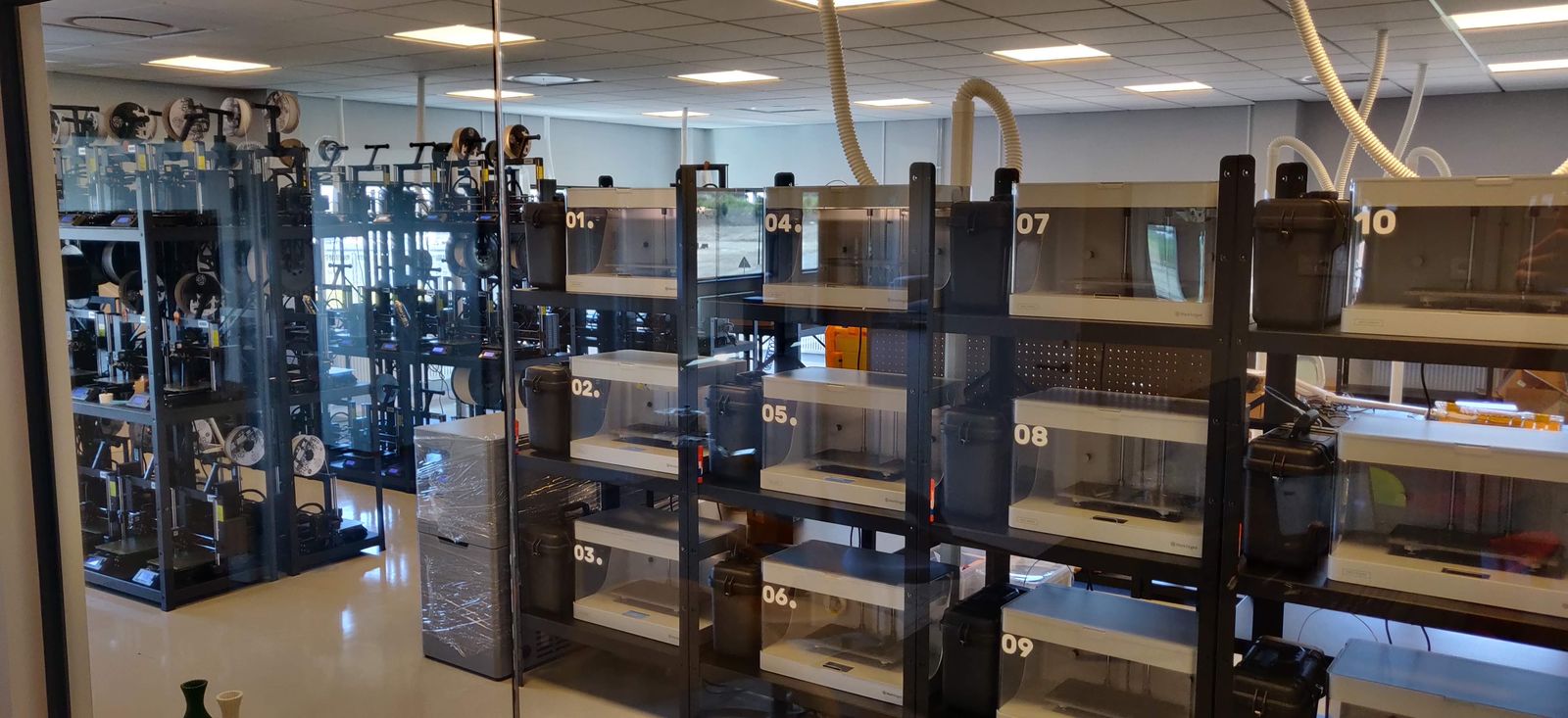
lostboyslab, ~100 printers across 3 farms (Prusa, Markforged, Voron, Modix) filosunu yönetmek için Filament yönetimi özelliğini nasıl kullanıyor, görün
The Filament Manager is the backbone of how we work. With an NFC tag on each spool, we track the exact material on each print - and because of our own system, we know where that spool came from.
Yazıcınızın tanıdığı NFC etiketleri
Her standartta okumak için dokunun, yazmak için dokunun
Bir makaranın verilerini NFC etiketine kodlayın; yazıcınız etiket takıldığı anda neyin yüklü olduğunu tam olarak bilsin. SimplyPrint, büyük açık standartları yan yana okuyup yazar: Creality CFS, Prusa OpenPrintTag, OpenSpool ve OpenTag. Ayrıca telefonunuzdan, tarayıcınızdan veya masaüstü USB okuyucunuzdan Bambu Lab AMS etiketlerini okur. Tek markanın ekosistemine bağlı kalmazsınız.
NFC filament takibini keşfedin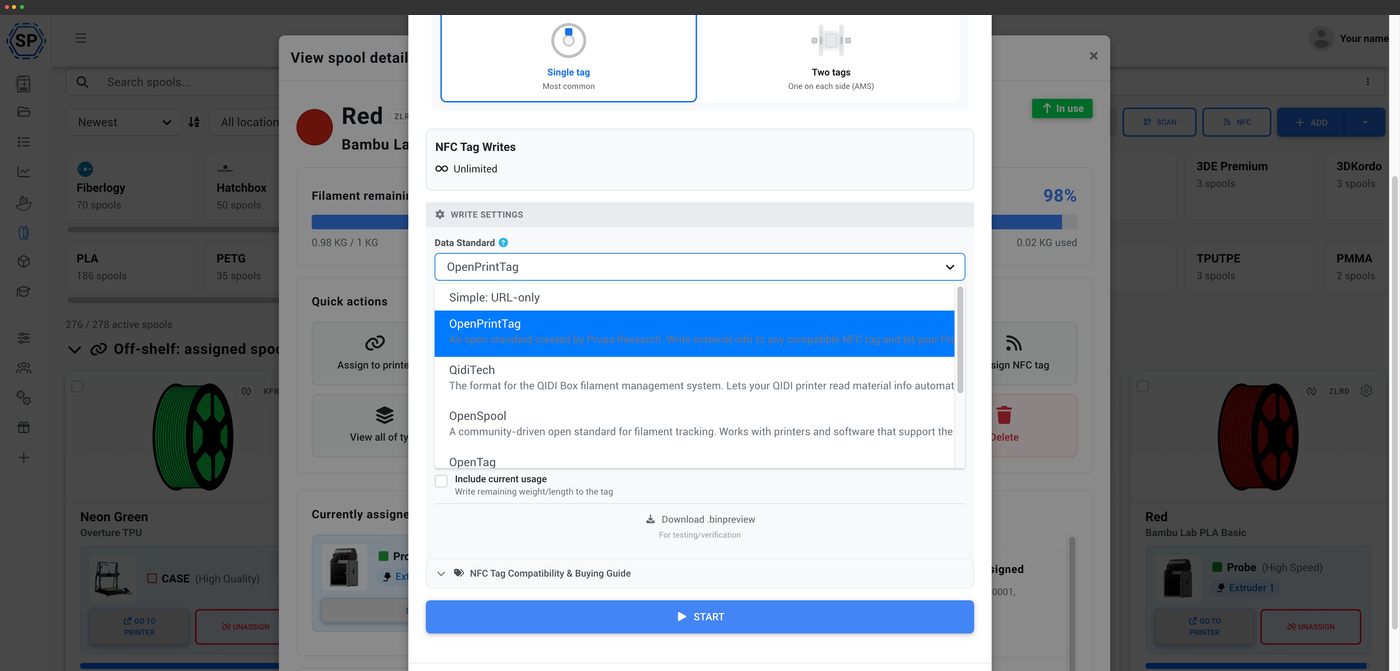
Makaraya dokunun, anında okuyun
Etiketli makarayı telefonunuza veya okuyucuya yaklaştırın; ayrıntıları yaklaşık bir saniyede yüklensin.
Tek filament takip sistemi, tüm NFC standartları
Yazıcınızın ekosistemini seçin veya farklılarını birlikte kullanın. Her standart aynı filament yöneticisinden okur ve yazar.
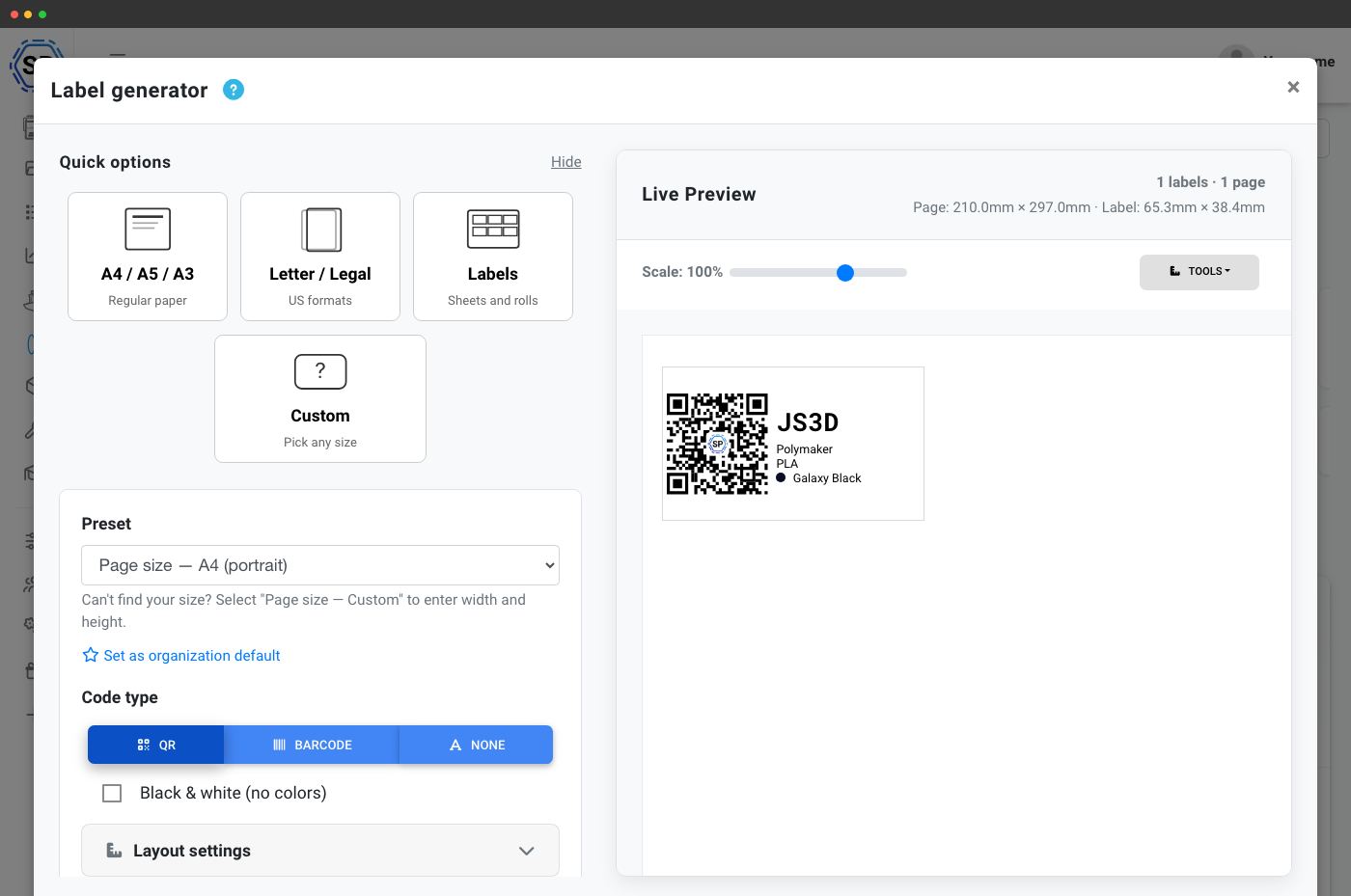
Etiketleri yazdırın, makaraları tarayın
Anında arama için QR kodlar ve barkodlar
Her makara için QR kodu veya barkod etiketi oluşturun ve normal bir yazıcıda ya da Dymo veya Zebra gibi termal etiket yazıcılarında yazdırın. Makarayı anında görüntülemek için etiketi telefon kameranızla, web kamerasıyla veya USB barkod tarayıcıyla tarayın. Bu yöntem, doğru makarayı raftan almak veya kalan ağırlığı saniyeler içinde kontrol etmek için idealdir.
Etiket oluşturma ve taramaEtiketi tarayın, makarayı bulun
Her makara için QR kodu veya barkod yazdırın, ardından envanterinizdeki filamenti açmak için telefon kameranız, web kamerası veya USB barkod tarayıcıyla tarayın.
- Renk
- Galaksi siyahı
- Konum
- Raf B · Kutu 12
- Makara kimliği
- RX-7K2
Open Filament Database tarafından desteklenir
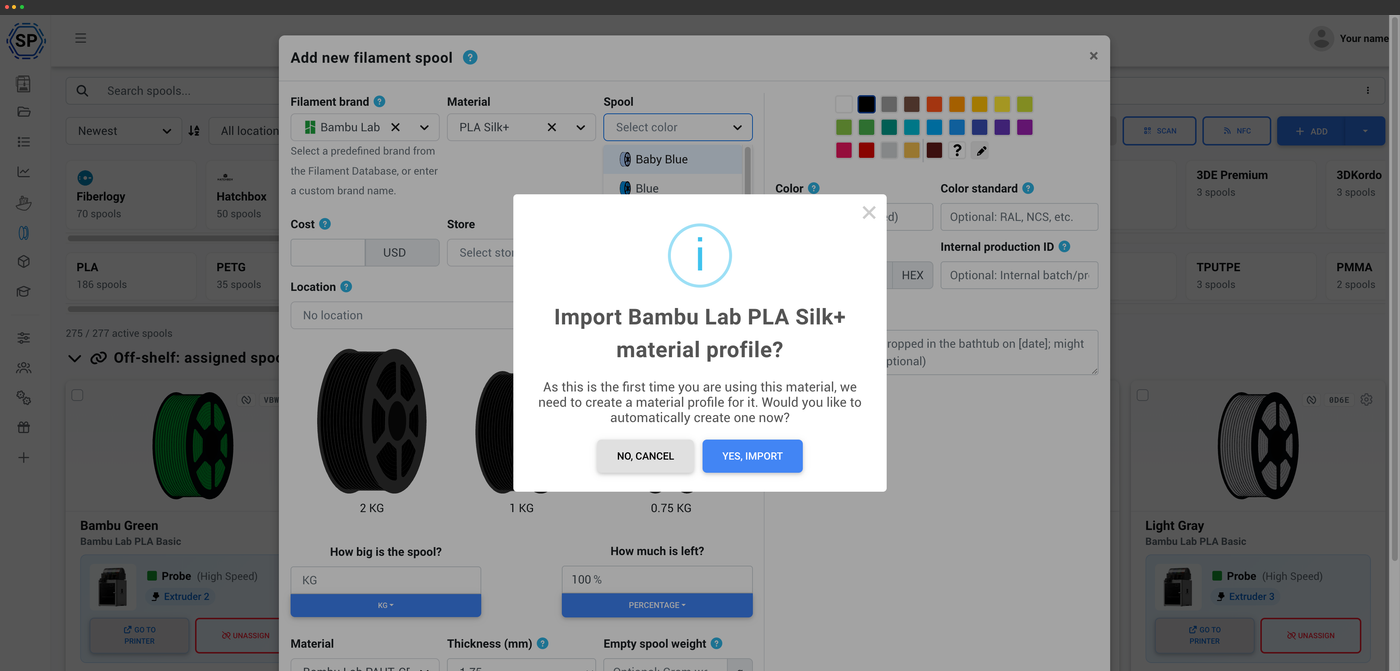
182 marka, 2,188 filament, 15,323 çeşit ve büyümeye devam ediyor
Makara eklediğinizde, SimplyPrint'in yönettiği, açık kaynaklı ve topluluk tarafından sürdürülen filament kataloğu Open Filament Database'de arama yaparsınız. Markanızı ve malzemenizi seçin, sıcaklıklar, yoğunluk ve makara ağırlıkları sizin için doldurulur. Bunlar, makaralarınızı slicer profillerine bağlayan verilerin aynısıdır. Ücretsizdir, MIT lisanslıdır ve herkes kod yazmadan dakikalar içinde katkıda bulunabilir.
Open Filament Database hakkındaFilamenti telefonunuzdan yönetin
NFC ve tarama destekli iOS ve Android
SimplyPrint uygulaması tüm envanterinizi cebinize taşır. NFC etiketlerini okuyup yazın, QR kodlarını ve barkodları tarayın, ağırlıkları ayarlayın, makaraları konumlar arasında taşıyın. Hepsini filamentinizi sakladığınız yerde yapın. Android tüm NFC standartlarını, iOS açık NDEF standartlarını destekler.
Mobil uygulamada filament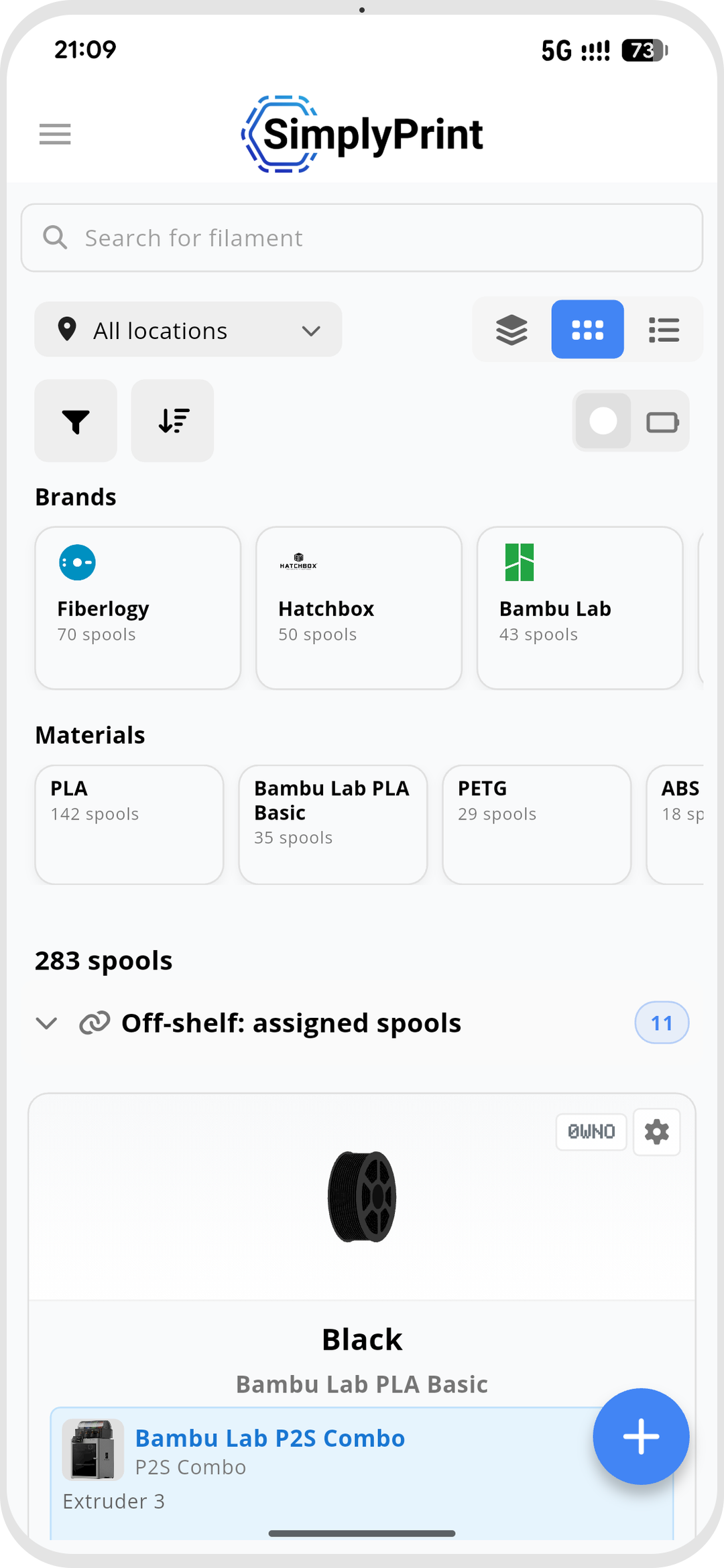
Kurulumu ücretsiz, her SimplyPrint planına dâhil.


iPhone, iPad ve Android telefonlar ve tabletlerde çalışır.
Filament yöneticisindeki her şeyi keşfedin
Filament yöneticisinin her bölümünün kendi ayrıntılı açıklaması vardır.
Otomatik takip
Filament kullanımı otomatik düşülür, terazi gerekmez
NFC filament etiketleri
Her standartta NFC etiketlerini oku ve yaz
Etiketler ve tarama
QR ve barkod etiketleri yazdırın, makarayı bulmak için tarayın
Mobil uygulama
Filamenti, NFC'yi ve taramayı telefonunuzdan yönetin
Plan erişimi: neler dâhildir?
Filament yöneticisinin kendisi, Free dahil her SimplyPrint planında bulunur: otomatik kullanım takibi, makara kayıtları ve Open Filament Database her zaman ücretsizdir. Üst planlar daha zengin görünümler, tarama, etiket yazdırma, konumlar ve daha yüksek aylık NFC yazma kotasını açar.
| Özellik / sınır | Ücretsiz | Basic | Pro | Baskı çiftliği | Kurumsal | Okul | Bulut slicer | Filament yöneticisi |
|---|---|---|---|---|---|---|---|---|
|
Filament yöneticisi
Makara kayıtları ve otomatik kullanım düşümü, Free dahil tüm planlarda.
|
||||||||
|
Aylık NFC etiketi yazma sayısı
Her ay makaralara yazabileceğiniz NFC etiketi sayısı.
|
10 | 30 | 100 | 10 | ||||
|
Barkod ve QR taraması
Bir makarayı görüntülemek için telefon, web kamerası veya USB barkod okuyucuyla etiketleri tarayın.
|
||||||||
|
Etiket oluşturucu: QR özelleştirme
Makaralarınız için oluşturduğunuz QR kod etiketlerini özelleştirin.
|
||||||||
|
Etiket oluşturucu: termal yazıcı desteği
Dymo ve Zebra gibi termal etiket yazıcılarına doğrudan yazdırın.
|
||||||||
|
Kompakt görünüm
Büyük envanterler için daha yoğun bir makara listesi.
|
||||||||
|
Tablo görünümü
Her makaranın ve alanlarının tam tablo görünümü.
|
||||||||
|
Gruplu görünüm
Makaraları marka ve renge göre, toplam kalan ağırlıklarıyla gruplandırın.
|
||||||||
|
Makara ağırlığını ayarla
Makaradaki kalan ağırlığı istediğiniz zaman manuel olarak düzeltin.
|
||||||||
|
Filamenti kurutulmuş olarak işaretle
Her makaranın en son ne zaman kurutulduğunu takip edin.
|
||||||||
|
Hızlı ekle
En sık kullandığınız marka ve malzeme ön ayarlarından tek tıkla ekleme.
|
||||||||
|
Gelişmiş arama ve filtreleme
Envanterinizi marka, malzeme, renk, konum ve diğer özelliklere göre filtreleyin.
|
||||||||
|
Depolama konumları
Kapasite sınırları olan iç içe konumlar (oda, raf, çekmece).
|
||||||||
|
Özel alanlar
Her makara kaydına kendi alanlarınızı ekleyin.
|
Planlarımız hakkında daha fazla bilgi ister misiniz?
Tam fiyat ve özellik karşılaştırmasını görüntüle