

Hey SimplyPrint'ers - specifically teachers and org-staff of SimplyPrint! 👋
We ship a lot of new features and updates, and if we're honest, we don't always do a great job of telling our schools about the parts built specifically for them. So this one is for the teachers, lab managers, librarians, and district IT folks running SimplyPrint in education. We've quietly shipped a whole stack of things for you over the last few months, and here it is, all in one place.
If you run a print farm or print at home, you can safely skip this one (though you may find some of the new organisation-management features we've added cool too!)
Quick version
If you only have a minute:
- ✨ New OpenID Connect SSO alongside our existing SAML (which also gains a test-login button and more mapping options), so students and staff sign in with the accounts they already have.
- ✨ District-wide SSO, new for both SAML and OIDC, share one setup across every school in your district.
- ✨ Automatic user provisioning with SCIM, plus CSV import and bulk tools to set up and clean up classes in minutes.
- ✨ Stronger access control, restrict by IP range and approved devices, and choose exactly what each person can do.
- ✨ The same access controls now work on the Hub, not just the panel.
- ✨ Semester quotas, set printing limits that follow your school year.
- ✨ Academy assignments and reporting, assign courses and see how each student is doing.
- ✨ Custom colour palettes, define your own colours and lock them down for the classroom.
- ✨ A lot more printers now work in your lab, all Duet3D-powered printers, Ultimaker 3, S3, S5 and S7, the Elegoo Centauri Carbon, and official Creality CFS and Anycubic ACE support, out now.
Read on for the details.
SSO: OIDC now live + improved SAML: Sign in with the accounts you already have
Managing a separate password for every student is nobody's idea of a good time, so single sign-on just got better.
We've had SAML SSO for a long time, and it's better now, with a test-login button so you can verify your setup in one click, plus more attribute-mapping options. The big new addition is OpenID Connect (OIDC), with ready-made presets for Microsoft Entra, Google, Okta, Keycloak and Authentik. Users are routed to the right login automatically by their email domain, so students and staff just sign in with the accounts they already have.
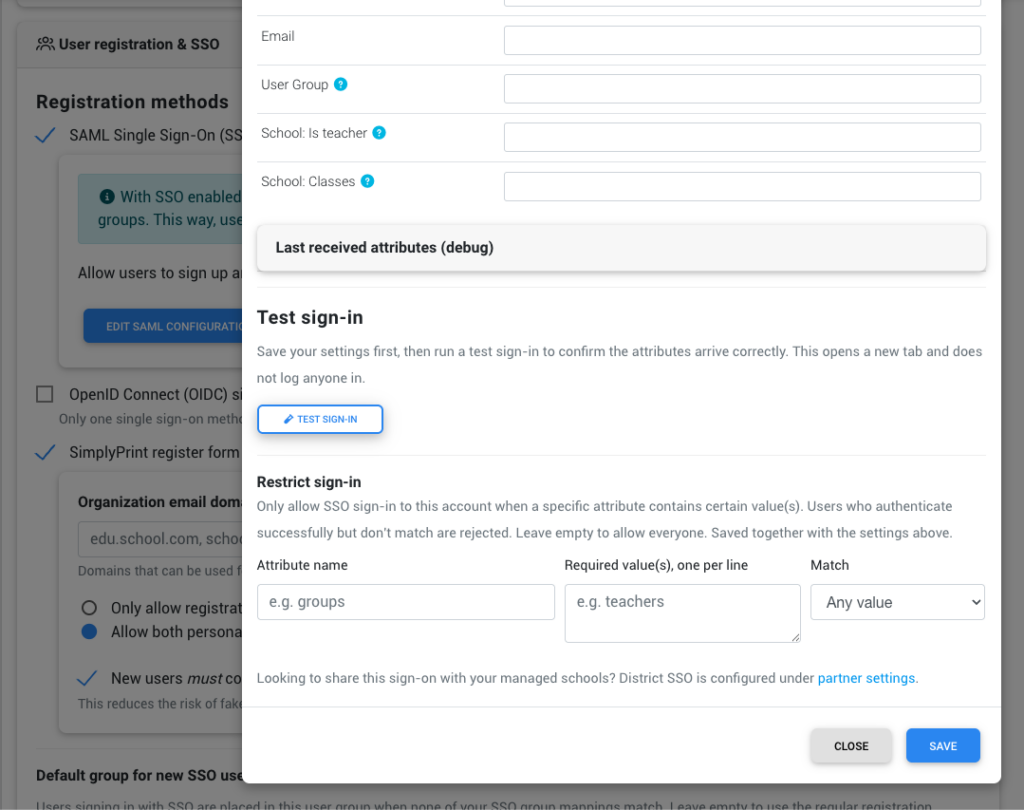
And if you're a district running many schools, you no longer set this up school by school. District-wide SSO is new for both SAML and OIDC: configure it once at the district level and share it across every school you manage. One setup, every classroom covered.
Read the single sign-on guide →
New User Import + SCIM and User Cleanup: Getting students in (and out) without the busywork
Setting up a new class shouldn't take an afternoon. A few ways it's faster now:
- SCIM provisioning. If your identity provider supports it, users are created, updated, and deactivated in SimplyPrint automatically as you manage them upstream. New student joins the group, they appear. They leave, they're removed. No manual sync.
- CSV import. Got a class list in a spreadsheet? Import it directly, assigning a class and a role as you go, with a preview before anything is committed.
- Bulk actions and better filters. The users page now lets you filter and select users far more precisely, and act on many at once, which makes end-of-term cleanup a single pass instead of a tedious one-by-one.
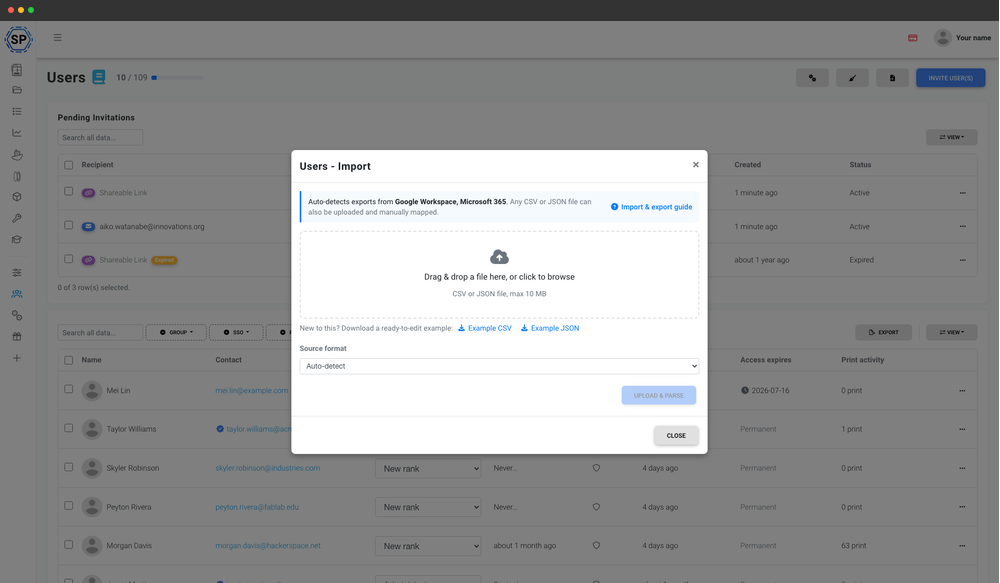
Thanks to everyone who asked for this!
Clean up users: End-of-term cleanup in one pass
When a class graduates or a year wraps up, you don't want to remove students one at a time. The new Clean up users tool finds the accounts worth removing and clears them in a single pass. Filter by last activity (say, inactive for 12+ months), include people who never logged in, limit it to users with zero prints, and scope it to specific user groups or how they were added. You get a preview of the matching users before anything happens.
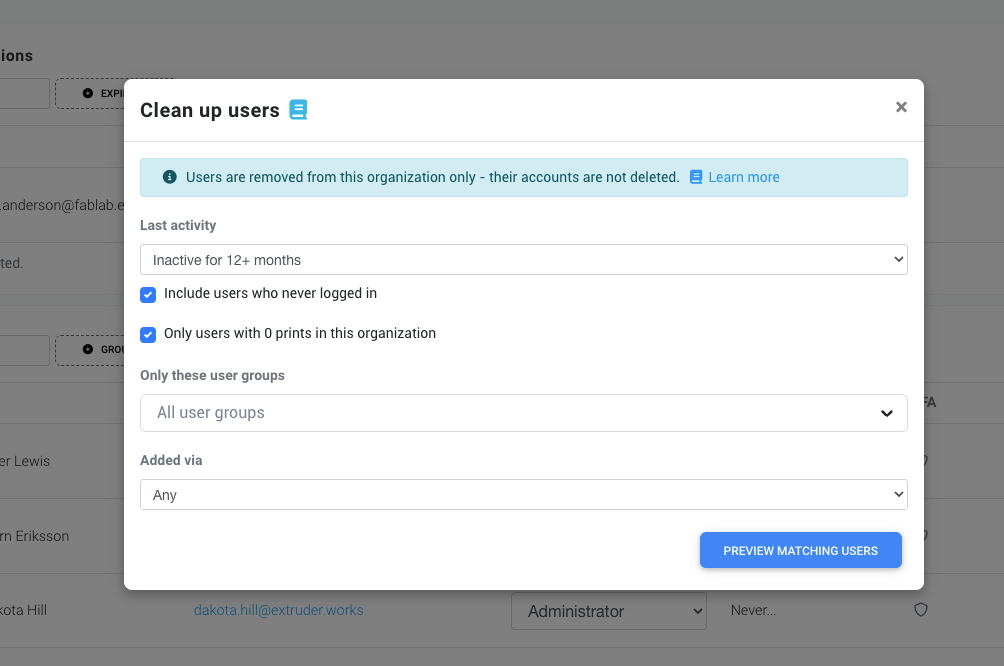
And the reassurance that matters: this removes users from your organization only, it does not delete their SimplyPrint accounts.
More access control: Control who can do what, and from where
Schools have asked us, repeatedly, for finer control over what students can do and from which machines. This is a big one.
You can now restrict access by IP range (so SimplyPrint only works from the school network) and by approved devices (so only the computers you've vetted can connect). On top of that, you choose exactly what each person is allowed to do:
- whether they can see the printer page
- whether they can start prints
- whether they can run printer actions
- whether they can view the camera
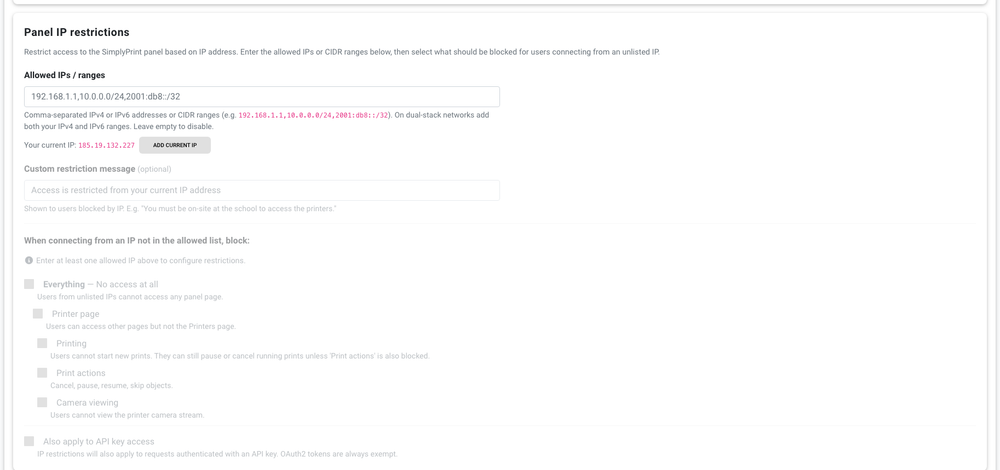
The approved-device system has been rebuilt to be more secure than the old one, and it's backwards compatible, so nothing you've already set up breaks.
Best part: these same controls now work on the Hub, not just the main panel. Before, the Hub only understood individual IPs. Now you get full IP ranges and the same approved-device protection there too, which is exactly what you want for a shared classroom kiosk.
See how to set up kiosk mode for a lab, library or makerspace →
Quotas that follow your school year
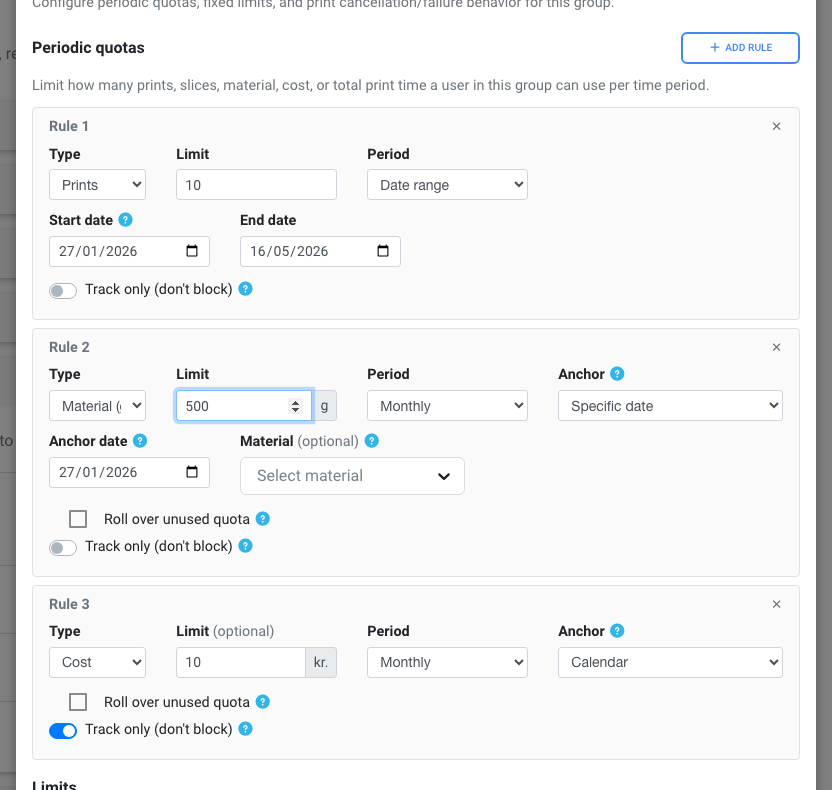
Printing limits only make sense if they line up with how a school actually runs. So quotas v2 adds a few things teachers have been asking for:
- Semester periods. Set a quota that resets per semester, matching the terms you've defined for your school.
- Rolling and fixed-date periods. Limit printing over a rolling window, or anchor it to a specific date.
- Track-only quotas. Want to see usage without blocking anyone? Track it without enforcing a hard cap.
Academy can now assign and report
If you use Academy to teach safe 3D printing before students touch a printer, it does more now. You can assign courses to students or classes, and then actually see how they're doing: how far each student got, where they answered incorrectly, and attendance. It turns Academy from "here's some training" into something you can run and grade like real coursework.
Custom colour palettes
This one started as a school request and turned into a feature everybody gets.
Under Settings, in the tagging section, you can now choose where the filament colour picker gets its colours:
- Standard palette, the standard colours plus your custom and brand colours.
- Custom palette only, hide the standard colours and offer only the ones you define.
- Filament inventory, only show the colours of spools you actually have, across all brands.
- Loaded filament only, only the colours of spools currently loaded in a printer.
- Loaded colour tags only, the strictest option, for when you tag colours on a printer instead of tracking individual spools.
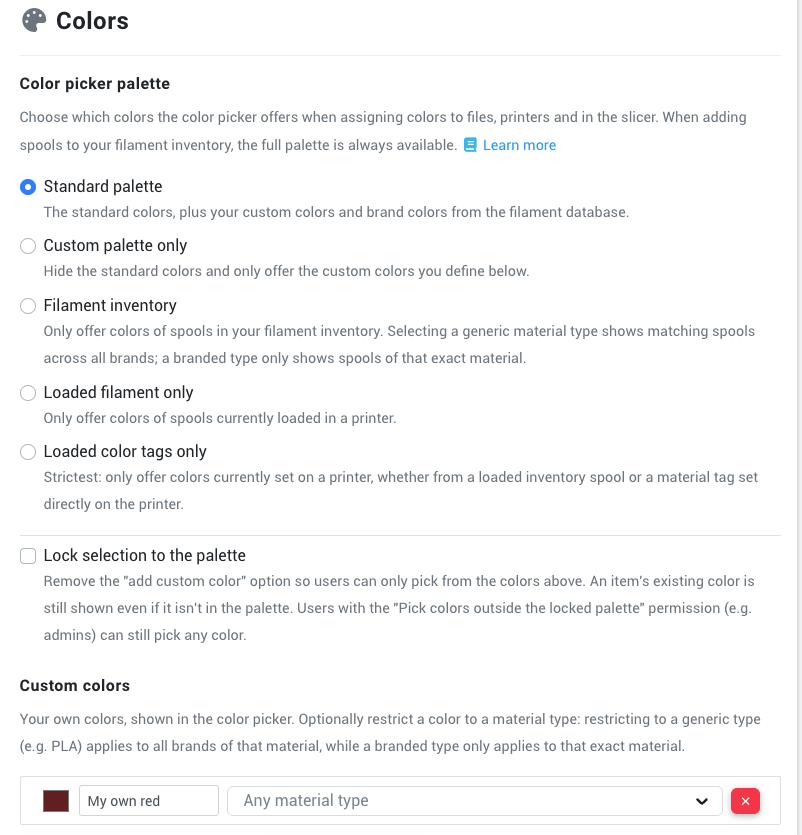
And the part schools specifically asked for: you can lock the palette so students can only pick from the colours above, not add their own. Great for keeping a classroom consistent.
Duet, Ultimaker, Elegoo Centauri, Creality CFS and Anycubic ACE, out now
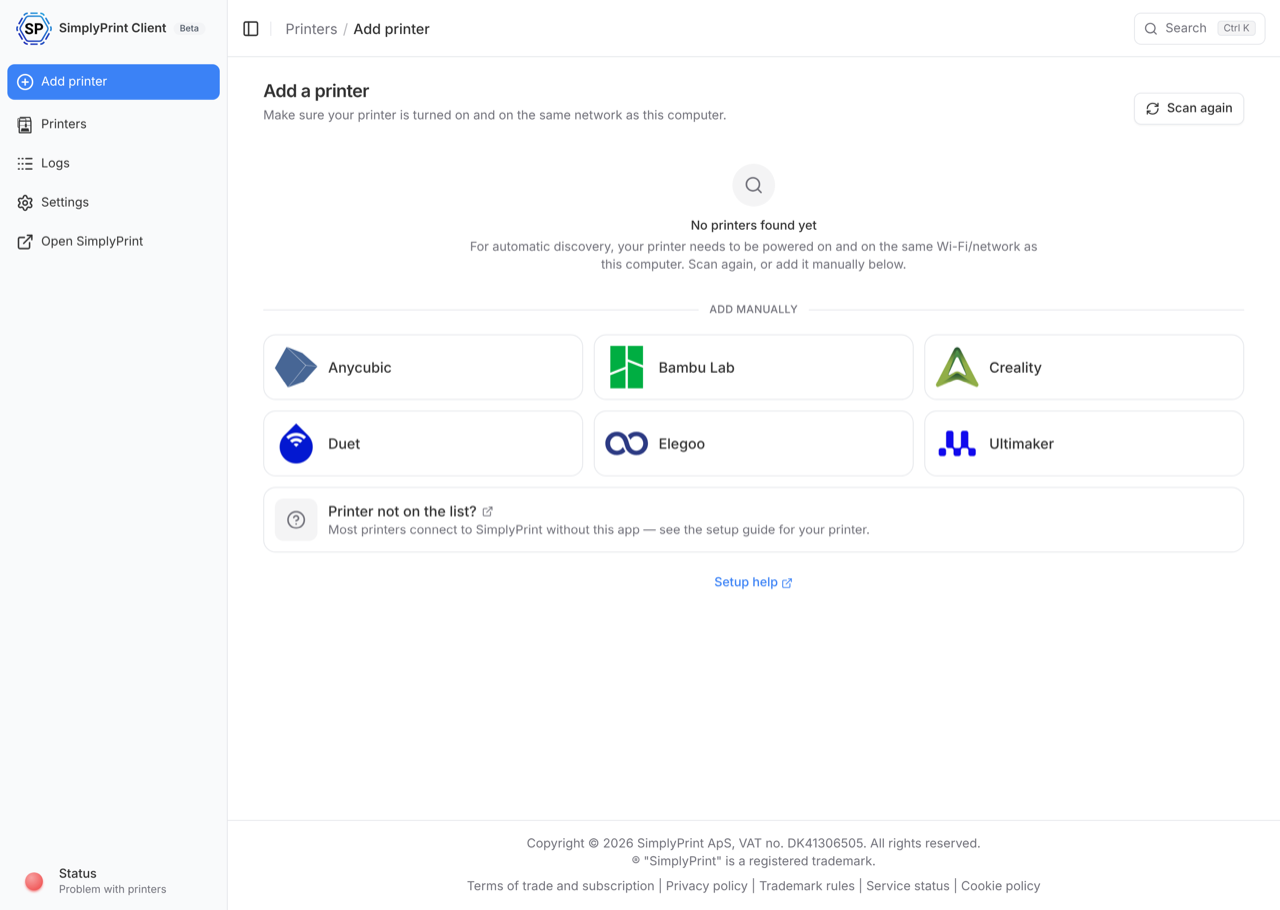
This is a big one for labs. We just released the new SimplyPrint client, and it brings a wave of new printer support that's out now:
- ✨ All Duet3D-powered printers (RepRapFirmware boards), everything that used to be marked "coming soon"
- ✨ Ultimaker 3, S3, S5 and S7
- ✨ The Elegoo Centauri Carbon range
- ✨ Official Creality CFS support
- ✨ Official Anycubic ACE support
If a printer you wanted to use in your classroom or lab wasn't supported before, there's a very good chance it is today.
All these newly supported printers and methods can be set up via our new SimplyPrint Client. You can install and learn more here: https://simplyprint.io/setup-guide/methods/simplyprint-client
Say hi to Drew
One more thing. For most of our life, SimplyPrint has been a team of developers. We love building, but it has meant the people answering your questions were usually the same people writing the code - often for better, and that will still be the case for all-things technical, but, we may not have been the first to reach out and ask "Hey! How's it going in your lab?".
That's changing. Drew has joined the team to look after the customer side of things and make sure everything runs smoothly for you, your school, and your district. If you have a question, run into something, or just want to talk through your setup, he would genuinely love to hear from you.
Say hi any time at [email protected].
Changelog
For the full list of everything we've shipped, check out our public changelog:
There's a lot more coming for education specifically, and we'd love to hear what would make the biggest difference for your school. Hop into our Discord and tell us.
- Albert @ SimplyPrint