

Hey SimplyPrint'ers! 👋
It's been a minute since our last blog post, and for good reason - we've been heads-down building. Since November, we've shipped over 20 updates packed with new features, improvements, and fixes. You can always browse the full changelog here, but let's talk about the highlights.
Filament manager v2
The biggest release of this period is the completely rebuilt Filament Manager. This isn't just an update - it's a ground-up redesign of how you track, organize, and manage your filament inventory.
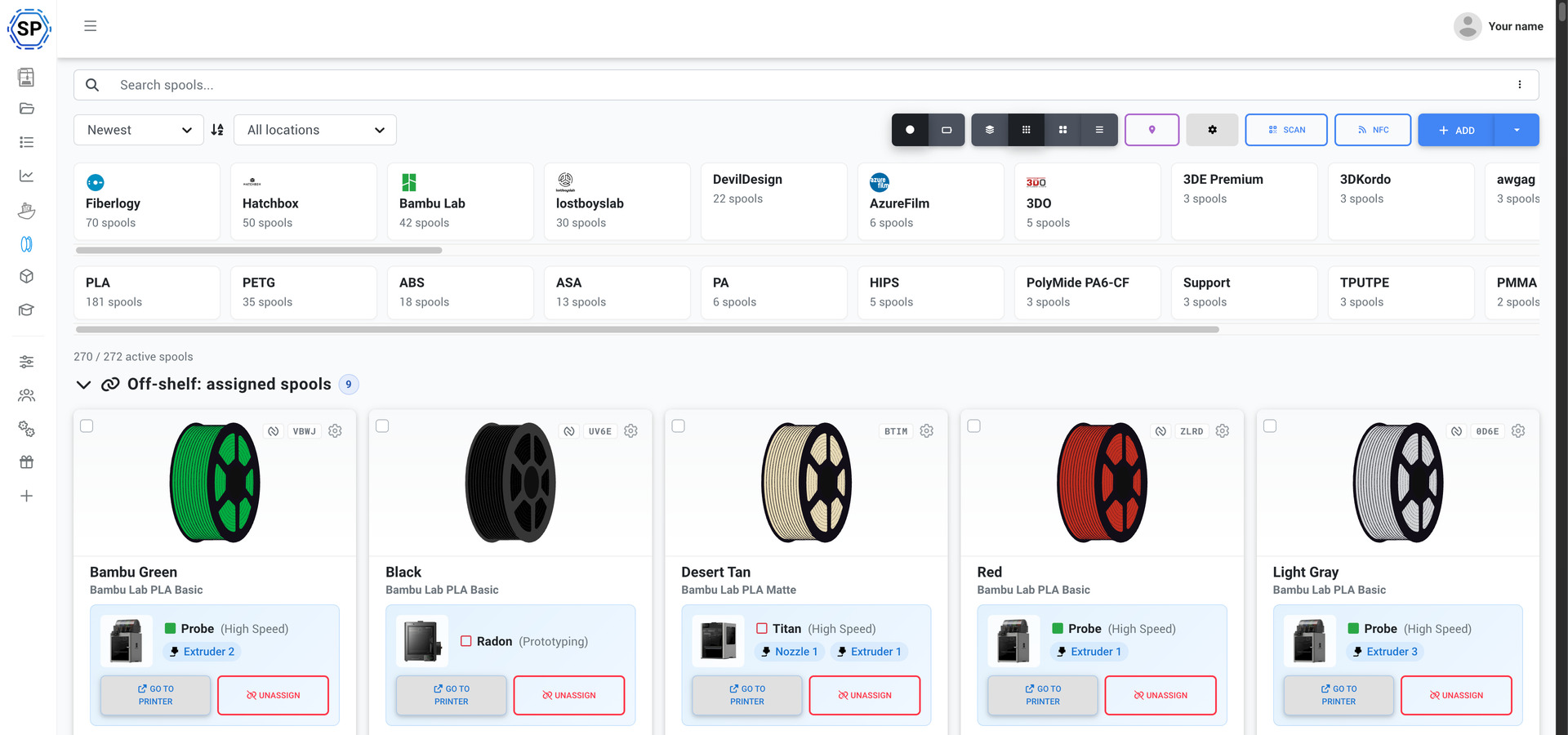
Here's what's new:
- ✨ Three view modes - Grid, compact, and table views so you can browse your inventory the way you prefer
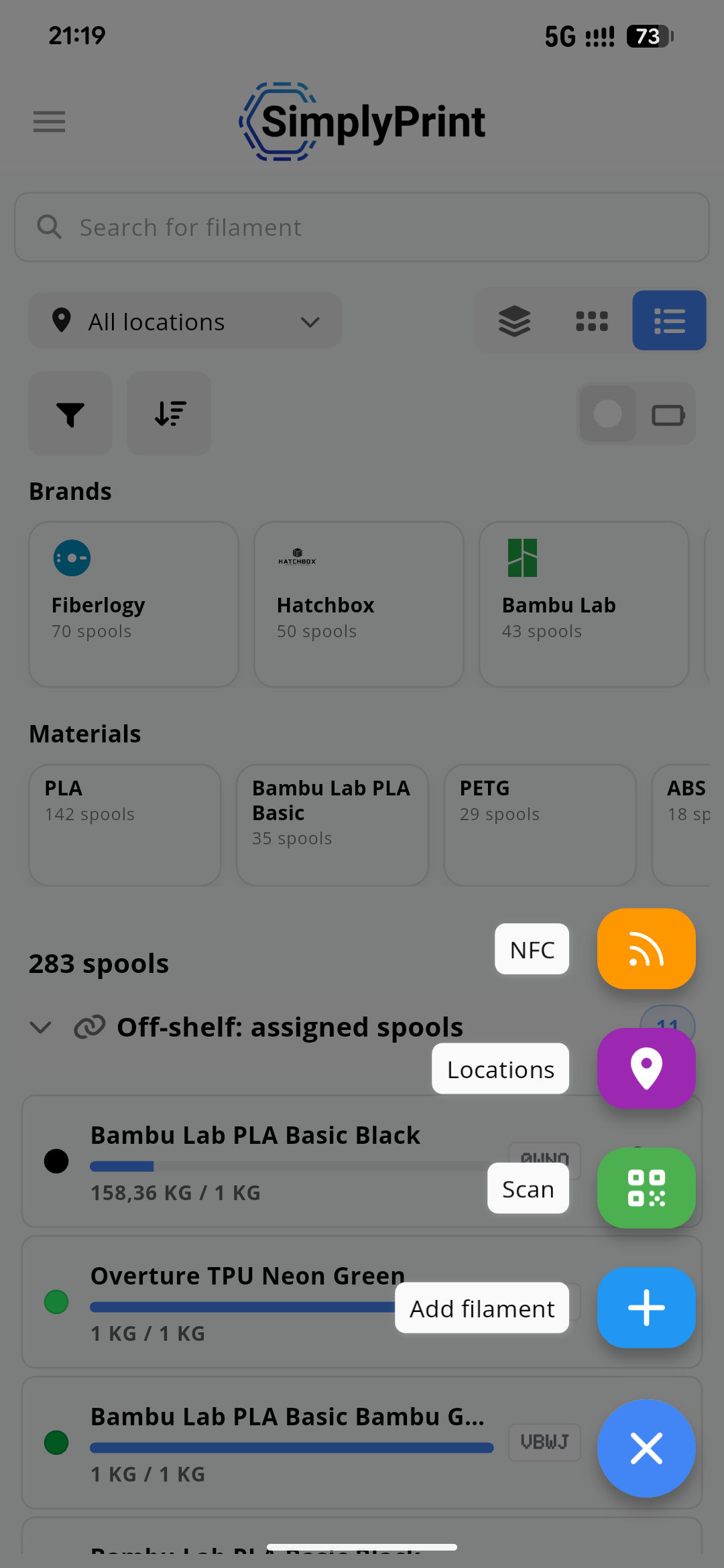
- ✨ Location tracking - Create storage locations (room, shelf, dry box) and track where every spool lives. Spools automatically "check out" when assigned to a printer
- ✨ NFC tag support - Read and write filament data to NFC tags with support for multiple standards including OpenSpool, OpenPrintTag, Anycubic ACE, Creality CFS, and more
- ✨ Barcode & QR scanning - Scan codes directly from the web panel or mobile app to quickly identify and load spools
- ✨ Label generator - Print labels on Zebra, DYMO, or standard A4 sheets with customizable templates, QR/barcode options, and live preview
- ✨ Filament importer - Migrating from another system? Import your spool inventory from OctoPrint and other formats
- ✨ Material & color clusters - Group equivalent materials and colors together so auto-matching (1-click print, AutoPrint) picks the right spool every time
- ✨ Smart search & filtering - Filter by brand, material, color, remaining amount, location, and more. Your filters are even saved in the URL so you can bookmark them
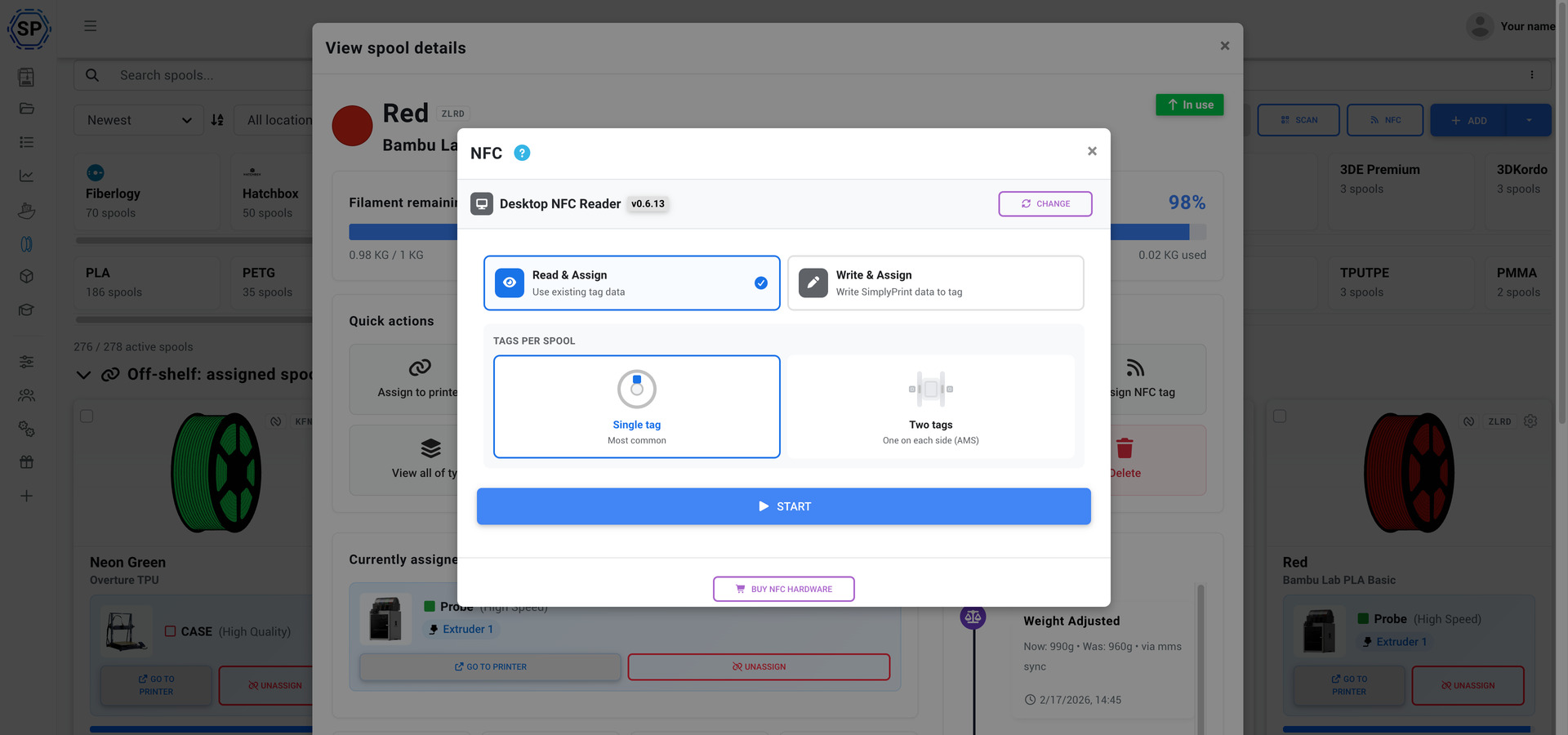
We've been rolling this out over the past few months and there's a lot more to come - think dashboards, store integration, and deeper analytics. We'll have a bigger dedicated announcement when the full vision is complete. For now, check out the full guide in our helpdesk to get started.
Multi-material & AMS overhaul
We've completely reworked how multi-material setups are displayed and managed. The new visualization properly represents uneven and extended AMS configurations, including full external spool support even when mixing between multiple AMS units or the spool holder.
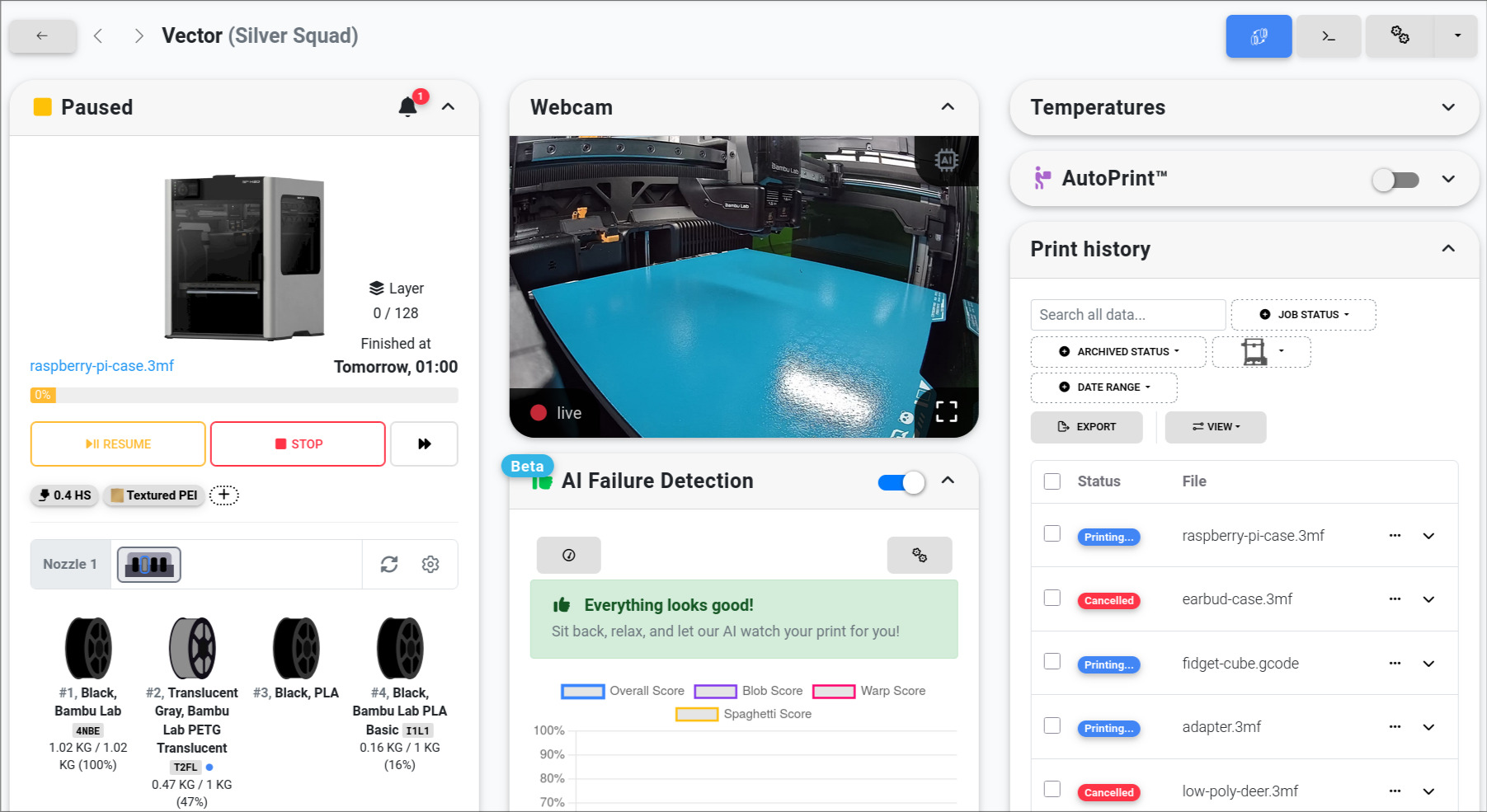
Filament slots now have quick actions - click any slot to open an edit popover where you can view spool details, assign, reassign, or unassign filament directly. Material mapping also got smarter with color cluster support, so your auto-assignments are more accurate across all extruders.
Cloud slicer upgrades
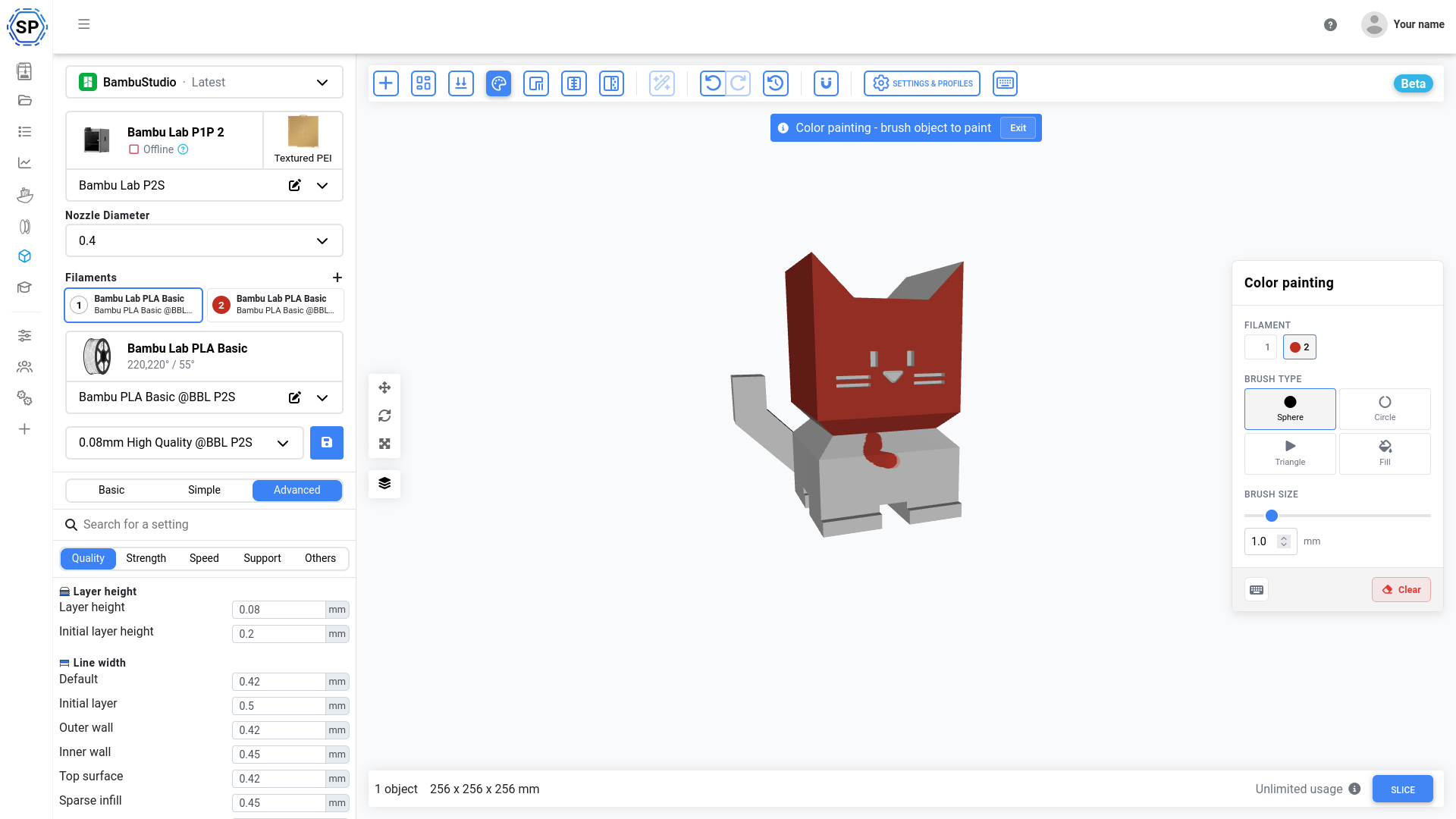
The SimplyPrint Cloud Slicer has seen a ton of work. Here are the highlights:
- ✨ Multi-plate support - Work with multiple build plates, manage parts across plates, and import multi-plate 3MF files with positions preserved
- ✨ Multi-nozzle & color support - Full support for multi-nozzle printers like the Bambu Lab H2D, with correct extruder and color assignments in both slicing and G-code preview
- ✨ Paint-on tools - Paint-on colors, support, seam, and fuzzy skin directly in the browser
- ✨ 3D text tool - Add text to your models with multiple font options
- ✨ Measurement tool - Measure distances between points and surfaces
- ✨ Simplify tool - Reduce polygon count for better performance with complex models
- ✨ Sequential printing - Print objects one at a time with collision clearance awareness
- ✨ G-code preview performance - Major rendering improvements with chunked rendering, reduced memory usage, and faster load times
- ✨ Raw JSON editor - Edit slicer profile settings directly as JSON with a diff confirmation view
We've also updated the bundled OrcaSlicer and BambuStudio engines to the latest versions, improved 3MF import handling, and added wipe tower position persistence across plates.
Queue & workflow improvements
The print queue got some powerful new tools:
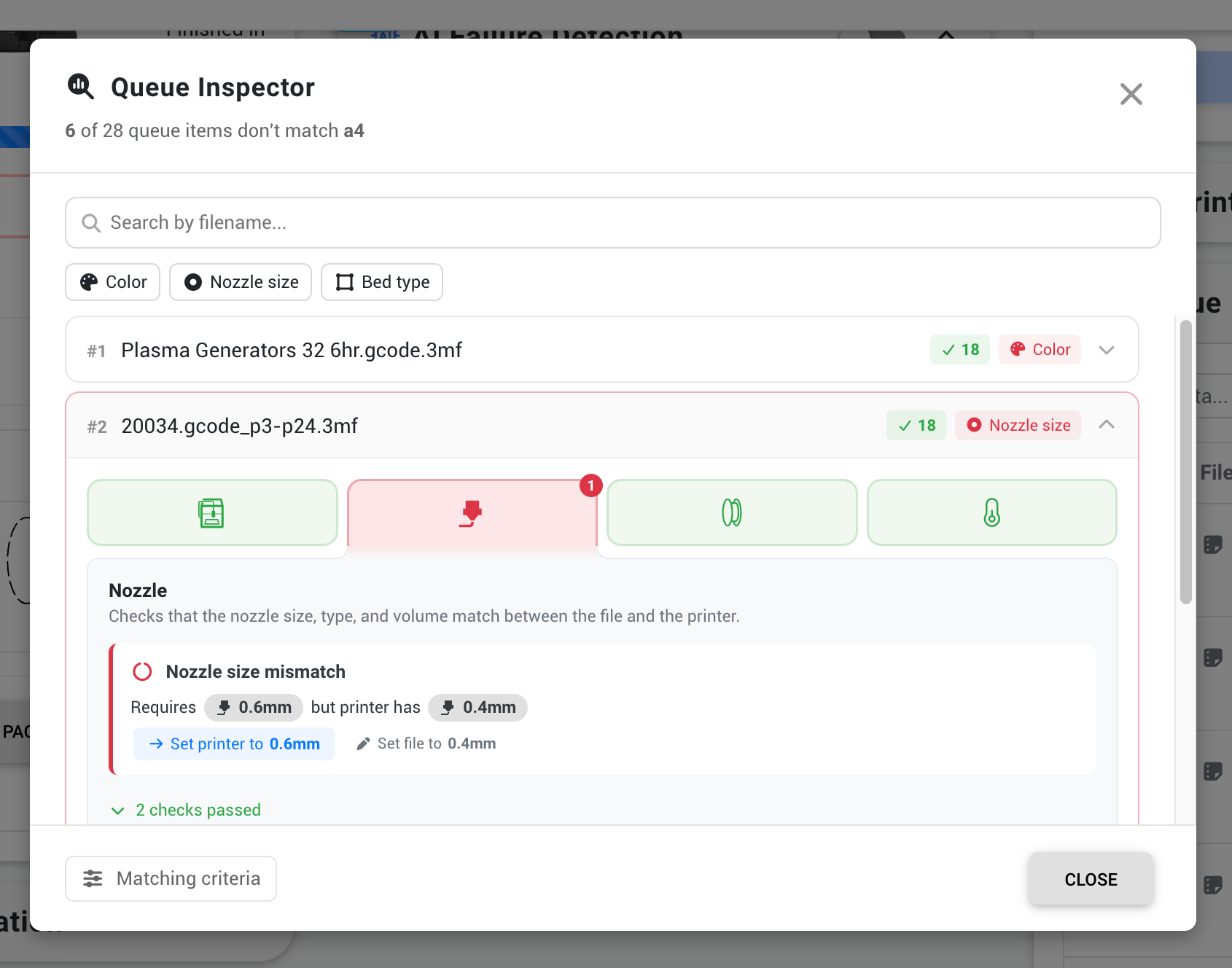
- ✨ Queue inspector - A new widget showing printer availability, queued items, and file-to-printer matching status at a glance
- ✨ Queue item positioning - Choose exactly where new items land: top, bottom, or a specific position
- ✨ Queue group access control - Restrict queue groups to specific user groups
- ✨ Per-model start option defaults - Save your preferred start options per printer model so you don't have to set them every time
- ✨ Per-group AutoPrint clear cycles - Trigger clear bed cycles for entire printer groups
- ✨ Cancel return-to-queue - When cancelling a print, choose whether and where to return the item to the queue
- ✨ Tags in "Done" section - See material, color, and nozzle tags directly in the completed items list
- ✨ Time-based printer filters - Filter printers by when they'll be done, including "done within" and "done after" options
90+ community suggestions shipped
Since October, we've completed over 90 community suggestions from our suggestion board. That's not a typo. Many of the features above started as your ideas, but here are some more highlights:
- ✨ STEP/STP file support - Upload CAD files directly, no conversion needed
- ✨ Printer completion time display - See exact finish times, not just countdowns
- ✨ Custom bed type tags - Create your own bed types for matching and filtering
- ✨ Custom fields in table view - Custom fields are out of beta and now available for printers and users too
- ✨ Print quotas & balances - Restrict printing by cost, set quotas per student or user group
- ✨ File approval workflow - Files can require approval before printing
- ✨ Queue item positioning - Place items at the top, bottom, or a specific position
- ✨ Cancel return-to-queue options - Choose whether and where to return cancelled prints
- ✨ Binary G-code support
- ✨ IP camera integration
- ✨ Prusa MK4 direct integration
- ✨ Auto-tag files from 3MF metadata
- ✨ ...and 80 more
Thanks to everyone who suggested these! Keep the ideas coming on our suggestion board - we are listening.
Mobile app updates
The SimplyPrint app has been getting serious love. Version 3.20.2 brought a wave of filament-focused features:
- ✨ NFC spool creation - Scan an unlinked NFC tag and create a prefilled spool in one step, with automatic brand and material matching from the filament database
- ✨ QR label generation - Generate, preview, print, and share QR labels right from your phone
- ✨ STEP file upload - Upload CAD files from mobile
- ✨ Deep linking - SimplyPrint links now open directly in the app on iOS and Android
- ✨ Compatibility matching - See file-to-printer matching visualized, aligned with the web panel
- ✨ Guided spool creation - New step-by-step flow for adding spools with purchase info
The app will keep getting more love - stay tuned.
And even more
A few more things worth mentioning:
- Privacy improvements - Switched from Google reCAPTCHA to Cloudflare Turnstile, redesigned cookie consent with full transparency, and added a public changelog for all legal documents
- Access & security settings - Restrict panel access to specific IPs or enforce hub-only printing
- Z-offset calibration wizard - A guided wizard to help dial in your first layer
- Printer offline troubleshooting - The offline popup now provides troubleshooting steps and links
- Schools - New quota system, cleaner sidebar, and hidden warning popups for students
- Setup guides - Improved guides for dozens of printers with AI-powered help
And of course, hundreds of bug fixes and stability improvements across the platform.
What's next
We're just getting started. Here's a taste of what's coming:
- Maintenance mode & Projects - Two big features we've been working on behind the scenes
- API cloud slicing - Slice files programmatically through the API
- More filament features - Dashboards, store integration, and deeper analytics
We'll keep shipping and sharing updates. Follow along on our public changelog or join us on Discord to stay in the loop.
Changelog
For the full list of changes, check out our public changelog:
- Albert @ SimplyPrint