

Hey SimplyPrint'ers! 👋
This is the biggest update to our 3D print farm software since we started. On October 8 we shipped a completely new look for the whole SimplyPrint panel, and alongside it the first beta of Projects, the feature many of you have been asking us for. Since then we have spent a week polishing, fixing and adding a long list of small things that make SimplyPrint faster to use every day.
And there is more coming: the Shop is next, and it is closer than ever.
Quick version
- ✨ A new look across the whole panel, more compact, more consistent, and easier to use in light and dark mode
- ✨ Global search with Ctrl/Cmd+K, keyboard shortcuts and better accessibility everywhere
- ✨ See what's printing: printer cards and the control panel now show a thumbnail of the current print
- ✨ Hold Shift to skip confirmations, and new settings to turn off popups you don't need, like the clear bed popup
- ✨ A fully reworked Files panel with copy and paste, ZIP downloads, folder uploads and file versions
- ✨ Projects is in beta for the Print Farm plan: one project, many variants, many printer models
- ✨ The Shop is coming soon for the Print Farm plan, with Shopify, WooCommerce, Etsy and more
A new look for 3D print farm software you use all day
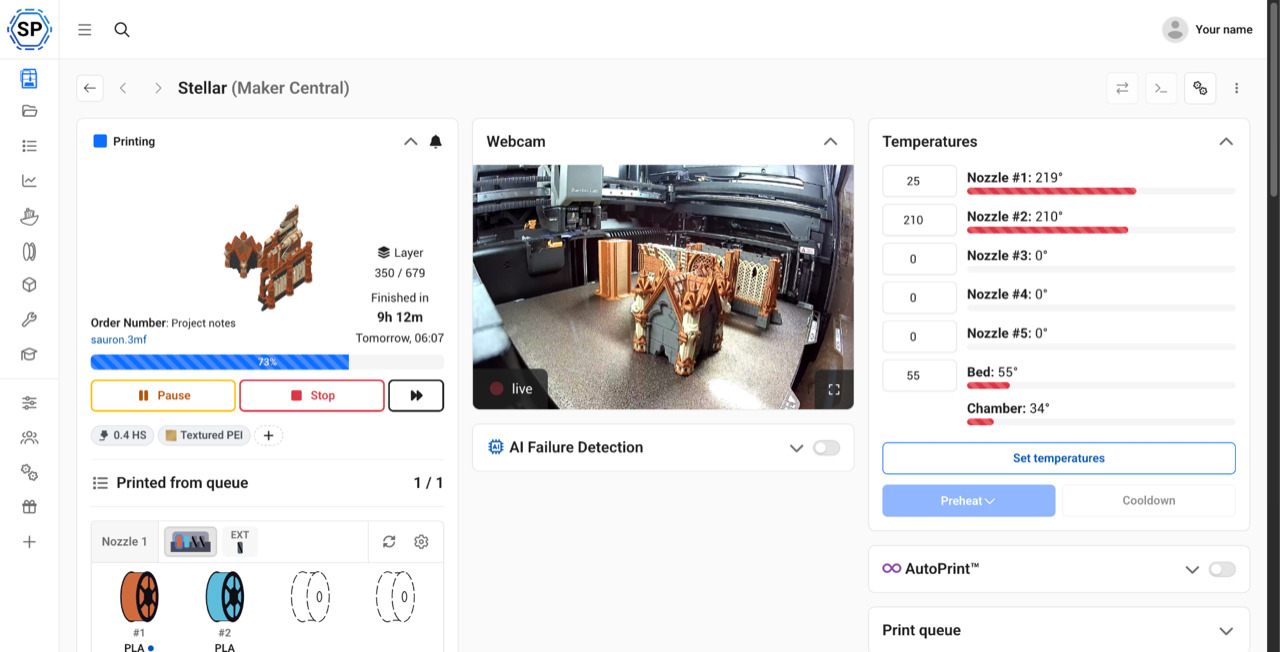
We rebuilt the panel on a brand new design system. Every button, table, dialog and menu now comes from the same set of building blocks, so things look and behave the same from the dashboard to the queue. Pages are generally a bit more compact, so you get more room for your printers and less scrolling. The sidebar can be shrunk to icons (press [), and tables now fold into neat rows on phones instead of making you scroll sideways.
Everything is where you left it. It just got a lot nicer to work in.
Global search and keyboard shortcuts
Press Ctrl+K (or Cmd+K on a Mac) anywhere in the panel to open the new global search. It finds pages, settings, printers, files, filament and users, and it can run actions directly: add a printer, report a problem, invite a user, switch to dark mode and much more. Settings that are on a higher plan are marked, so you know what you are looking at.
You can favorite results and record your own two-key hotkeys for the things you do all the time. Press ? to see every keyboard shortcut, or hold Ctrl/Cmd to see the shortcut for the buttons on your screen.
We also did a big accessibility pass across the panel: much better keyboard navigation, visible focus outlines, screen reader labels, and support for reduced motion and high contrast mode.
See what's printing
This one has been on the suggestion board for a long time. Printer cards on the Printers page and in your dashboards now show a thumbnail of the job each printer is working on, so you can tell your prints apart at a glance. The printer control panel shows it too.
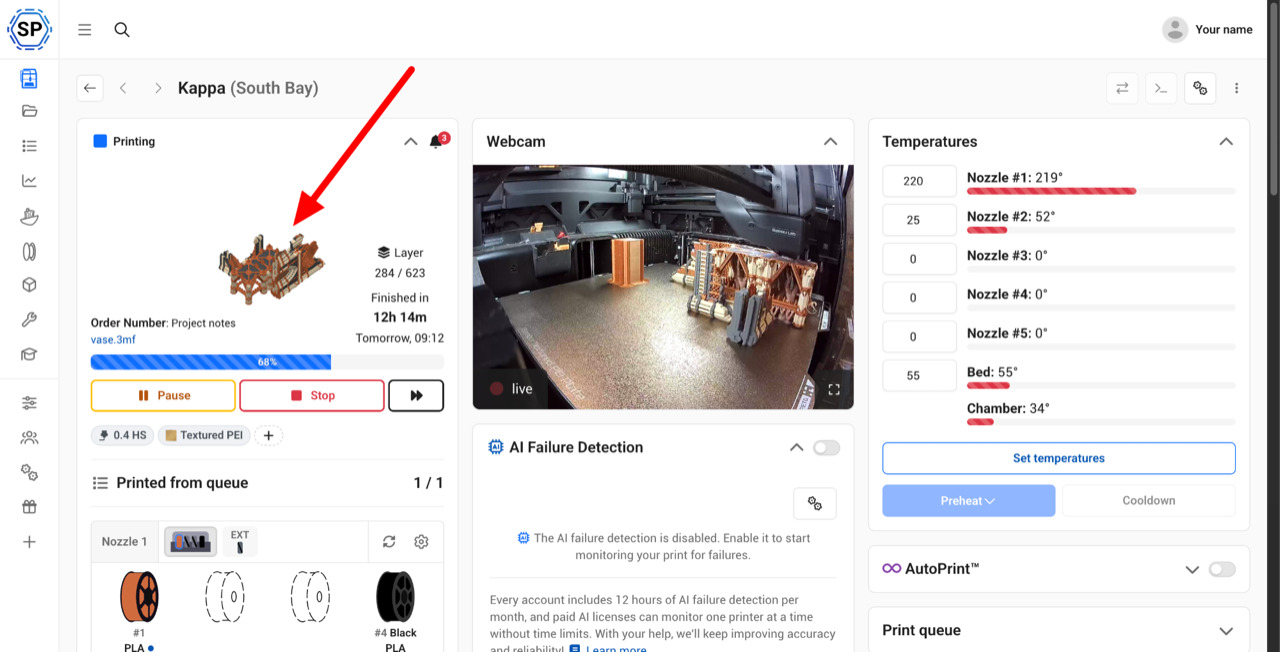
Not a fan, and want your printer pictures back? In true SimplyPrint fashion, there is of course a setting for that: Settings > Printers > Grid overview. If you have locked down who can see other people's files, a new permission also hides thumbnails of files others uploaded.
Thanks to everyone who voted for suggestion #128!
Fewer clicks, more control
For power users, we have added a few ways to get dialogs out of your way, and a few new settings to make SimplyPrint work the way you do:
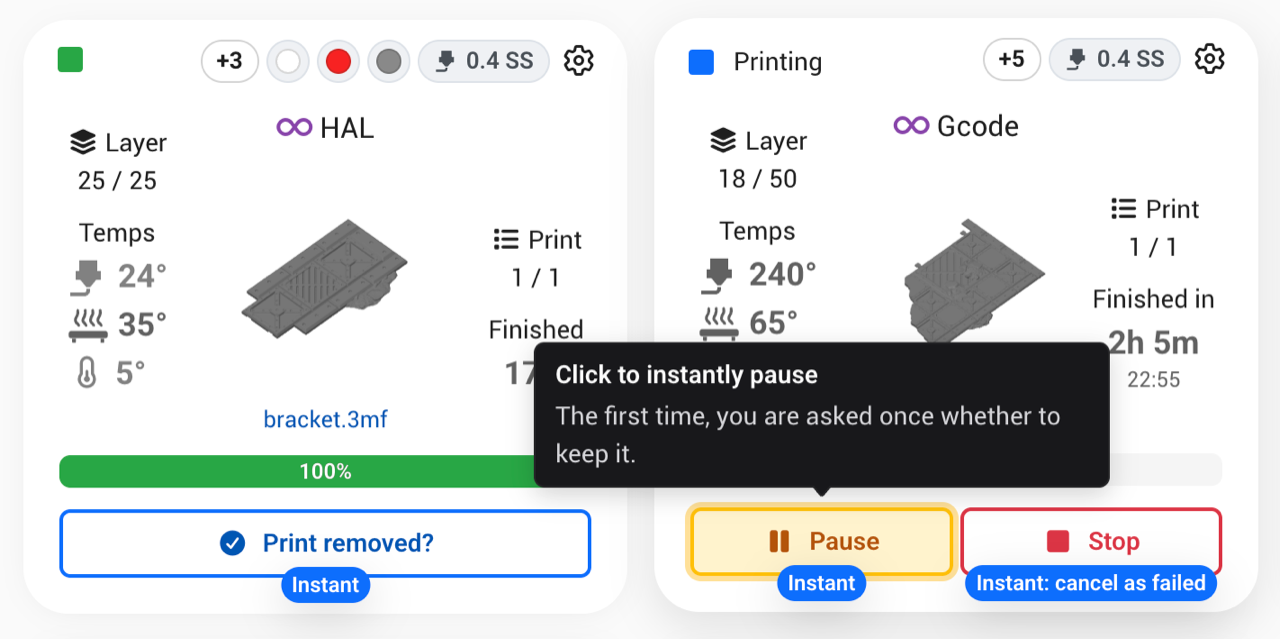
- Hold Shift to skip confirmations. Hold Shift when you click Clear bed, Pause, Resume, Cancel, a spool action and more, and the confirmation is skipped. Holding Shift shows you which buttons will act instantly. You can choose per action how this should work for your whole account in Settings > General > Confirmations, and our help article explains every option.
- Turn off the clear bed popup. Printers can now mark their bed as cleared by themselves when a print finishes successfully (or is cancelled, if you choose). Failed prints still wait for you. Find it in Settings > Printers > When a print ends. Suggestion #328
- Ready all. One button in the Printers top bar readies every printer waiting for a bed clear, across all your groups (Pro and up, when you have more than one group). Suggestion #877
- Checks before you print. Choose what SimplyPrint should check when you start a print yourself, in Settings > Printers > Checks before you print. Warnings now say exactly what clashed and how serious it is, and come with a Fix button. A different plate is just a note, while a file that won't fit asks before printing.
- Quieter G-code warnings. Pick the flagged G-code commands you don't want to be warned about in Settings > Printers > G-code warnings.
- Keep done items longer. On Print Farm, keep finished queue items for up to 30 days instead of 3, in Settings > Queue. Suggestion #860
- Materials per group. Limit which materials a user group can slice with, and which slicer profiles it sees (Print Farm). Suggestion #869
A fully reworked Files panel
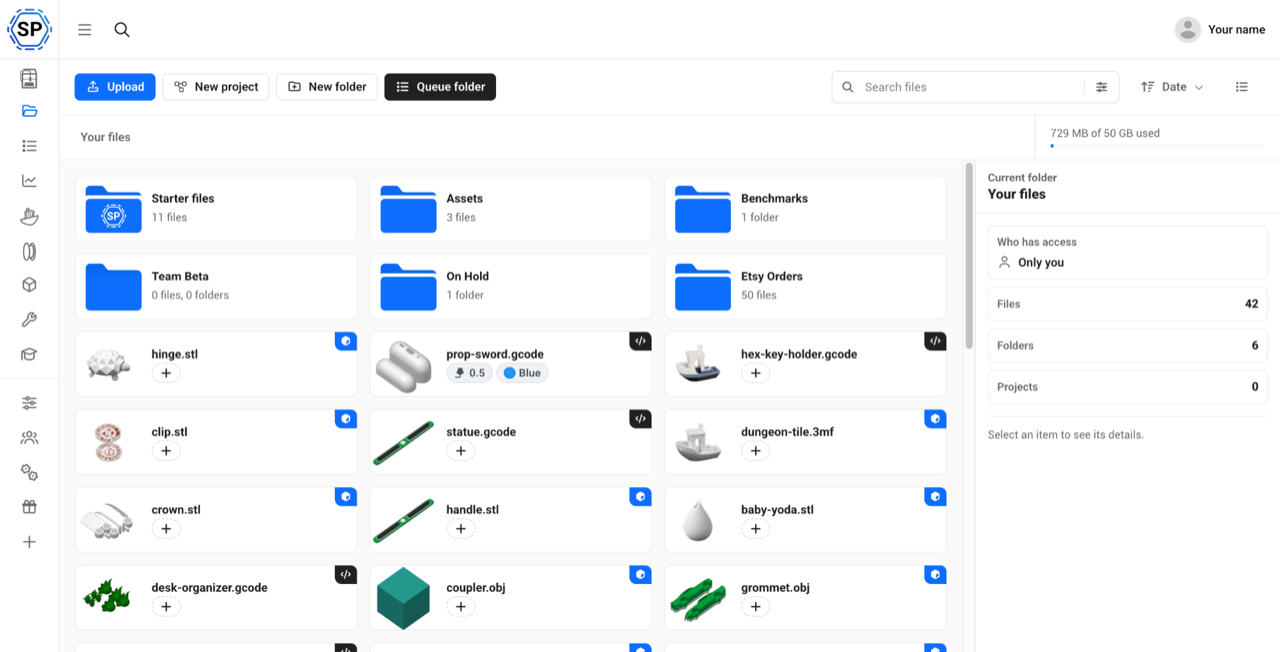
The Files panel was rebuilt from the ground up, and it got a lot of new features on the way:
- Copy and paste files and folders, with the menu or Ctrl+C, Ctrl+X and Ctrl+V. Suggestion #859
- Download a folder as a ZIP, or any selection of files. Suggestion #364
- Upload whole folders or zips, and the folder structure is recreated for you
- File versions: replace a file with a new version, and restore an older one if you need to
- A smarter search that matches words in any order, shows which folder each result is in, and searches subfolders too
- A details panel that shows where a file is used, how often it has been printed, and who has access
Projects: everything for one thing you make
Real prints are rarely a single file. A product is often many parts, in several sizes and colors, printed on different printers. Until now, that meant a folder full of files and a lot of remembering which file goes on which printer. Projects puts all of it in one place.
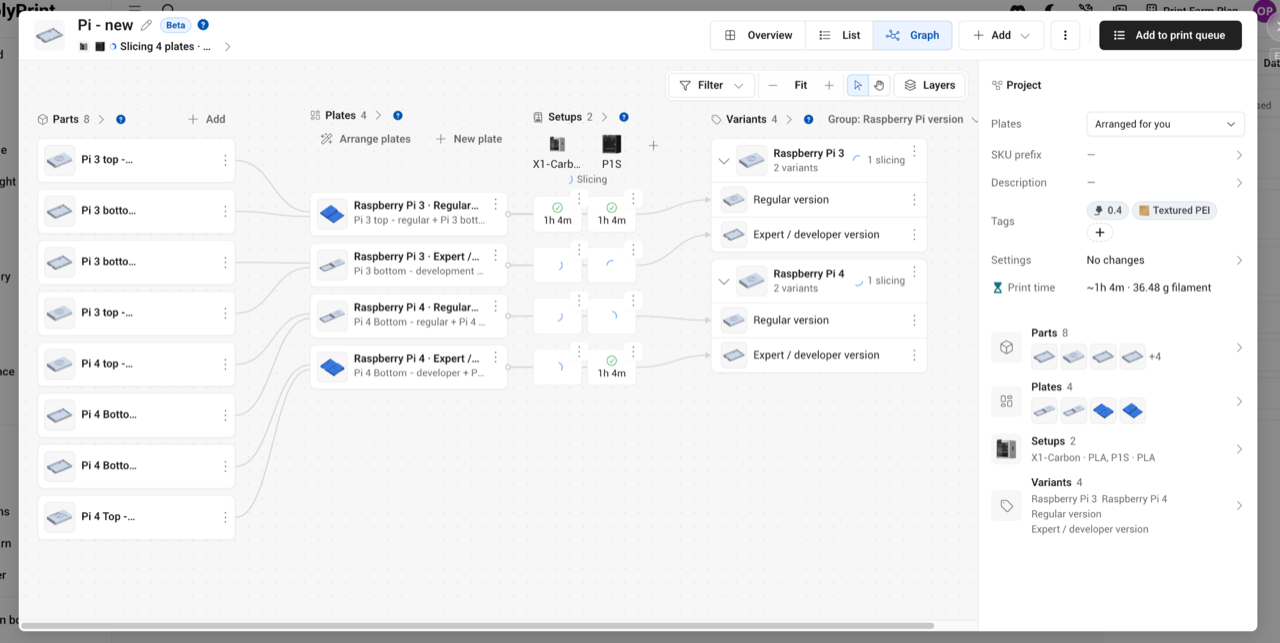
A project is built from a few simple pieces:
- Parts are the files you add, or the plates of a 3MF
- Plates are what goes on one bed
- Setups are the printers the project prints on, with their nozzle, bed type, filament and print profile
- Options and variants are what changes between versions, like size, color or "regular vs. expert". Options multiply, so 5 sizes in 4 colors in 6 finishes gives you 120 variants. Projects with 100+ variants are no problem.
- Sets print several variants and parts together, each with a count, like a starter kit
Every variant can have its own SKU, or you set a SKU prefix and let SimplyPrint build them for you. That detail matters a lot for the Shop, more on that below.
AutoSlice and one project for every printer
With one click, AutoSlice slices every plate for every printer setup in the cloud. Your X1 Carbon and your P1S each get their own print files, sliced with the right profiles. You can set your preferred slicer, profiles and filament per printer model, nozzle and material in Settings > Slicing > AutoSlice, so new projects slice the way you want from the start. Let SimplyPrint arrange the plates for each printer, or keep your own.
When it is time to print, you add the project to the queue once. That one queue item holds the plates for every setup, and whichever printer picks it up prints the files sliced for its own model. Set a quantity, and SimplyPrint tracks how many have been printed, so a failed print is simply printed again instead of forgotten. You also get print time, cost and filament usage per variant.
Overview, List and Graph views let you look at the project the way that suits you, and you can export a project, open any plate in the slicer, or upload your own pre-sliced files.
Closed beta for Print Farm, for now
Projects is in beta, and for now it is only available on the Print Farm plan (and Enterprise). Go to Files > New project to try it out. It is still missing a lot, and we have a long list of updates planned for it. We wanted to get it into the hands of print farms first, and get your feedback before we open it up to everyone. It will be widely available later.
There is no documentation yet, so please tell us what works and what doesn't. Bug reports and feedback are very welcome in our Discord server, or on suggestion #780.
Coming soon: the Shop
Projects is a big deal on its own. But it is also the foundation for the next big piece of what we think 3D print farm software should be, the one a lot of you have been waiting years for: the Shop.
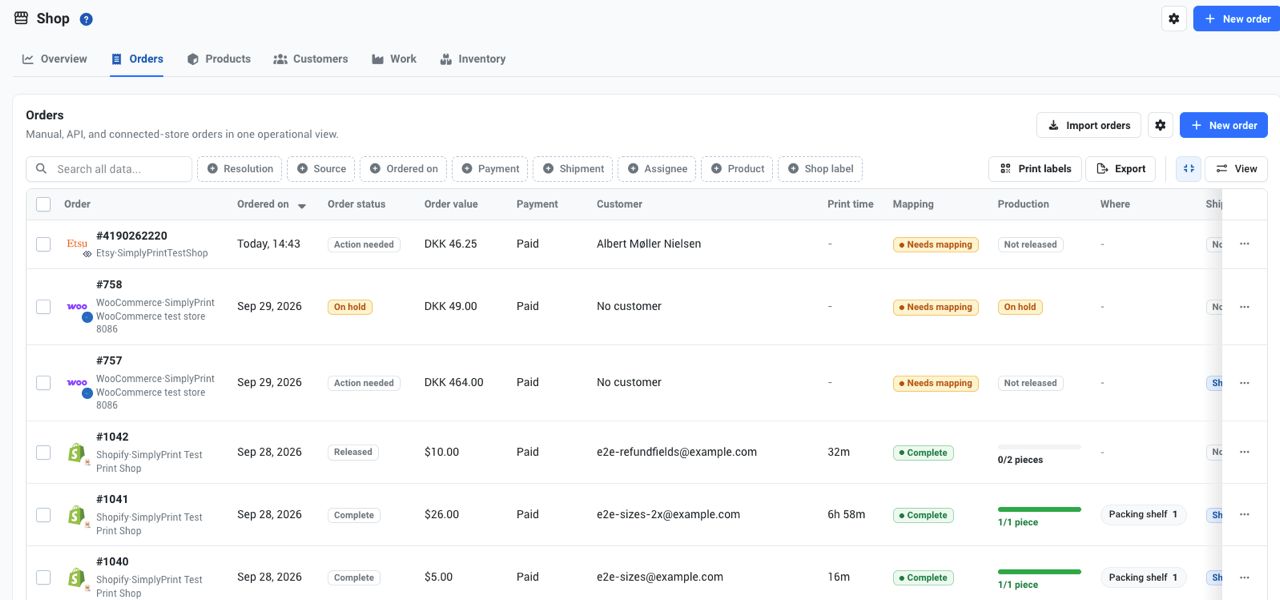
The Shop brings your orders, products and customers into SimplyPrint, right next to the printers that make them. We are building integrations for Shopify, WooCommerce, Etsy, eBay and Amazon, plus manual orders and our API, with more stores to follow.
Why Projects makes the Shop so powerful
A product in Shopify has variants and SKUs. A project in SimplyPrint has variants and SKUs too. That is not a coincidence: we designed Projects so that a project can be set up much like a product in your store.
Once a product is mapped, every order line for it points to the exact project and variant that makes it. One item in the print queue can expand into the right project, and that project can expand into, say, 6 different plates, for several different printer models. The printer that picks it up gets the plates sliced for its own model. You don't have to decide in advance which printer makes which order.
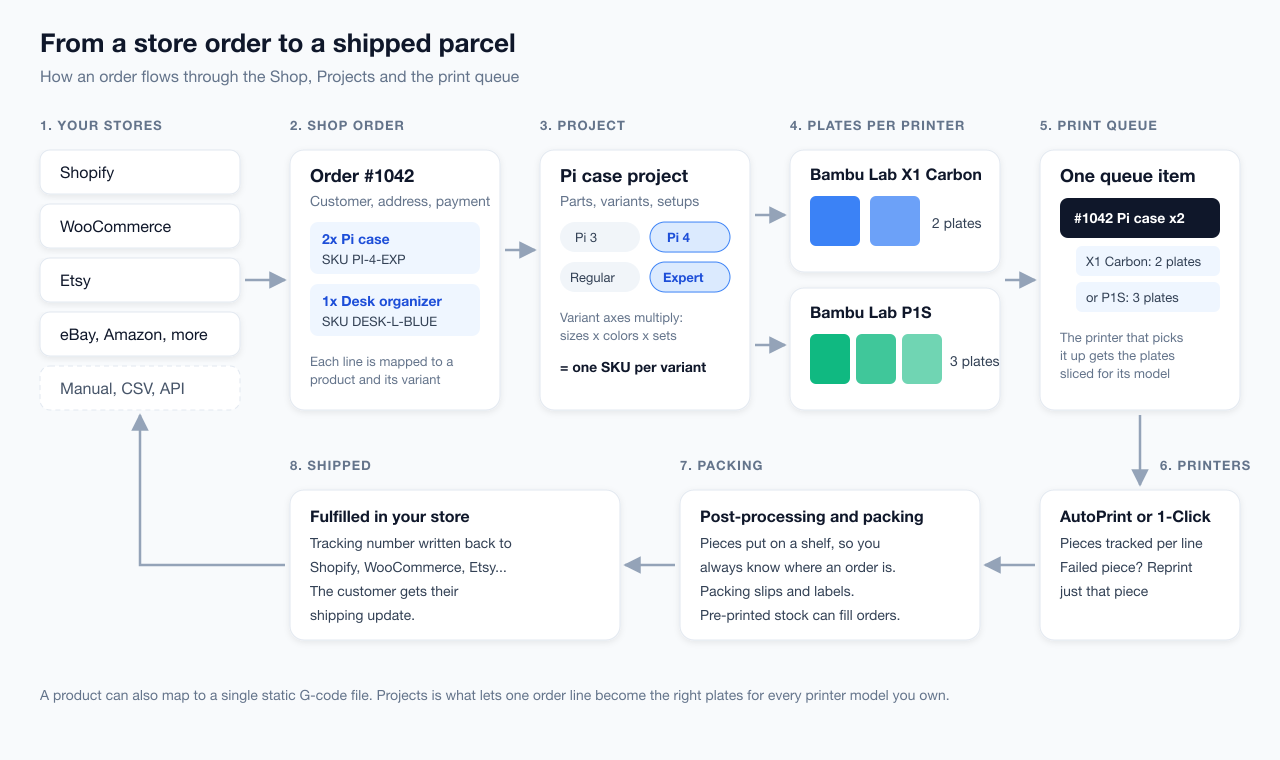
Of course, a product can still map to one static G-code file for one printer, if that is all you need. But Projects superpowers it.
Not just an order import
You could already import orders into the queue with Zapier or our API, like most 3D print farm software lets you. The Shop is something else entirely. It knows what was ordered, what still needs to be made, and which printer setup makes it. It follows every piece through printing, post-processing and packing, and knows where a finished piece is, down to the shelf. Here is a taste of what it handles:
- Mapping order lines to products, with suggestions, bulk auto-mapping and CSV import. Nothing is mapped silently behind your back.
- Tracking every piece: per order line, so a failed print gets a replacement piece, not a reprint of the whole order
- Shelves and containers, so you always know where an order's pieces are
- Packing slips and QR labels for pieces, shelves and containers
- Inventory of pre-printed stock, with reservations, minimum stock and suggestions for what to print next
- Back to your store: cancelled or changed orders are picked up, and the order is marked fulfilled with its tracking number when you ship
- Several stores in one account, with dedicated permissions for orders, customers, products and stock
It is deep. The Shop, with the inventory and workflow engine under it, is over 1,000 commits, 59 new database tables, 190 new API endpoints and well over 3,000 automated tests, built on top of everything Projects brings. It has taken a long time to develop, because we wanted to do it right.
Built with you
The Shop is built on years of feedback from real print farms. Suggestion #79 for Shopify and WooCommerce integrations has been one of the most upvoted ideas on our board, and many of you shared exactly how you run your orders today. The last three Print Farm Townhall meetings in our Discord server shaped a lot of the details too.
A huge thank you to everyone who contributed. Community feedback, ideas and contributions are what make SimplyPrint so great, and the Shop is the best example of that yet.
If you run a print farm and want a say in what comes next, join our Discord and come to the next Townhall.
When?
Soon. We are aiming to release the Shop for the Print Farm plan within the next month or so. Some store integrations depend on approval from the platforms themselves, so they may arrive one by one.
Everything else we shipped
The new look, Projects and the Shop are the headliners, but a lot more has shipped since our last post: new file download permissions, username accounts for schools and Enterprise, Enterprise location improvements, the Chitu PlateCycler on the Bambu Lab A1, and a long list of fixes.
Read the full changelogs:
You asked, we built
Every one of these came from our suggestion board:
- #128 Show thumbnail of model that is currently being printed
- #780 Projects, assemblies & products: multi-slice, file versions & more
- #328 Option to disable bed clear pop up
- #364 Download folder as ZIP
- #859 Add ability to copy files in the file manager
- #860 Extend "Recently Done Items" list
- #877 Global / location-wide "Ready All" button
- #869 Assign slicer selectable materials to groups
Thanks to everyone who suggested and voted for these!
Happy printing, and see you in Discord!
- Albert @ SimplyPrint